How to Draft a Vendor Agreement
Quick Summary
A Vendor Agreement (or Supply Agreement) is a commercial contract governing the procurement of goods or services from a vendor. It defines scope, delivery terms, inspection windows, payment credits, and warranties. This step-by-step visual guide walks you through drafting a Vendor Agreement on Founding Legals.
Commercial Agreements - Agreement Type
This agreement falls under the Commercial Agreements category on the Founding Legals Agreements page, which governs day-to-day business operations under Indian commercial law.
Understanding the Vendor Agreement
A Vendor Agreement is a binding contract executed between a purchaser (buyer) and a supplier (vendor) for the acquisition of goods, equipment, raw materials, or commercial services. It establishes key metrics around delivery logistics, quality inspections, payment terms, and warranty support. When drafting a Vendor Agreement under Indian law, three major compliance and legal considerations apply:
- MSMED Act, 2006 Compliance (Sections 15 & 16): Under Section 15 of the Micro, Small and Medium Enterprises Development (MSMED) Act, 2006, payment terms for registered MSME vendors cannot exceed 45 days from the date of acceptance. Under Section 16, failure to pay within this limit mandates compound interest at three times the RBI bank rate, which is a statutory penalty that cannot be contractually waived.
- Inspection & Rejection (Sale of Goods Act, 1930): The buyer has a statutory right to inspect goods upon delivery before formal acceptance. Defining a clear, reasonable Inspection Window (e.g., 10 days) balances this right with the vendor's need for transaction finality and protects against late rejection claims.
- Delay Liquidated Damages (Section 74, Indian Contract Act, 1872): Late supply of critical business inputs can stop production. Defining a weekly delay penalty (e.g., 1% of the PO value per week of delay) encourages prompt delivery. To ensure court enforceability under Section 74, this must be capped (e.g., 15% of the PO value) as a genuine pre-estimate of loss.
Step-by-Step Guide to Drafting a Vendor Agreement
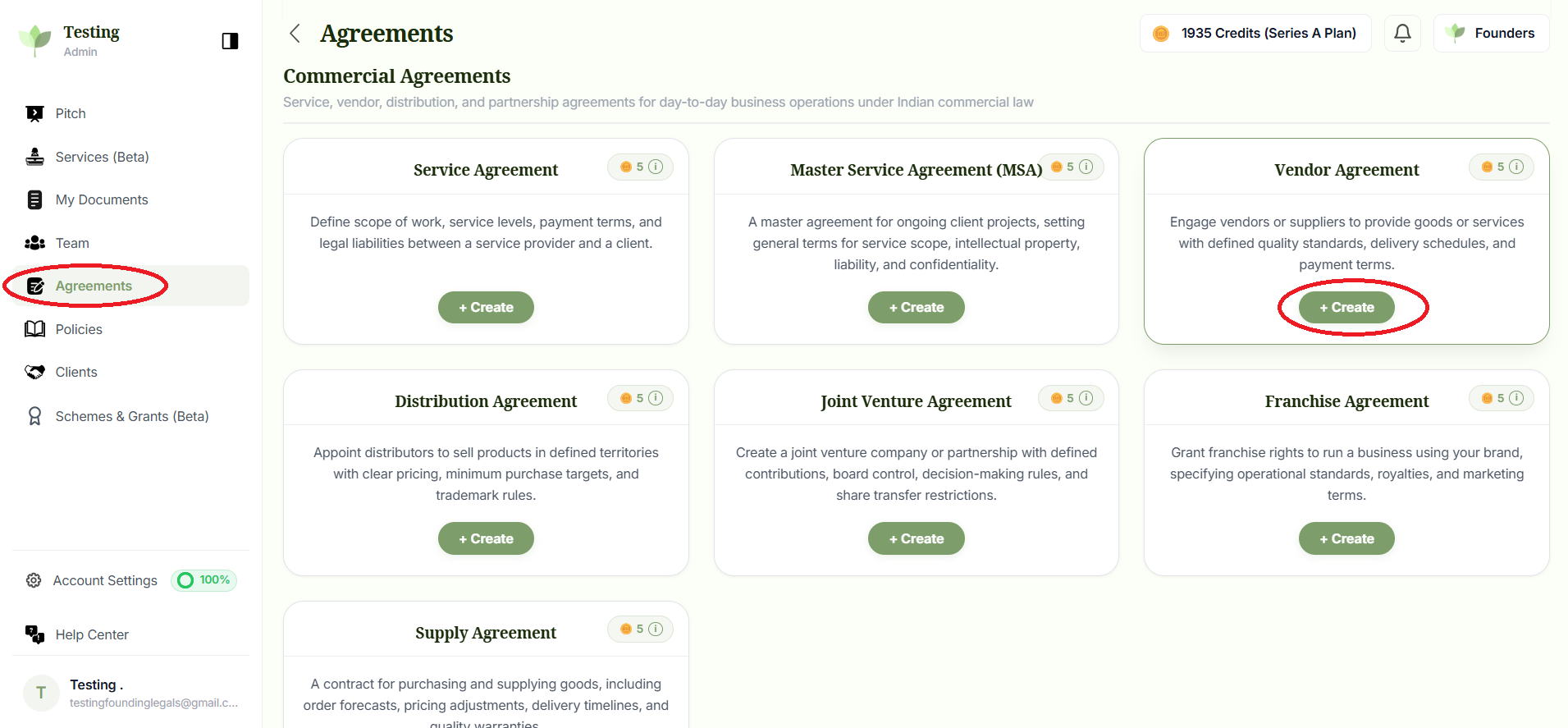
Access the template: Go to the Agreements tab in the left sidebar. Scroll down to the Commercial Agreements category and locate the Vendor Agreement card. Click + Create to open the drafting workspace.
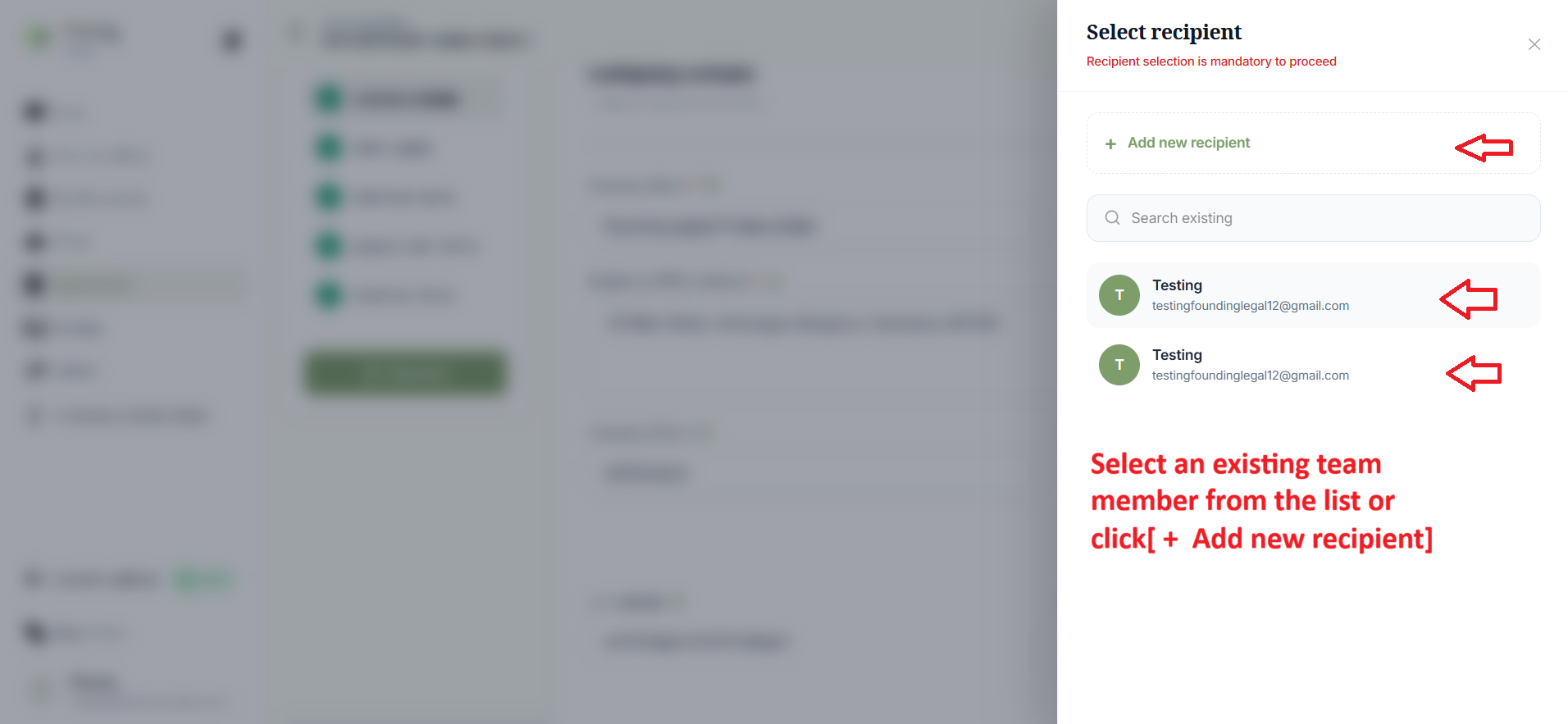
Select the signee: In the Select Recipient panel on the right, select the vendor's signing representative from your contact list, or click + Add new recipient.
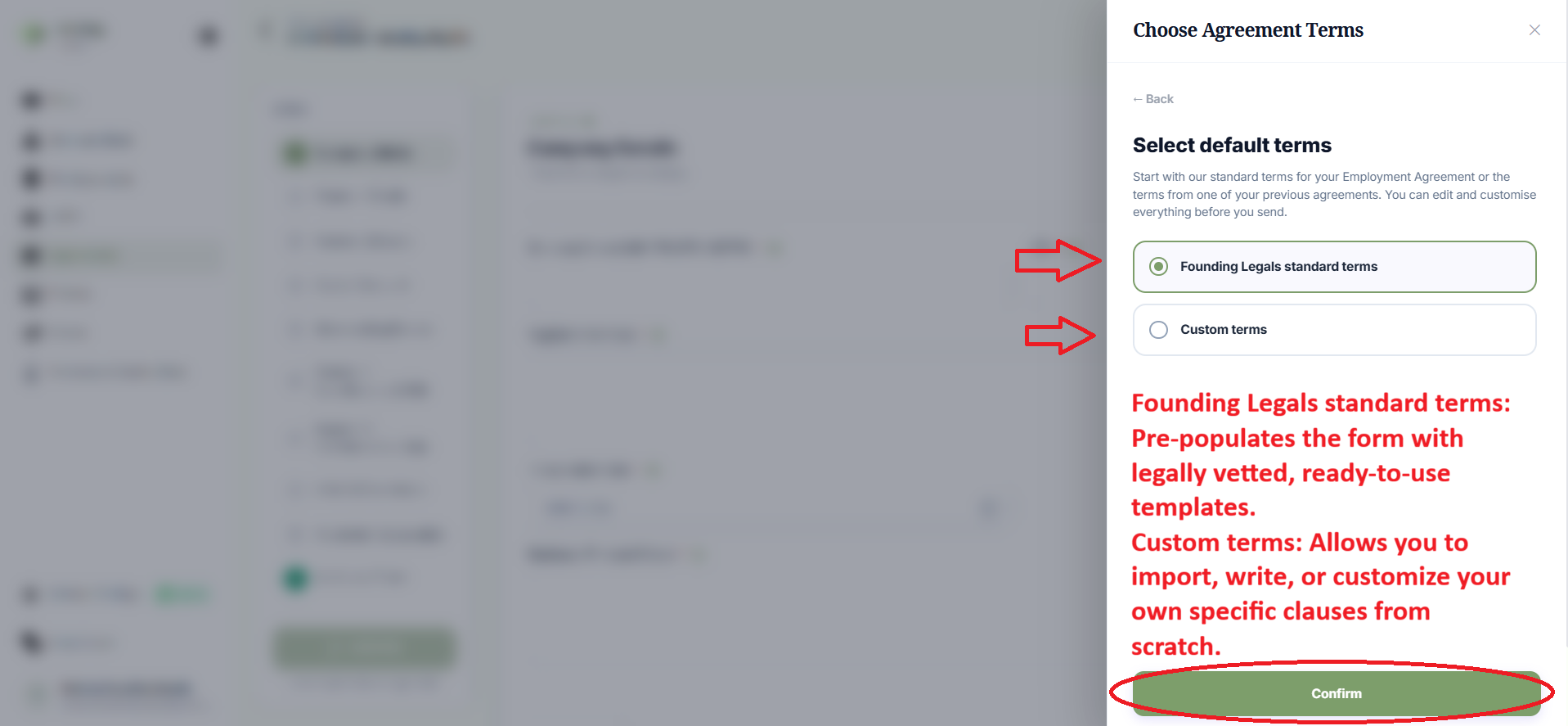
Choose terms baseline: In the Choose Agreement Terms menu, select:
- Founding Legals standard terms: Pre-populates the editor with standard supply clauses, MSME compliance terms, and warranty obligations.
- Custom terms: Choose this to import your own custom legal terms.
Click Confirm to proceed.
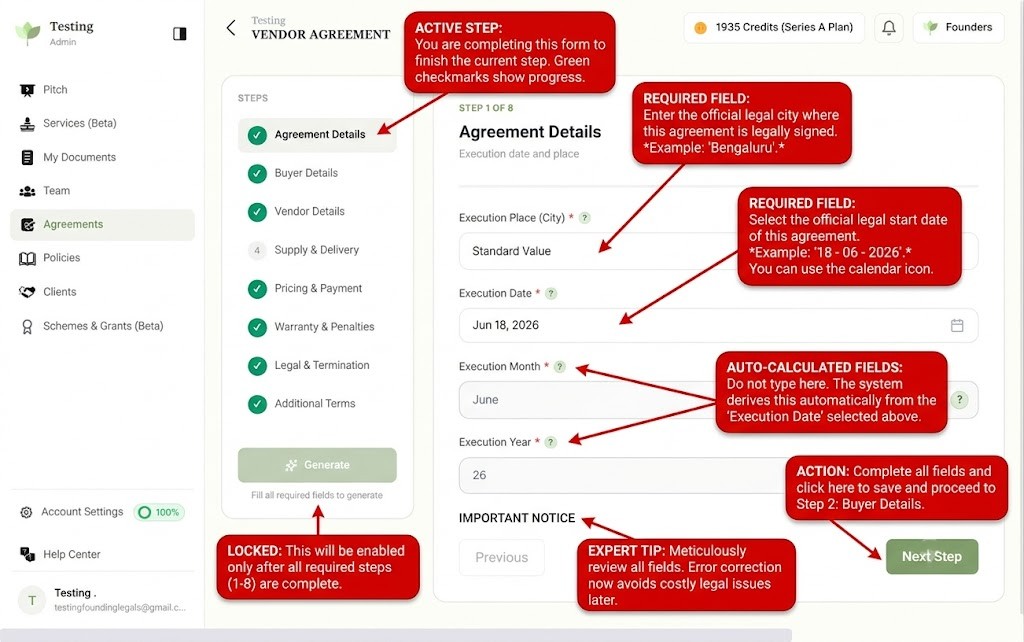
Enter signing place and date: In Step 1, enter:
- Execution Place (City): Enter the specific city where this Vendor Agreement is legally signed (e.g., Bengaluru). This sets the local jurisdiction for stamp duty rules.
- Execution Date: Select the calendar date this agreement becomes active. Month and Year will auto-fill instantly.
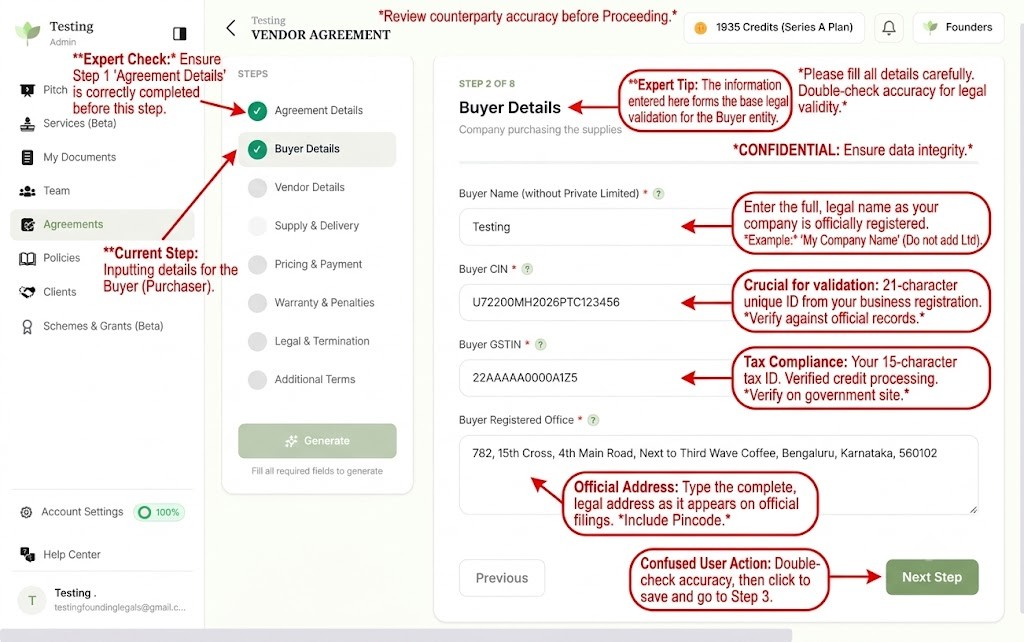
Enter purchaser registration details: In Step 2, enter the buyer company's details. Ensure all names and registration details match official corporate records exactly:
- Buyer Name: Enter your full, official corporate name exactly as registered (e.g., My Company Name). Do not append Private Limited or LLP suffix as the editor adds it automatically.
- Buyer CIN: Input your unique 21-digit Corporate Identification Number (CIN) for companies.
- Buyer GSTIN: Enter your 15-digit Goods and Services Tax Identification Number for correct tax invoicing compliance.
- Buyer Registered Office: Enter the official registered office address including the Pincode.
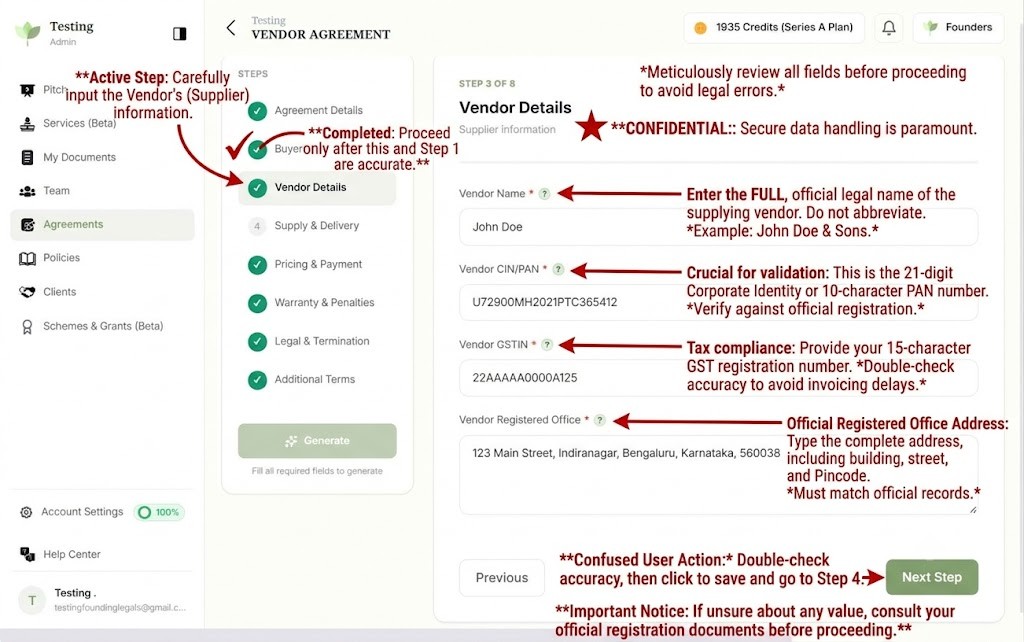
Enter supplier registration details: In Step 3, enter the supplying vendor's registration details:
- Vendor Name: Enter the vendor company's full, official name (e.g., John Doe & Sons).
- Vendor CIN / PAN: Input the vendor's unique 21-digit CIN for corporations, or 10-character PAN number for partnerships/sole proprietorships.
- Vendor GSTIN: Enter the vendor's 15-digit GST registration number to prevent tax credit mismatches.
- Vendor Registered Office: Enter the official registered address of the vendor company including the building, street, and Pincode.
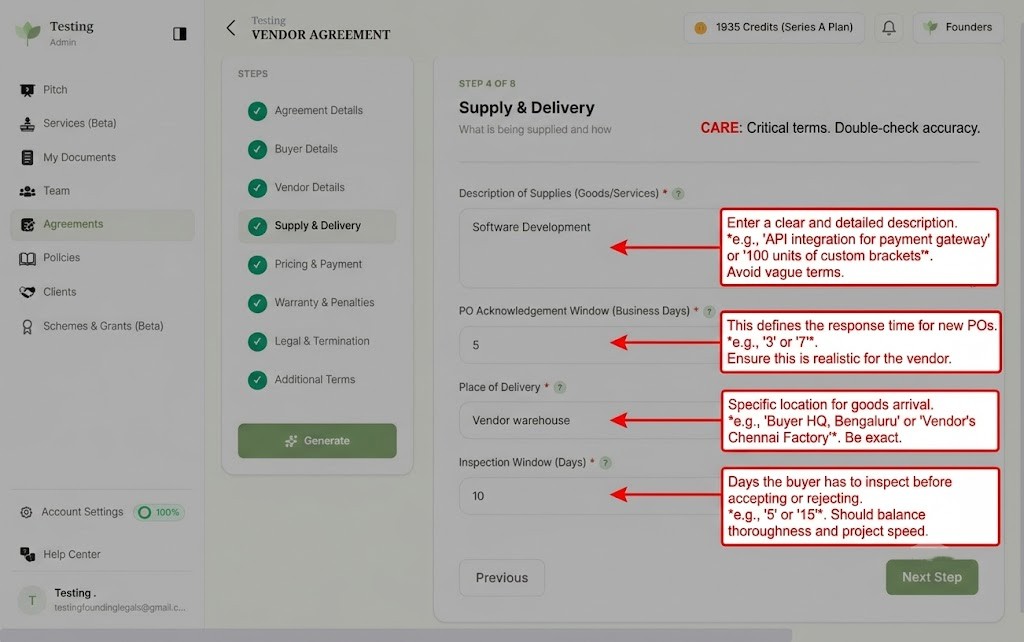
Set delivery and inspection windows: In Step 4, enter:
- Description of Supplies (Goods/Services): Enter a clear and detailed description (e.g., "API integration for payment gateway" or "100 units of custom brackets"). Avoid vague terms.
- PO Acknowledgement Window (Business Days): The response time allowed for new POs (e.g., 5 days). Ensure this is realistic for the vendor.
- Place of Delivery: The specific location for goods arrival (e.g., Vendor warehouse or Buyer HQ, Bengaluru). Be exact.
- Inspection Window (Days): Number of days the buyer has to inspect before accepting or rejecting (e.g., 10 days).
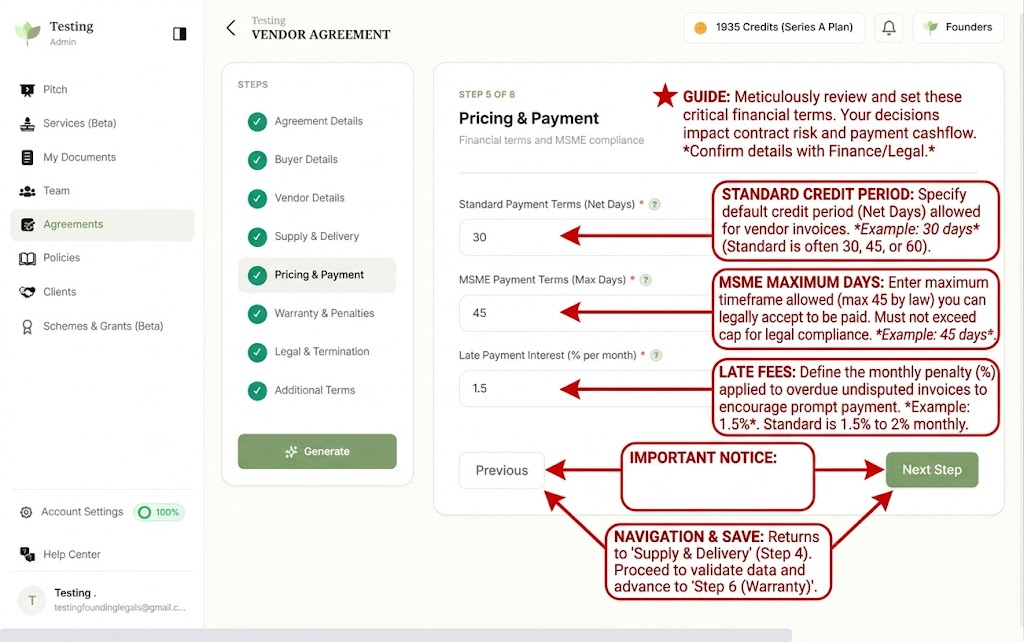
Define credit and MSME limits: In Step 5, enter:
- Standard Payment Terms (Net Days): Specify default credit period allowed for vendor invoices (e.g., 30 days). Standard is often 30, 45, or 60.
- MSME Payment Terms (Max Days): Enter the maximum timeframe allowed (max 45 by law) you can legally accept to be paid. Must not exceed cap for legal compliance (e.g., 45 days).
- Late Payment Interest (% per month): Define the monthly penalty (%) applied to overdue undisputed invoices (e.g., 1.5%). Standard is 1.5% to 2% monthly.
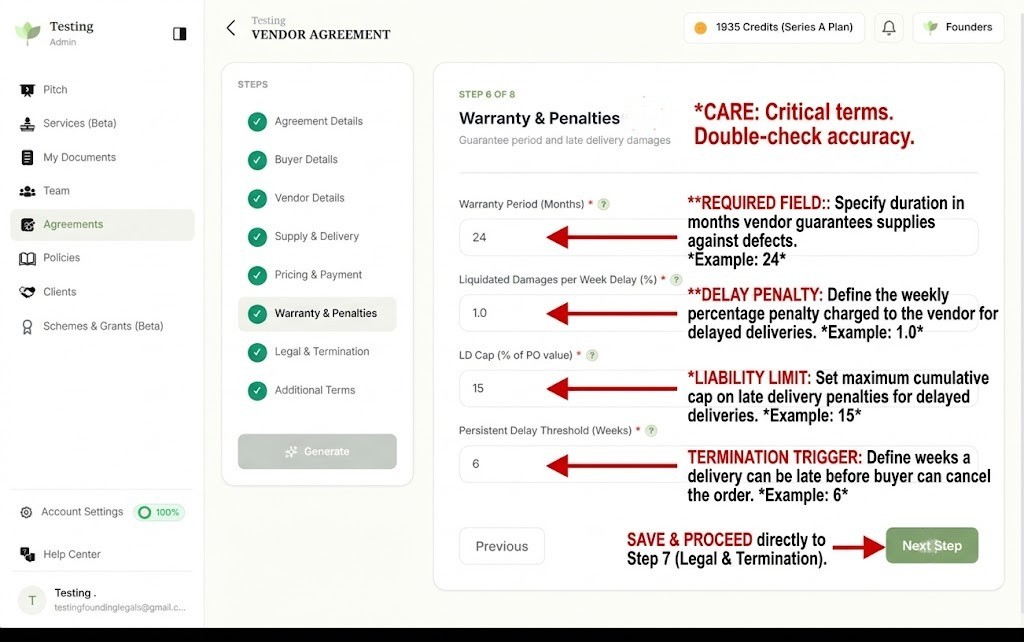
Specify quality guarantee and delay damages: Step 6 governs product warranty support and late delivery penalties:
- Warranty Period (Months): Specify duration in months the vendor guarantees supplies against defects (e.g., 24 months).
- Liquidated Damages per Week Delay (%): Define the weekly percentage penalty charged to the vendor for delayed deliveries (e.g., 1.0%).
- LD Cap (% of PO value): Set the maximum cumulative cap on late delivery penalties for delayed deliveries (e.g., 15%).
- Persistent Delay Threshold (Weeks): Define weeks a delivery can be late before the buyer can cancel the order (e.g., 6 weeks).
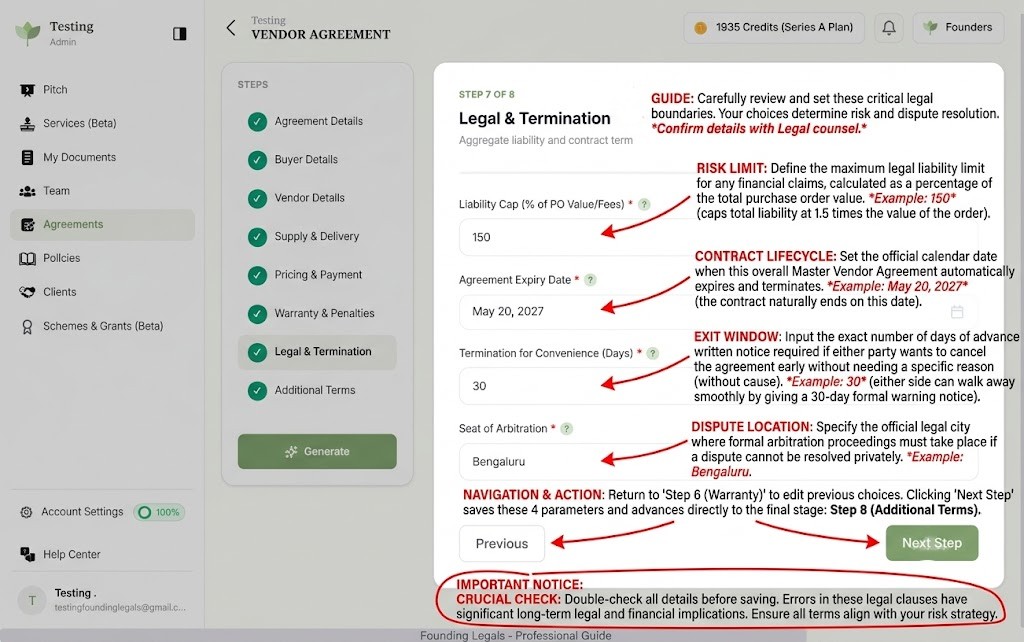
Configure liability ceilings and exit terms: In Step 7, enter:
- Liability Cap (% of PO Value/Fees): Define the maximum legal liability limit for any financial claims, calculated as a percentage of the total purchase order value (e.g., 150%).
- Agreement Expiry Date: Set the official calendar date when this overall Master Vendor Agreement automatically expires and terminates (e.g., May 20, 2027).
- Termination for Convenience (Days): Input the exact number of days of advance written notice required to cancel the agreement early without cause (e.g., 30 days).
- Seat of Arbitration: Specify the official legal city where formal arbitration proceedings must take place if a dispute cannot be resolved privately (e.g., Bengaluru).
Add custom clauses and compile: In Step 8, enter any custom terms (such as specialized SLAs or testing parameters). Once all 8 steps show green checkmarks, click Generate to build the draft.
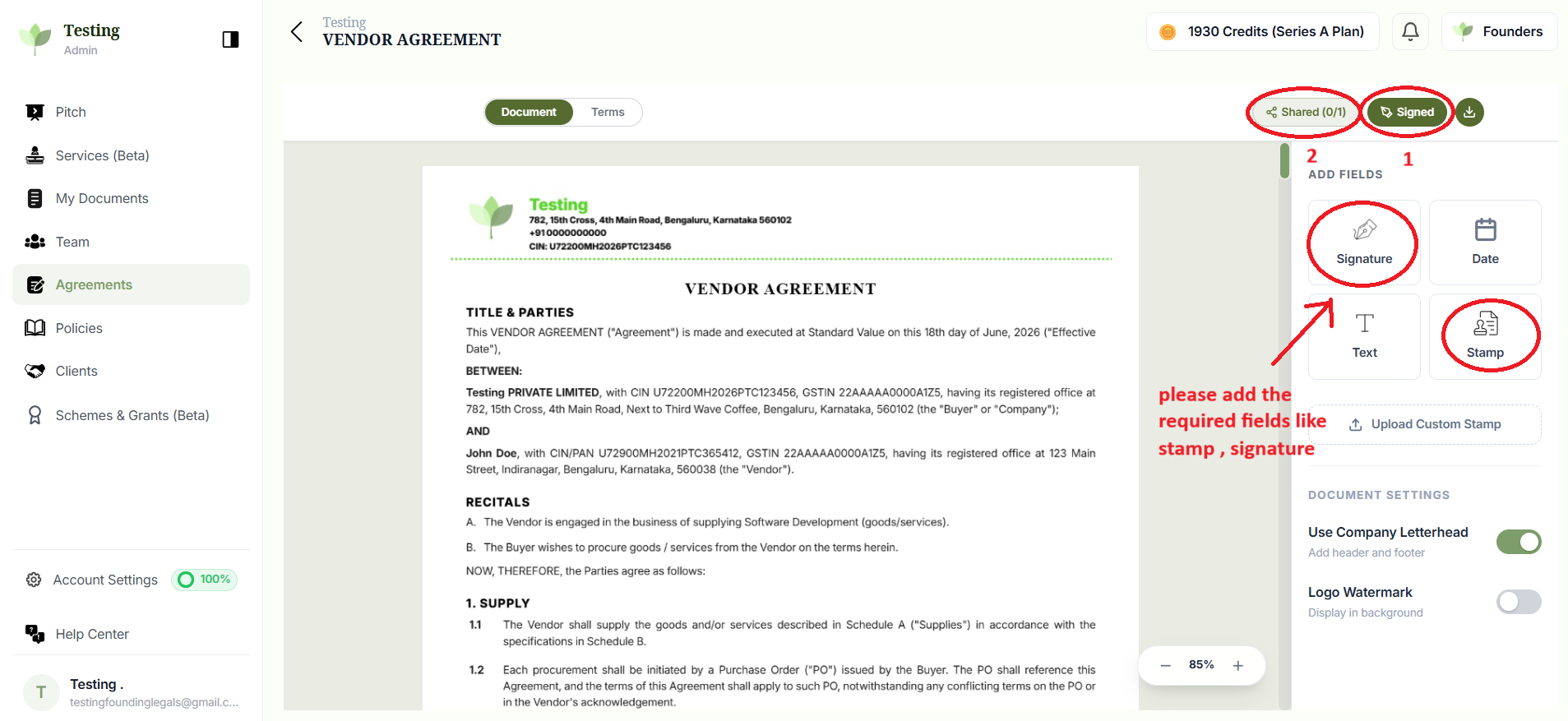
Position execution cues and sign: On the document preview screen:
- E-Sign Layout: Drag and drop the Signature and Stamp fields onto the sign block areas.
- Execution: Toggle company letterhead or watermark, and click Signed or Shared.
If your vendor is a registered Micro or Small Enterprise, Indian law mandates that payments must be made within 45 days of acceptance under Section 15. Under Section 16, delay triggers statutory compound interest at three times the RBI bank rate. Any contract clause seeking to reduce or waive this statutory interest is invalid and unenforceable.
Weekly liquidated damages for delayed delivery must be a genuine pre-estimate of loss under Section 74 of the Indian Contract Act, 1872. Keep the weekly percentage (e.g., 1.0%) and the overall cap (e.g., 10% to 15%) reasonable to prevent courts from classifying it as an unenforceable penalty.
Ensure the Inspection Window (e.g., 10 days) balances operational safety with project speed. A window that is too short may force the buyer to accept defective goods, while a window that is too long delays vendor payouts and harms vendor relationships.
Quality Assurance
Reviewed by Manoj Kumar Thota
Founder / Developed Founding Legals
About the Author
Manoj Kumar Thota is the creator behind Founding Legals