How to Draft a Supply Agreement
Quick Summary
A Supply Agreement specifies the purchase and distribution terms between a Supplier (manufacturer) and a Buyer (purchaser). It covers standard lead times, MOQ requirements, price adjustment indexations, Incoterms risk transfer, and liquidated damages caps for delays. This step-by-step visual guide walks you through drafting a Supply Agreement on Founding Legals.
Commercial Agreements - Agreement Type
This agreement falls under the Commercial Agreements category on the Founding Legals Agreements page, which governs day-to-day business operations under Indian commercial law.
Understanding the Supply Agreement
A Supply Agreement governs the commercial relationship under which a manufacturer or seller (the Supplier) produces and delivers goods to a purchaser (the Buyer). To ensure risk mitigation and statutory compliance under Indian law, three main legal areas must be addressed:
- Liquidated Damages for Delayed Delivery (Sections 73 & 74, Indian Contract Act, 1872): To address supply-chain disruptions caused by late shipments, buyers require clear liquidated damages (e.g., 1% of the order value per week of delay). Under Section 74 of the Indian Contract Act, 1872, these pre-estimated damages must represent a genuine, reasonable forecast of actual loss rather than a penalty. Establishing a liability cap (e.g., 5% of order value) protects the supplier against infinite escalation.
- Risk Allocation & Delivery (Sale of Goods Act, 1930): By default, under Section 26 of the Sale of Goods Act, 1930, risk remains with the seller until ownership transfers to the buyer. Using standardized ICC Incoterms 2020 (e.g., EXW or FOB) overrides this default rule, clearly defining the exact physical point where risk of loss, insurance liability, and transport costs transfer from the Supplier to the Buyer.
- GST Compliance & Input Tax Credit (CGST Act, 2017): Buyers cannot claim Input Tax Credit (ITC) unless the Supplier pays the corresponding tax to the government and files their GSTR-1. Ensure the agreement verifies the Supplier's GSTIN and holds the Supplier liable for any interest or tax loss resulting from their failure to upload tax invoices.
Step-by-Step Guide to Drafting a Supply Agreement
Access the template: Navigate to the Agreements tab in the left sidebar. Scroll down to the Commercial Agreements section, locate the Supply Agreement card, and click + Create.
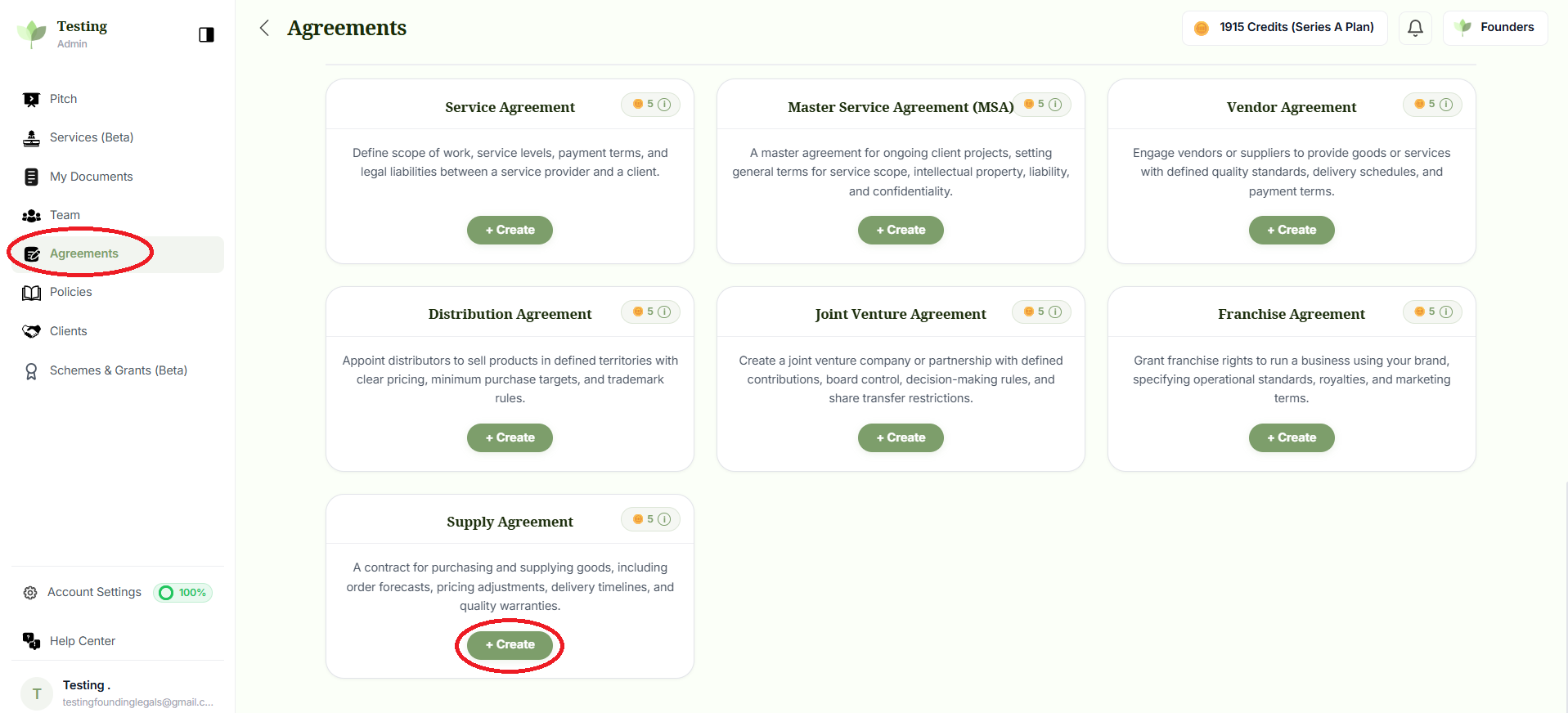
Select the counterparty: In the Select Recipient panel on the right sidebar, search for the counterparty's representative or click + Add new recipient.
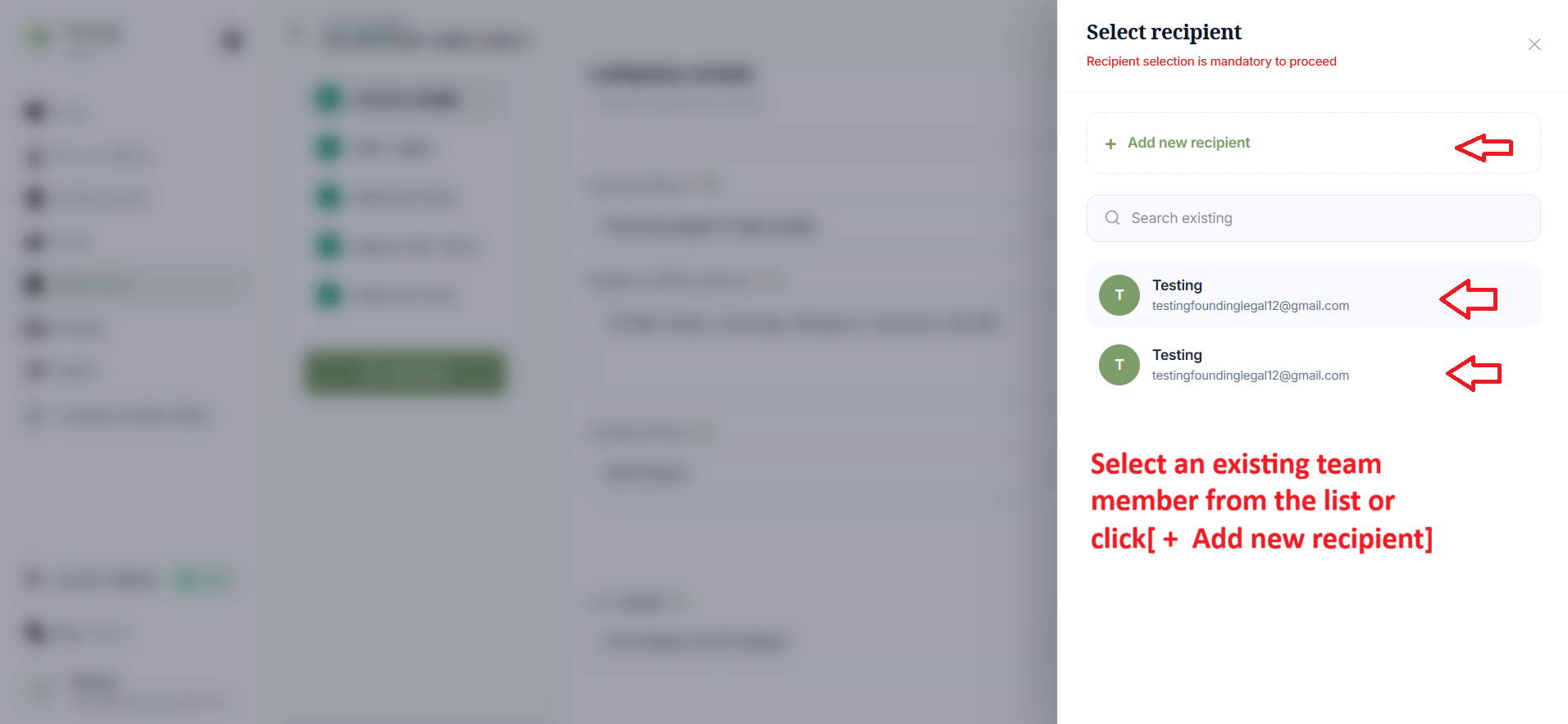
Choose terms baseline: In the Choose Agreement Terms menu, select:
- Founding Legals standard terms: Pre-populates the editor with standard manufacturing and supply covenants, product specifications, delivery procedures, and audit clauses.
- Custom terms: Choose this option to upload your own custom supply template.
Click Confirm to launch the editor.
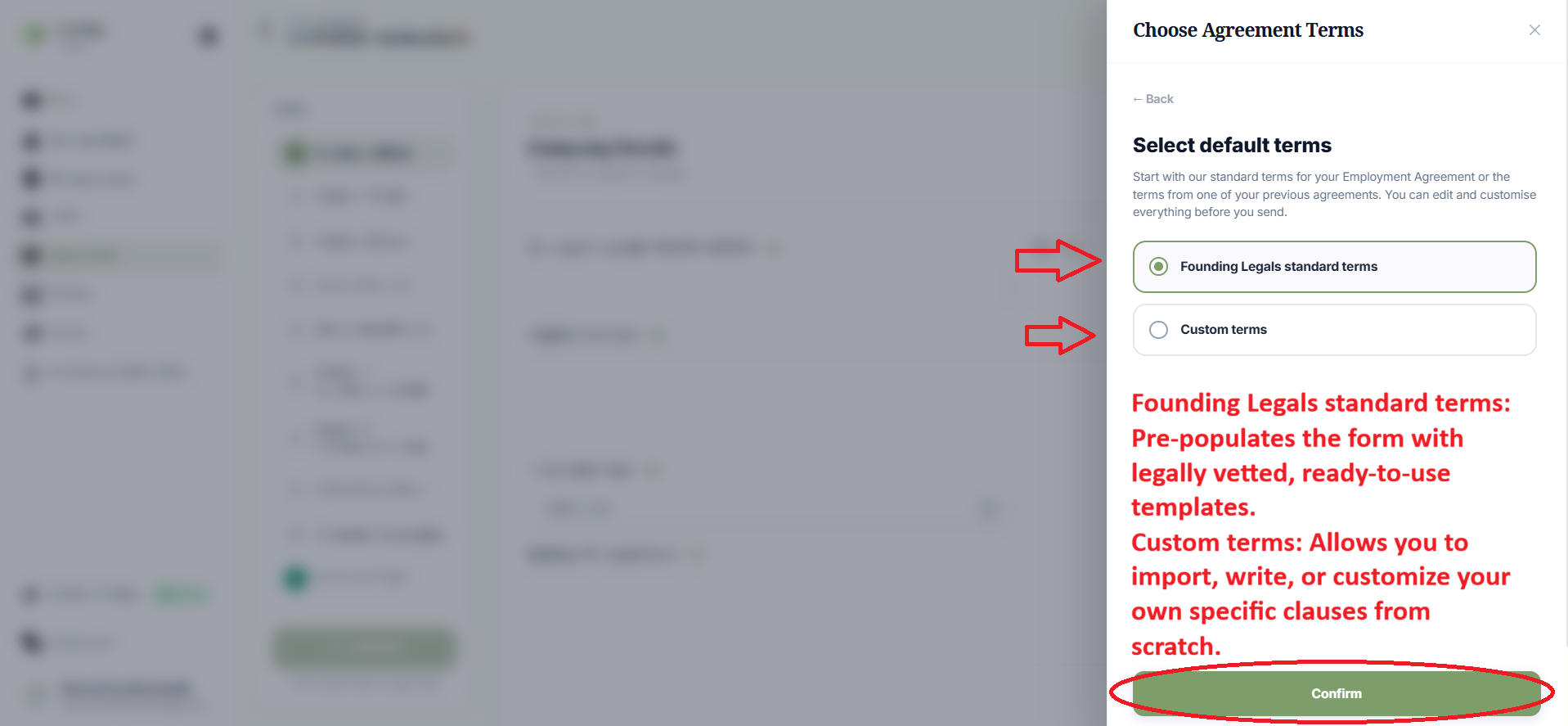
Enter signing place and date: In Step 1, input:
- Execution Place (City): Enter the geographical city where this agreement is executed (e.g., Chennai). This determines the jurisdiction and local stamp duty requirements.
- Execution Date: Select the calendar date the agreement takes effect. Month and Year will auto-fill.
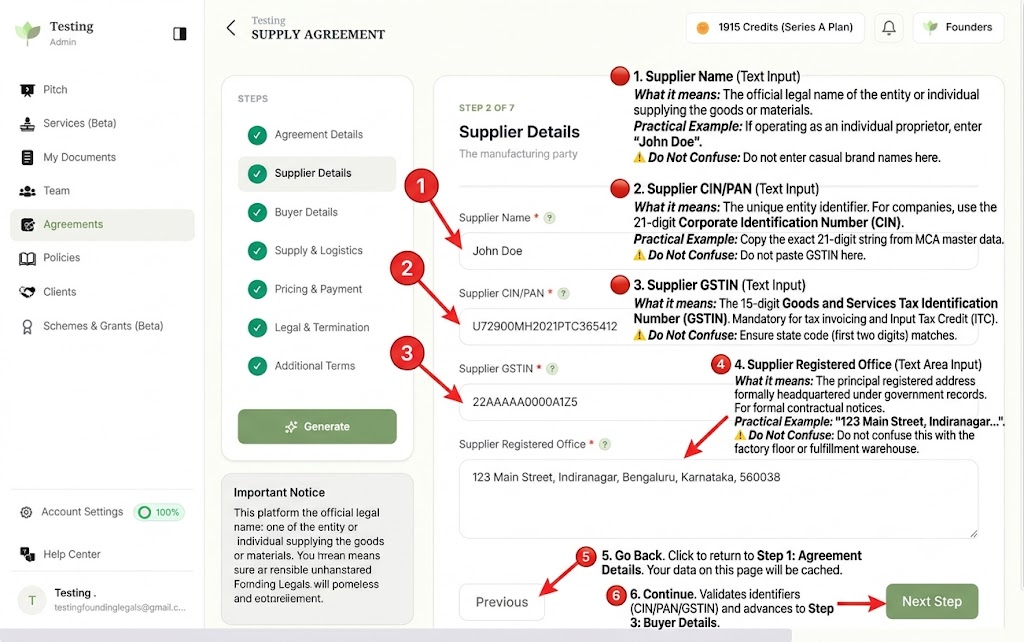
Provide Supplier legal details: In Step 2, enter:
- Supplier Name: Enter the official legal corporate name of the supplying entity or individual (e.g., John Doe).
- Supplier CIN/PAN: Enter the 21-digit Corporate Identification Number for companies, or the individual PAN.
- Supplier GSTIN: Enter the 15-digit GSTIN, ensuring the first two digits match the state code.
- Supplier Registered Office: Enter the official physical address registered with the RoC.
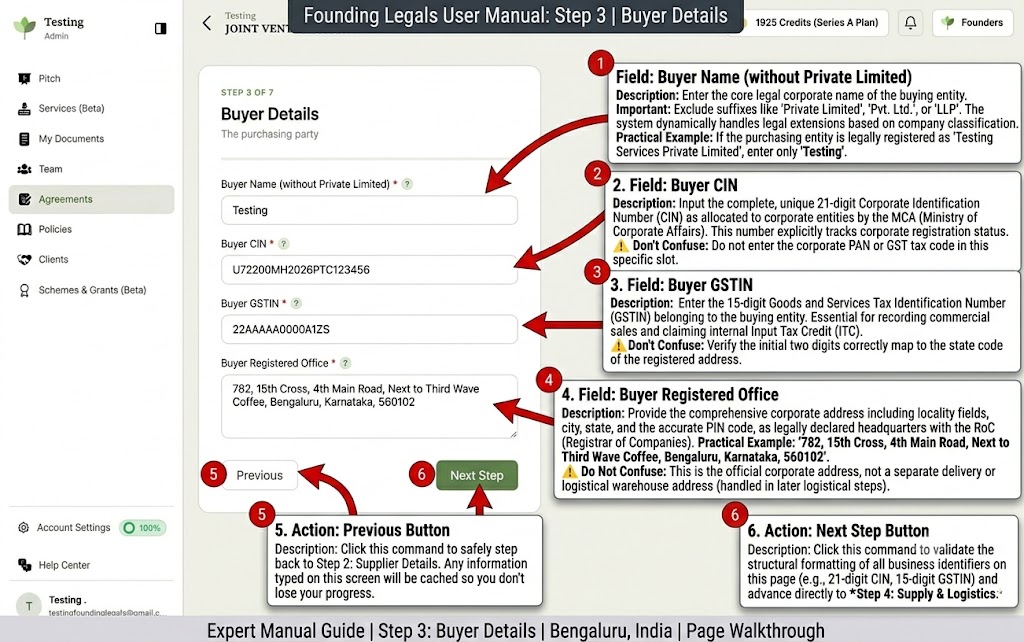
Provide Buyer registration details: In Step 3, enter:
- Buyer Name: Enter the official corporate name of the purchasing entity, excluding suffixes like 'Private Limited' or 'Pvt. Ltd.' (e.g., Testing).
- Buyer CIN: Enter the 21-digit Corporate Identification Number.
- Buyer GSTIN: The 15-digit GST identification number of the Buyer.
- Buyer Registered Office: Enter the registered corporate headquarters address.
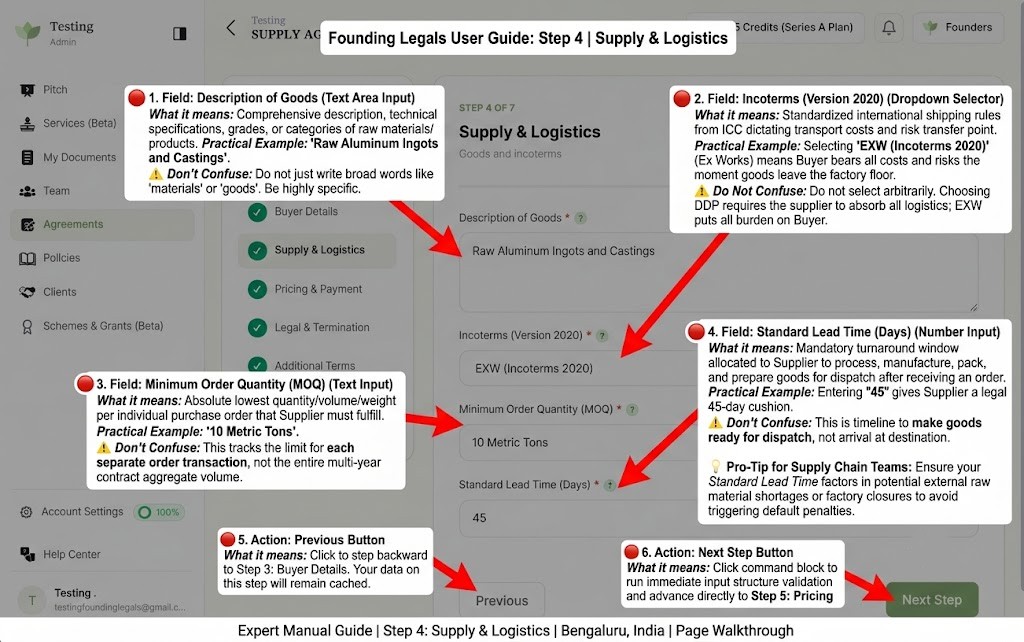
Configure logistics and delivery parameters: In Step 4, enter:
- Description of Goods: Detailed technical specifications, grades, or categories of materials to be supplied (e.g., Raw Aluminum Ingots and Castings). Avoid generic terms.
- Incoterms (Version 2020): Select the standardized international shipping rule from the dropdown (e.g., EXW (Incoterms 2020)). Selecting EXW transfers all risks and costs to the Buyer at the Supplier's factory floor.
- Minimum Order Quantity (MOQ): The lowest quantity or weight required for each separate purchase order (e.g., 10 Metric Tons).
- Standard Lead Time (Days): The turnaround window allocated to the Supplier to manufacture, pack, and prepare goods for dispatch (e.g., 45 days).
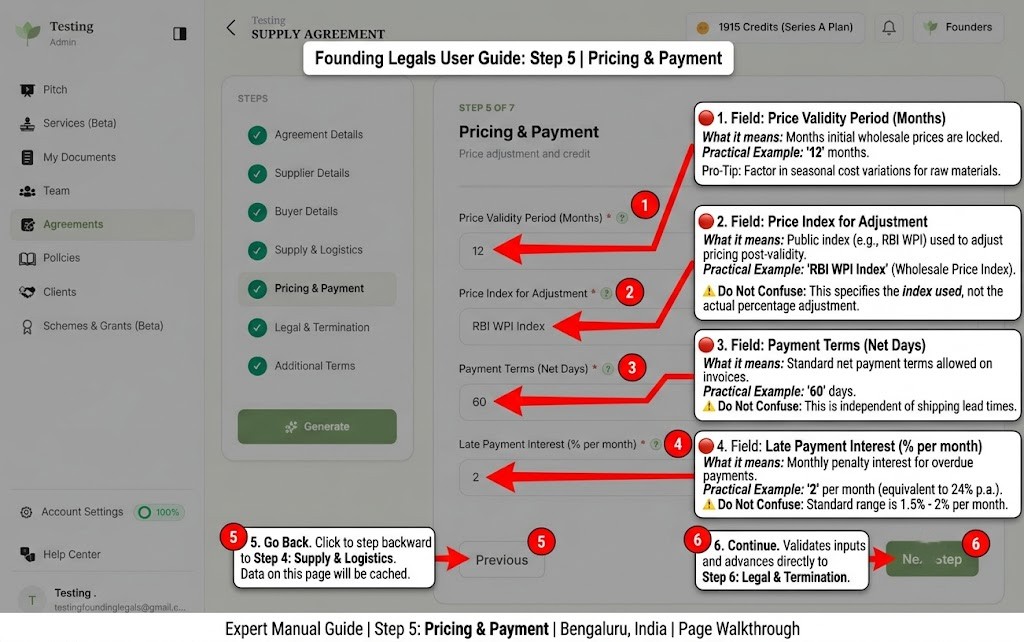
Define payment timelines and indexation: In Step 5, enter:
- Price Validity Period (Months): The initial period during which wholesale prices are locked (e.g., 12 months).
- Price Index for Adjustment: The public index (e.g., RBI WPI Index) used to adjust pricing post-validity to protect against raw material cost variations.
- Payment Terms (Net Days): The standard net days allowed to pay invoices (e.g., 60 days).
- Late Payment Interest (% per month): The monthly penalty interest rate for overdue invoices (e.g., 2%).
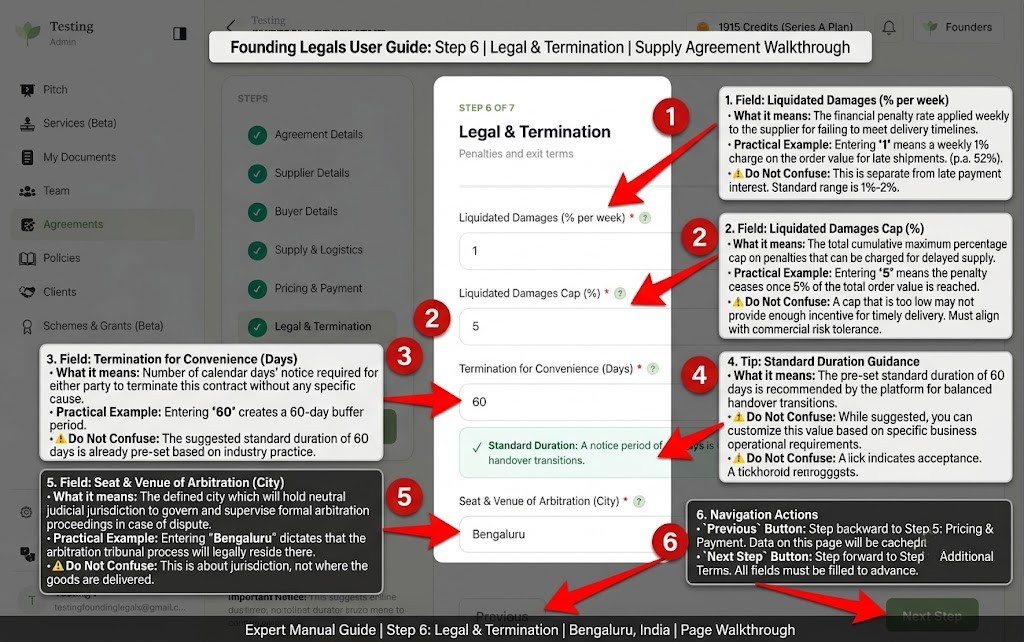
Configure delay penalties and exit structures: In Step 6, input:
- Liquidated Damages (% per week): The weekly penalty rate applied to the Supplier for delayed shipments (e.g., 1%).
- Liquidated Damages Cap (%): The maximum cumulative cap on delay penalties (e.g., 5%).
- Termination for Convenience (Days): The notice window required for either party to exit the agreement without cause (e.g., 60 days).
- Seat & Venue of Arbitration (City): The city designated as the legal seat for arbitration proceedings (e.g., Bengaluru).
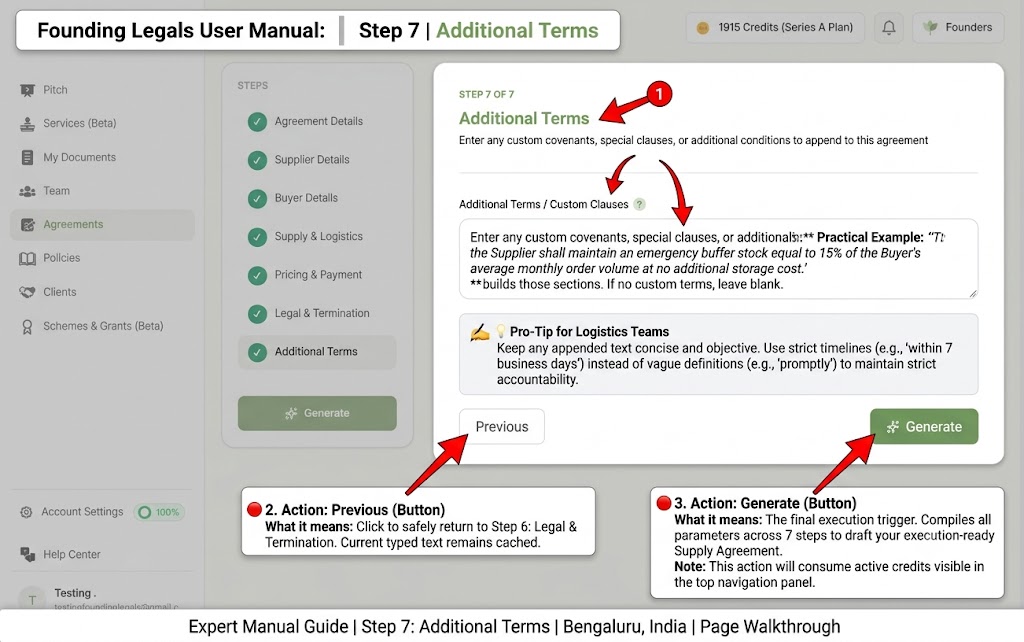
Add custom covenants and compile: In Step 7, enter any custom parameters (e.g., requiring the Supplier to maintain an emergency buffer stock equal to 15% of the Buyer's average monthly volume). Click Generate to compile the draft.
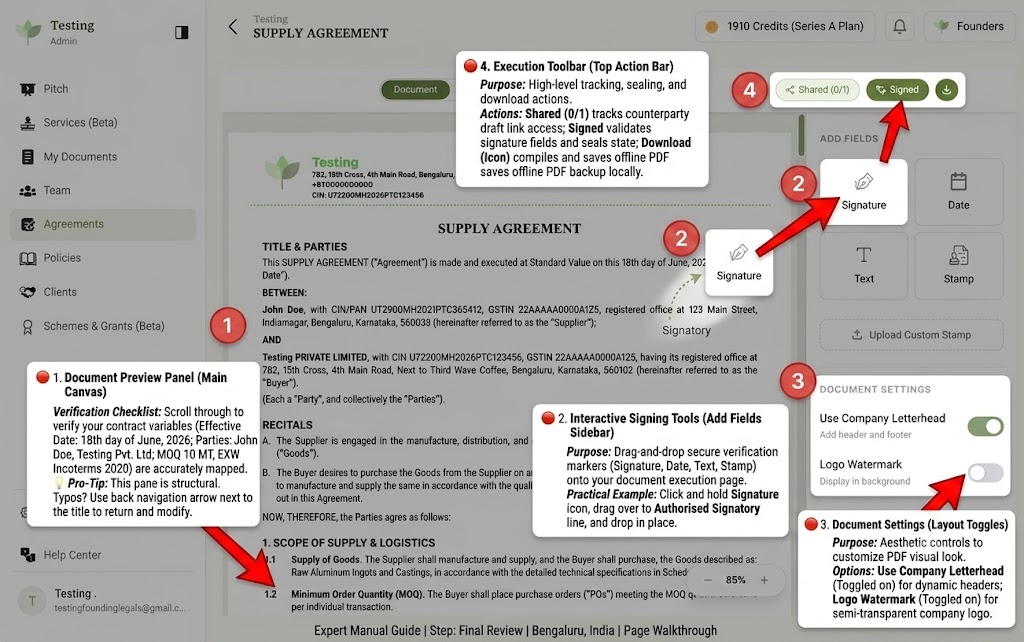
Execute the Supply Agreement: In the final Document Review screen:
- Document Preview: Scroll through the main canvas to verify that all variables (Effective Date, MOQ, Incoterms, Liquidated Damages) are accurately merged.
- Interactive Signing Tools: Drag-and-drop the Signature, Date, and Stamp fields from the panel onto the signing block.
- Document Settings: Toggle Use Company Letterhead or Logo Watermark.
- Execution: Click Signed / Send to execute and route the agreement to the counterparty, or Download to save an offline copy.
Under Section 74 of the Indian Contract Act, 1872, if a contract specifies a liquidated damages rate for delay (e.g., 1% per week), the courts will only award reasonable compensation up to that limit. To prevent the clause from being struck down as a penalty, ensure the rate represents a genuine, pre-estimated economic loss associated with delivery delays.
Under the CGST Act, 2017, the Buyer cannot claim Input Tax Credit (ITC) if the Supplier defaults on GST payments or invoice uploads. To mitigate this risk, verify that the Supplier's GSTIN is active, and ensure that the agreement holds the Supplier liable to indemnify the Buyer for any interest or lost tax credit.
When negotiating Standard Lead Time (e.g., 45 days), Suppliers should factor in raw material shortages, custom delays, or seasonal logistics disruptions. Add a 5–7 day grace or cure window in the agreement to prevent immediate default or liquidated damages triggers for minor delays.
Quality Assurance
Reviewed by Manoj Kumar Thota
Founder / Developed Founding Legals
About the Author
Manoj Kumar Thota is the creator behind Founding Legals