How to Draft a Trademark License Agreement
Quick Summary
A Trademark License Agreement allows a trademark owner (licensor) to grant another party (licensee) the right to use their registered brand name, logo, or trademark for specific products and territories under strict quality control. This step-by-step visual guide walks you through drafting and executing a Trademark License Agreement on Founding Legals.
Protect Your IP — Agreement Type
This agreement falls under the Protect Your IP category on the Founding Legals Agreements page, alongside the Non-Compete Agreement, Mutual Non-Disclosure Agreement (NDA), IP Assignment Agreement, Technology Transfer Agreement, and Software License Agreement.
Understanding the Trademark License Agreement
A Trademark License Agreement (TLA) is a critical branding contract that permits a trademark owner (Licensor) to authorize another business or individual (Licensee) to use their registered trademarks, logos, and brand assets. In trademark law, maintaining the reputation and goodwill of a mark is paramount. Therefore, a trademark license must enforce strict quality control standards. Without these controls, the license is deemed a "naked license" which can invalidate the trademark registration itself. The agreement specifies the permitted product lines, territorial limits, royalty payouts, quality inspections, and post-termination sell-off protocols.
Step-by-Step Guide to Drafting a Trademark License Agreement
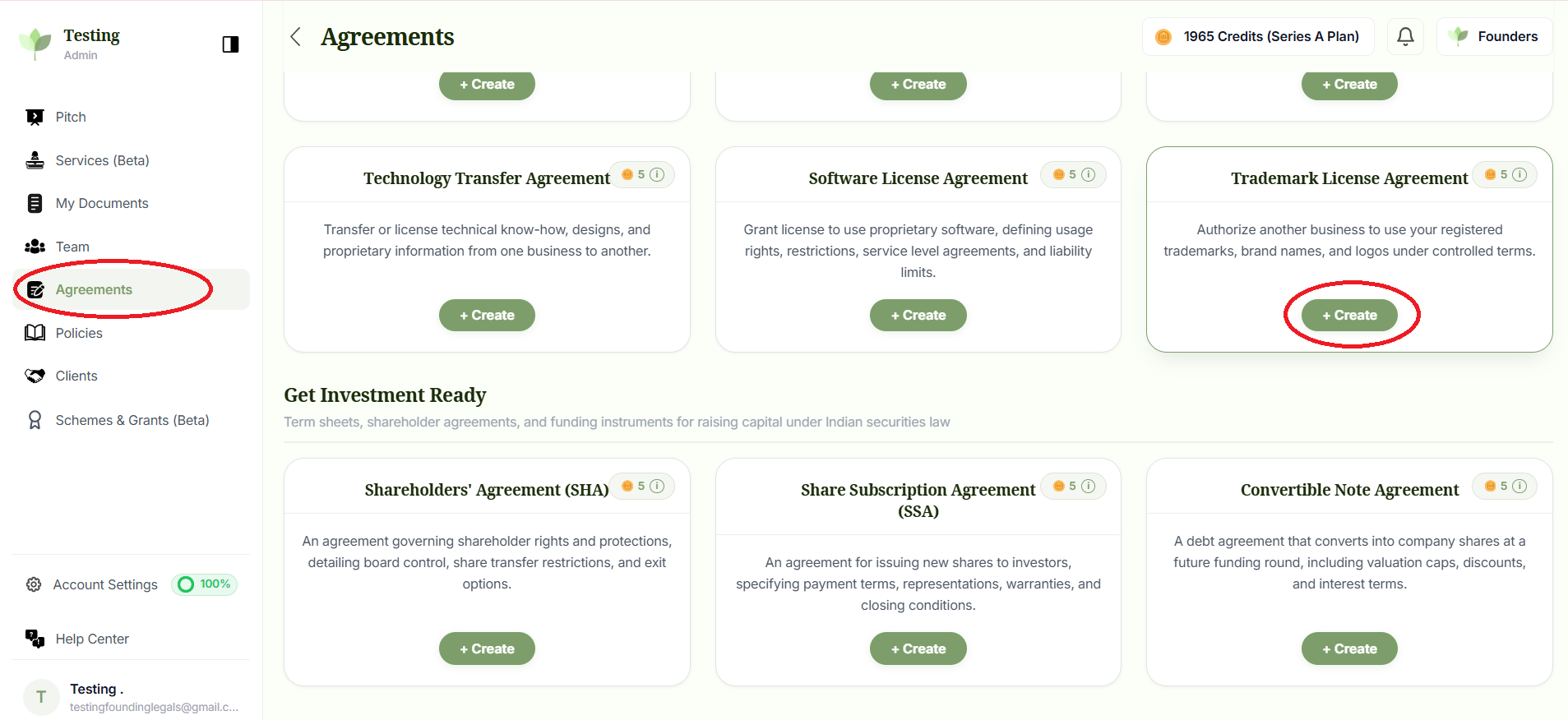
Access the module: Click on Agreements in the left-side navigation panel of the dashboard. Scroll to the Protect Your IP category and locate the Trademark License Agreement card. This agreement permits authorizing another business to use your registered trademarks, brand names, and logos under controlled terms. Click + Create.
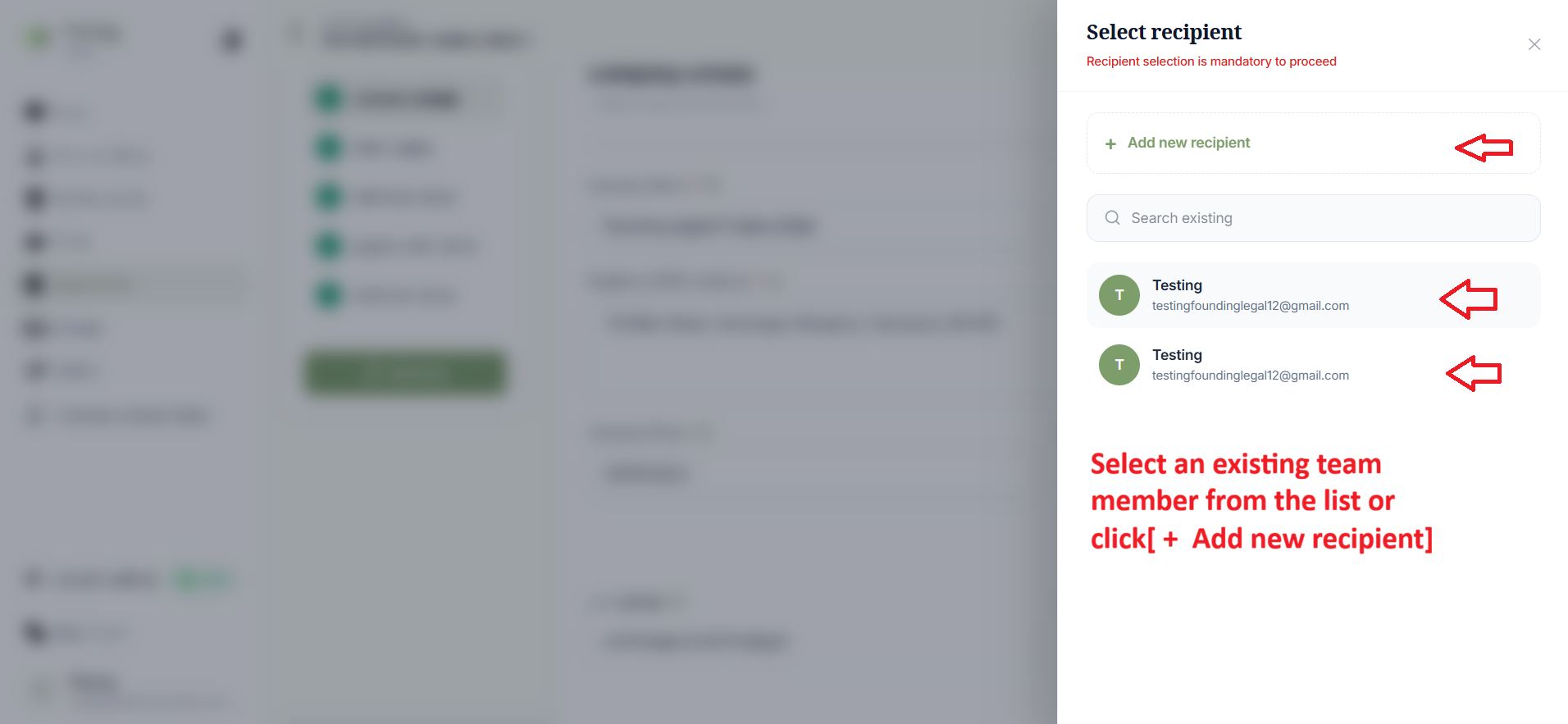
Assign the counterparty: The Select Recipient panel slides out from the right side of the page. Select an existing team member or corporate contact from the list, or click + Add new recipient to register a new recipient.
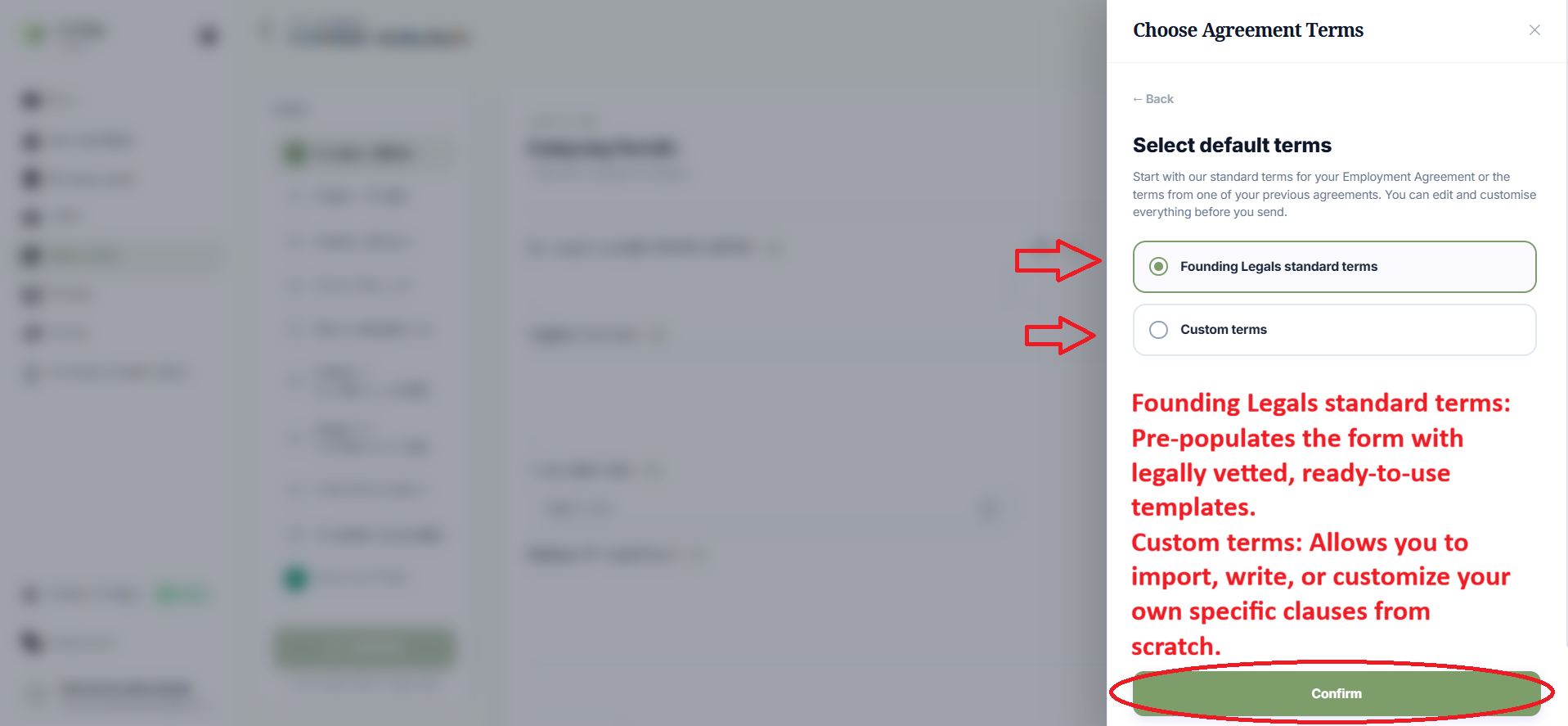
Select default or custom terms: The Choose Agreement Terms panel will appear. You can pick:
- Founding Legals standard terms: Pre-populates the form with legally vetted, ready-to-use templates that establish quality controls, specify royalty payments, and include mutual indemnification clauses.
- Custom terms: Pick this option to write, import, or paste your own custom trademark clauses.
Select your terms baseline and click Confirm.
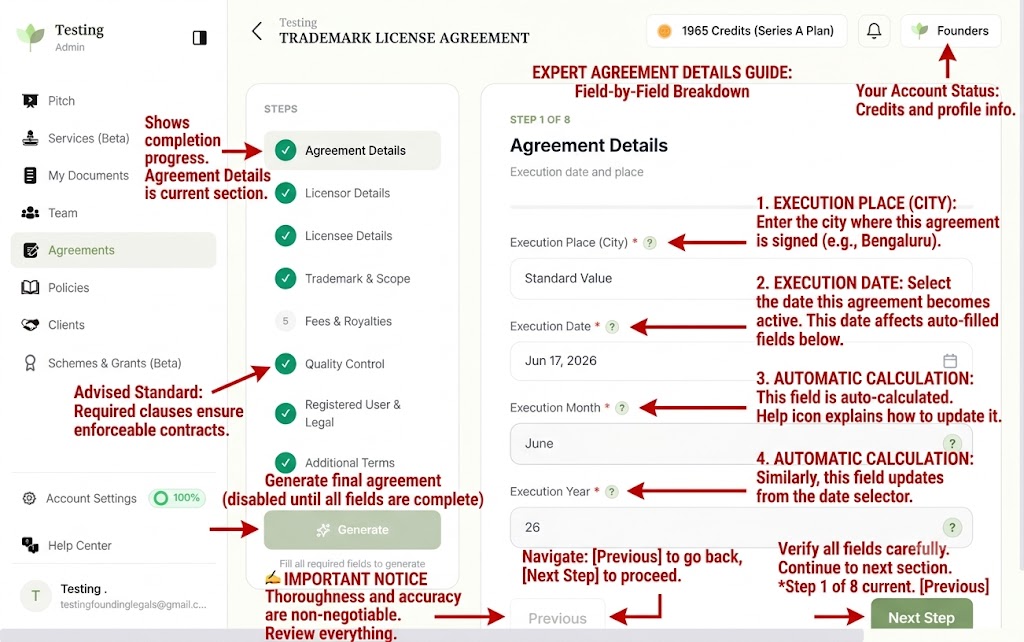
Specify the signing parameters and execution terms: Under Step 1 of the configuration flow, enter:
- Execution Place (City): Enter the city where this agreement is legally executed (e.g., Bengaluru).
- Execution Date: Click the calendar icon to select your exact signing date.
- Execution Month & Year: Auto-filled based on the date selected above.
Review everything carefully. Click Next Step to save these details and proceed.
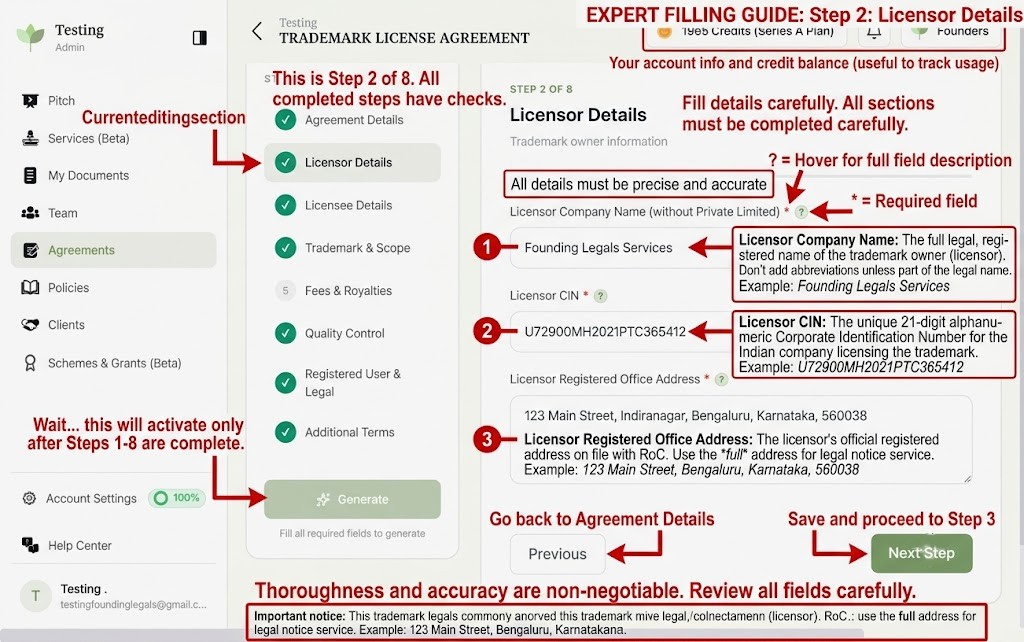
Enter the Licensor legal corporate details: In Step 2, provide the information for the company owning the trademark:
- Licensor Company Name (without Private Limited): Enter the registered corporate name of the Licensor entity (e.g. Founding Legals Services). Do not include suffixes like Private Limited.
- Licensor CIN: Enter the unique 21-digit Corporate Identification Number for the Indian company licensing the trademark.
- Licensor Registered Office Address: Enter the complete physical address registered with the Registrar of Companies (RoC) for official notices.
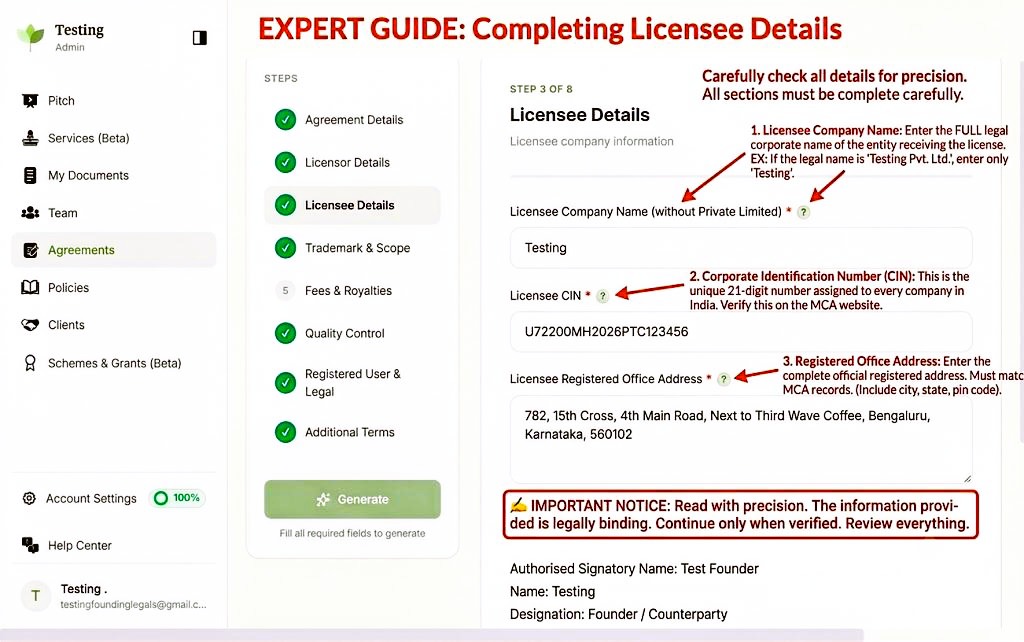
Enter the Licensee contact and statutory details: Step 3 captures the business details of the entity receiving the brand license:
- Licensee Company Name (without Private Limited): Enter the registered corporate name of the Licensee entity (e.g., Testing).
- Licensee CIN: Enter the licensee's unique 21-digit Corporate Identification Number.
- Licensee Registered Office Address: Enter the complete physical registered office address of the licensee.
- Authorised Signatory Name & Designation: Enter the name and title (e.g., Founder / Counterparty) of the person executing the agreement.
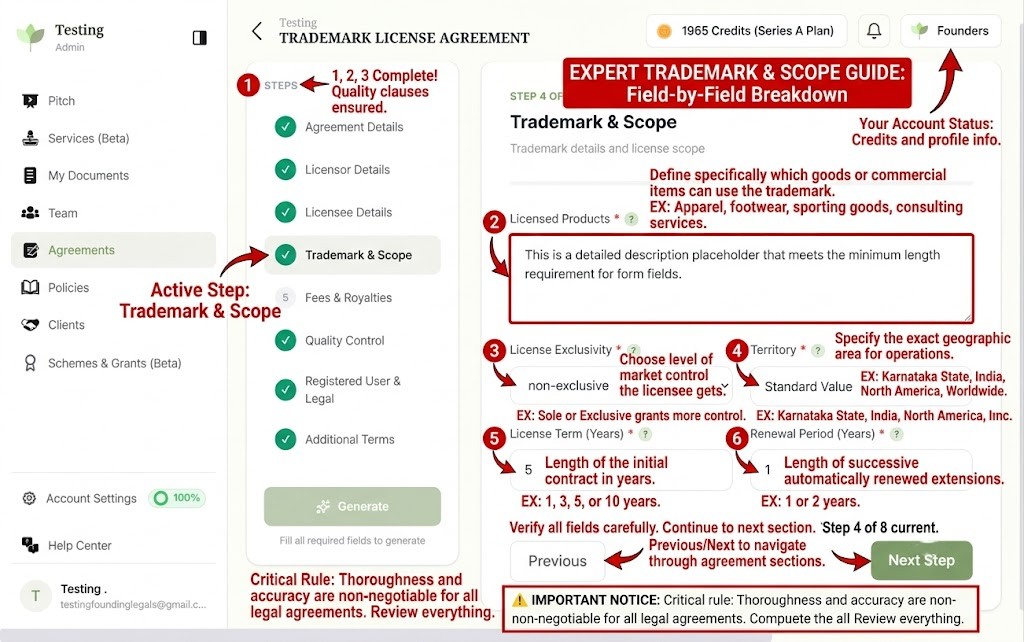
Define the trademark boundaries and product scope: Step 4 establishes the commercial and territorial scope of the trademark license:
- Licensed Products: Detail exactly which goods or commercial services are permitted to use the trademark (e.g., Apparel, footwear, sporting goods, consulting services). Be highly specific.
- License Exclusivity: Select the level of market control the licensee gets (e.g., non-exclusive, sole, or exclusive).
- Territory: Specify the exact geographic area for operations (e.g., Karnataka State, India or North America).
- License Term (Years): Define the initial duration of the license in years (e.g., 5).
- Renewal Period (Years): Set the duration of successive automatic contract extensions (e.g., 1 or 2 years).
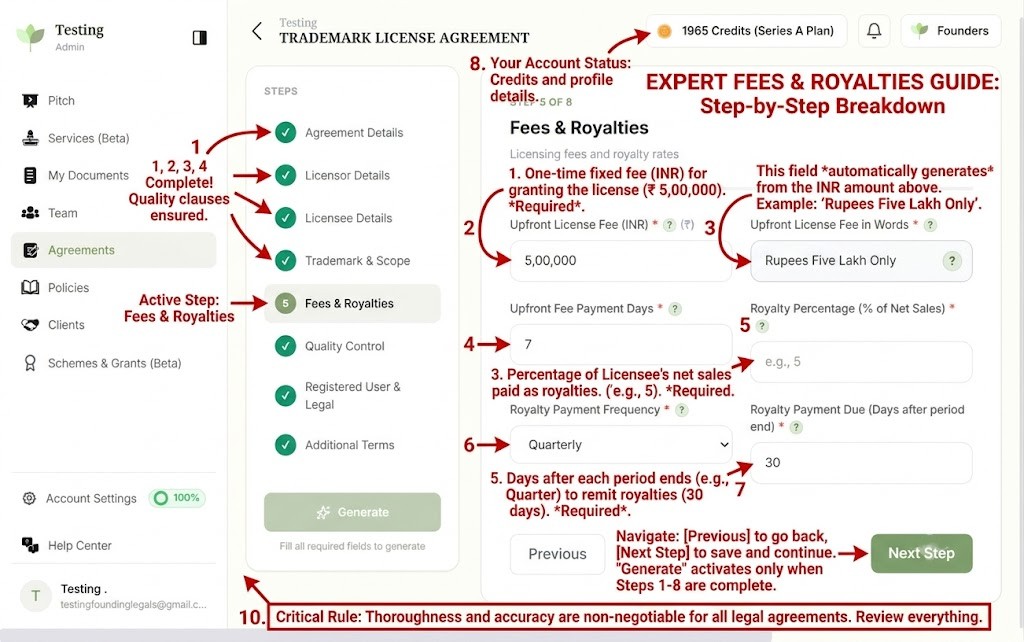
Configure license fees, royalties, and payment intervals: Step 5 regulates the commercial terms of the trademark use:
- Upfront License Fee (INR): Enter the one-time fixed fee paid upon executing the license (e.g., 5,00,000).
- Upfront License Fee in Words: Automatically auto-fills based on the number input above (e.g., Rupees Five Lakh Only).
- Upfront Fee Payment Days: Specify the number of days after signing within which the licensee must pay the upfront fee (e.g., 7 days).
- Royalty Percentage (% of Net Sales): Enter the royalty percentage of net sales paid by the licensee (e.g., 5).
- Royalty Payment Frequency: Select the interval for calculations (e.g., Monthly, Quarterly, Semi-Annually, or Annually).
- Royalty Payment Due (Days after period end): Enter the grace period to remit royalties after each calculation period ends (e.g., 30 days).
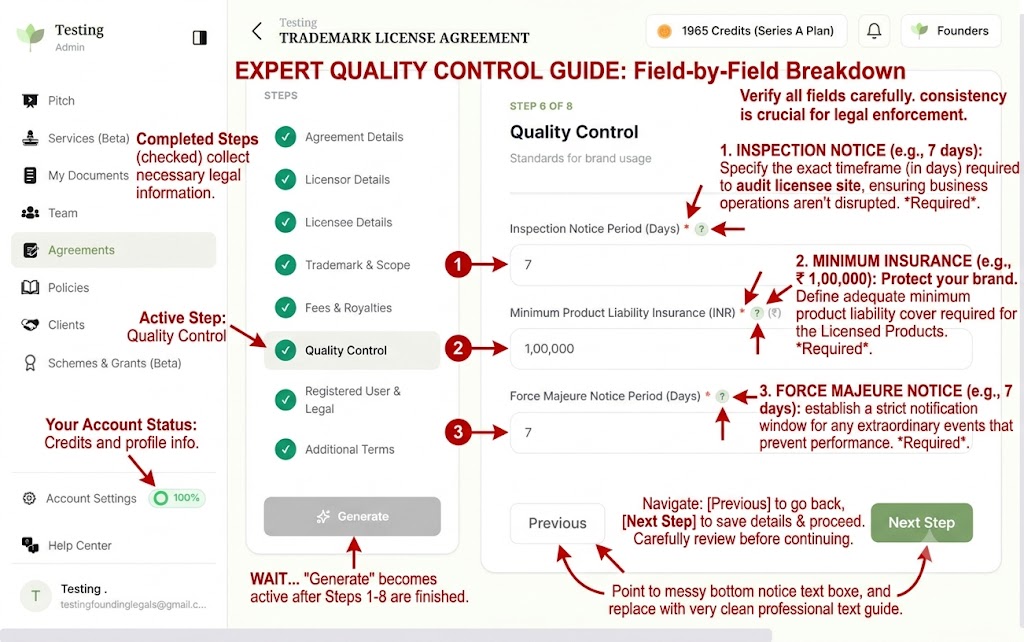
Establish trademark quality safeguards and audits: Step 6 ensures the licensor maintains branding oversight:
- Inspection Notice Period (Days): Enter the number of days of advance notice the licensor must give before auditing the licensee's site or manufacturing facility (e.g., 7 days).
- Minimum Product Liability Insurance (INR): Specify the minimum insurance coverage the licensee must maintain to protect against consumer lawsuits regarding licensed products (e.g., 1,00,000).
- Force Majeure Notice Period (Days): Enter the timeframe to notify the other party of extraordinary events preventing contract performance (e.g., 7 days).
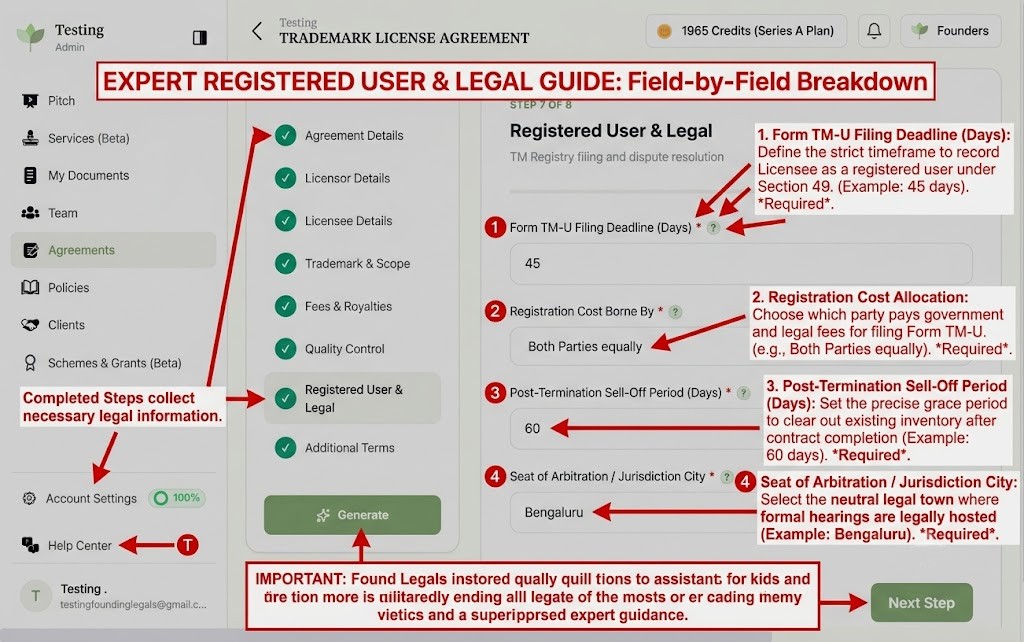
Configure trademark registry filings and dispute settings: Step 7 sets legal and statutory governance:
- Form TM-U Filing Deadline (Days): Set the strict timeframe in days to record the licensee as a registered user under Section 49 of the Trade Marks Act (e.g., 45 days).
- Registration Cost Borne By: Choose which party covers government and legal fees for filing Form TM-U (e.g., Both Parties equally).
- Post-Termination Sell-Off Period (Days): Specify the grace period (in days) to clear existing branded inventory after contract expiration or termination (e.g., 60 days).
- Seat of Arbitration / Jurisdiction City: Choose the neutral town where all formal arbitration hearings are hosted (e.g., Bengaluru).
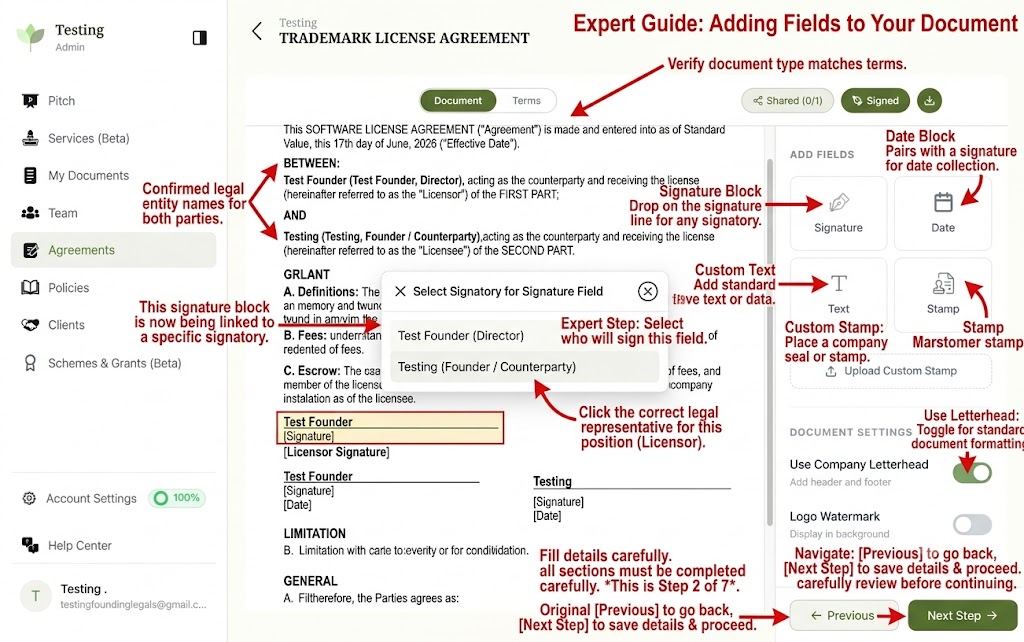
Check details, position fields, and execute the trademark license: Step 8 presents the final document layout:
- Verify corporate details: Review the entity names, CIN details, licensed products, royalties, and seat of arbitration in the document viewer.
- Select Signatory: Drag and drop the Signature, Date, Text, or Stamp fields. Choose the correct legal representative (Licensor vs. Licensee) from the popup list to link the field.
- Apply Letterhead & Watermarks: Toggle Use Company Letterhead or Logo Watermark to match your corporate branding.
- Execute: Click Shared to invite the counterparty or click Signed once all fields are executed.
Under Sections 48 and 49 of the Trade Marks Act, 1999, registering a licensee as a "Registered User" using Form TM-U with the Trademark Registry is highly recommended. If you fail to record the licensee, their usage of your brand may not legally accrue to your benefit. This poses a risk in non-use cancellation actions, where a third party can apply to expunge your trademark for lack of direct usage. Furthermore, licensing a trademark without active and continuous quality control is treated as a "naked license" (naked licensing in gross) under Indian law. Naked licensing can lead to a court declaring that the trademark has lost its distinctiveness, effectively invalidating your brand registration.
Since the licensee sells goods under your brand name, consumers may sue you for product defects under the Consumer Protection Act, 2019. Always require the licensee to maintain a Minimum Product Liability Insurance policy with the Licensor named as an additional insured. Additionally, remember that brand licensing royalties are subject to 18% GST (HSN 99733) and the licensee must withhold 10% TDS under Section 194J (Royalties) of the Income Tax Act. Specify in your terms whether fees are inclusive or exclusive of GST.
Quality Assurance
Reviewed by Manoj Kumar Thota
Founder / Developed Founding Legals
About the Author
Manoj Kumar Thota is the creator behind Founding Legals