How to Draft a Technology Transfer Agreement
Quick Summary
A Technology Transfer Agreement transfers or licenses technical know-how, designs, and proprietary information from one business to another. This visual step-by-step guide explains how to define the scope of technology, delivery timelines, milestones, consideration, and dispute resolution parameters on Founding Legals.
Protect Your IP — Agreement Type
This agreement falls under the Protect Your IP category on the Founding Legals Agreements page, alongside the Non-Compete Agreement, Mutual Non-Disclosure Agreement (NDA), IP Assignment Agreement, Software License Agreement, and Trademark License Agreement.
Understanding the Technology Transfer Agreement
In today's collaborative tech ecosystem, companies frequently transfer or license intellectual property assets—such as proprietary software, manufacturing designs, technical know-how, and trade secrets—to another business entity. A Technology Transfer Agreement (TTA) sets the legal boundaries for this transfer, detailing whether it is a permanent assignment of ownership or a limited license to use. It governs crucial details such as support and onboarding training, delivery timelines, payment milestones, royalties, and post-term confidentiality.
Step-by-Step Guide to Drafting a Technology Transfer Agreement
Access the module: Click on Agreements in the left-side navigation panel of the dashboard. Scroll to the Protect Your IP category and locate the Technology Transfer Agreement card. This agreement permits transferring or licensing technical know-how, designs, and proprietary information from one business to another. Click + Create.
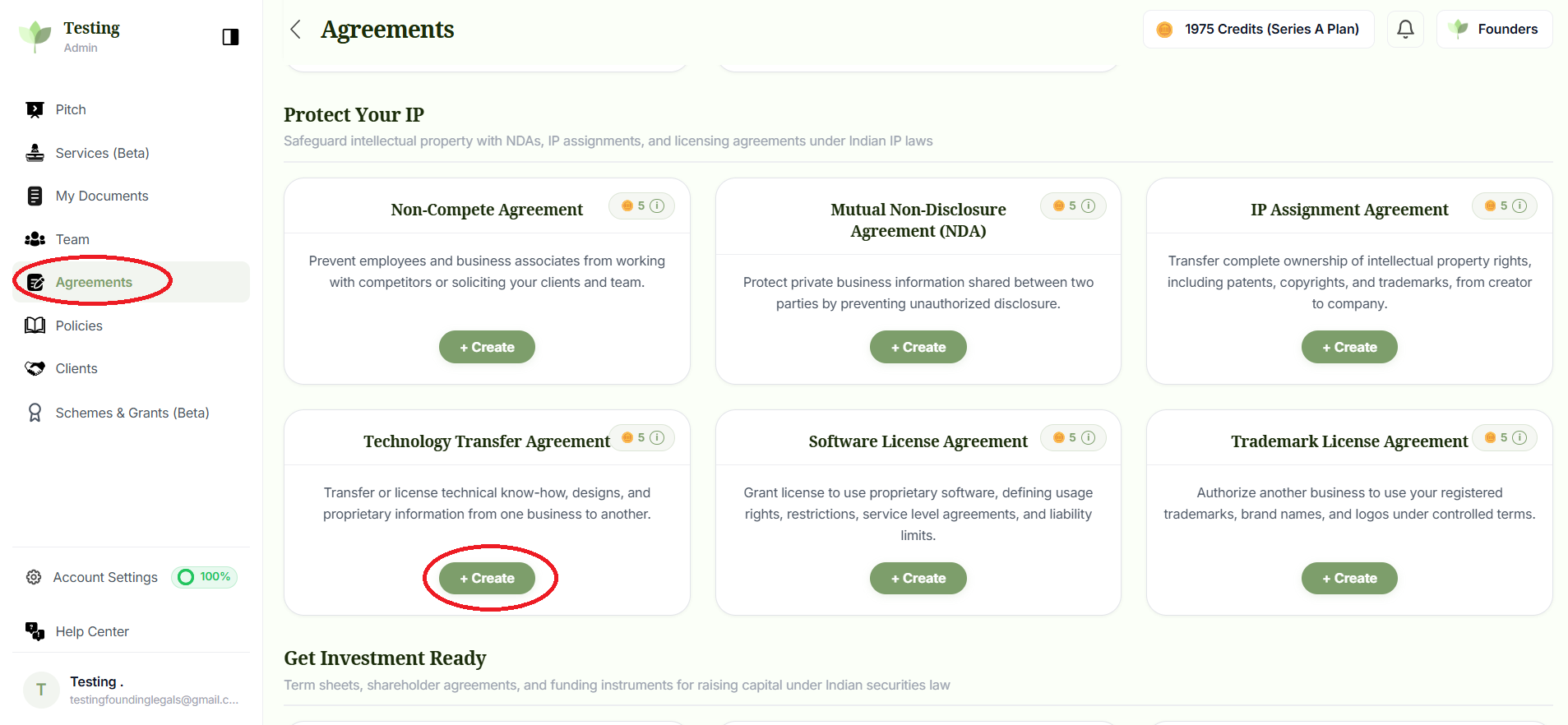
Assign the counterparty: The Select Recipient panel slides out from the right side of the page. Select an existing team member or corporate contact from the list, or click + Add new recipient to register a new user. Choosing a recipient is mandatory to proceed.
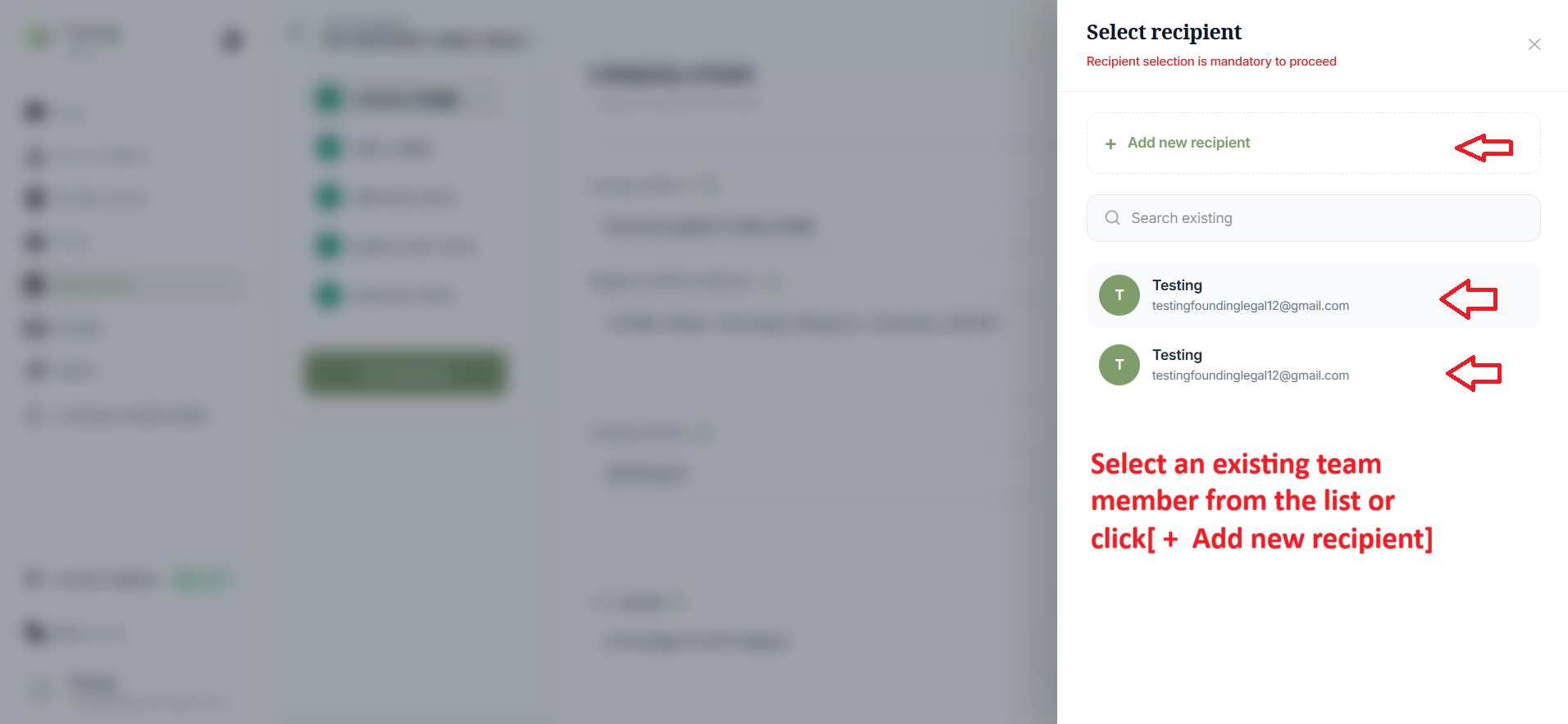
Select default or custom terms: The Choose Agreement Terms panel will appear. You can pick:
- Founding Legals standard terms: Pre-populates a comprehensive baseline that protects the background IP, sets explicit boundaries on transfer, and ensures standard legal warranties.
- Custom terms: Pick this option to write, import, or paste your own custom clauses from scratch.
Select your terms baseline and click Confirm.
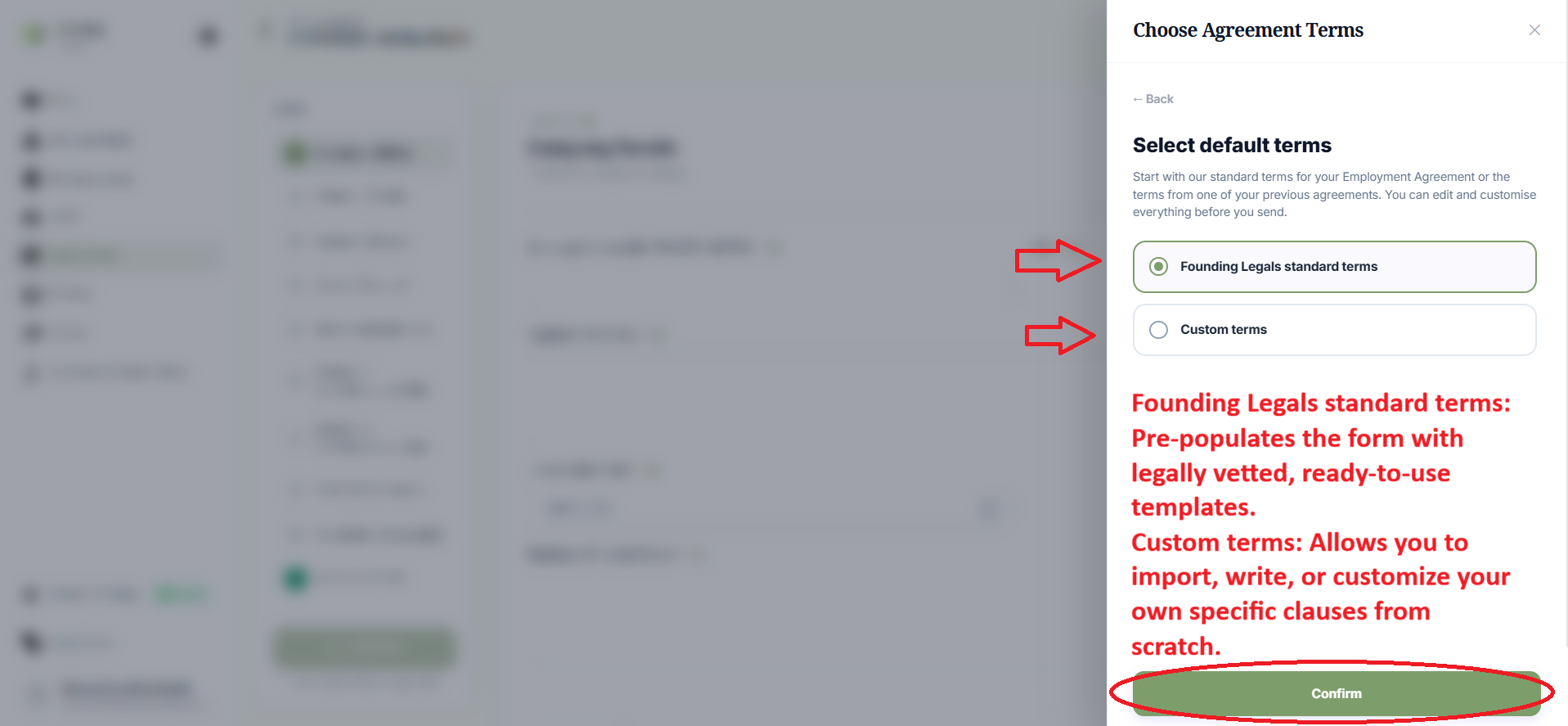
Specify the signing parameters: Under Step 1 of the configuration flow, enter:
- Execution Place: Enter the city where this agreement is legally signed (e.g., Bengaluru).
- Execution Date: Click the calendar icon to select your exact signing date.
- Execution Month & Year: Auto-filled based on the date selected above.
Click Next Step to save these details and proceed.
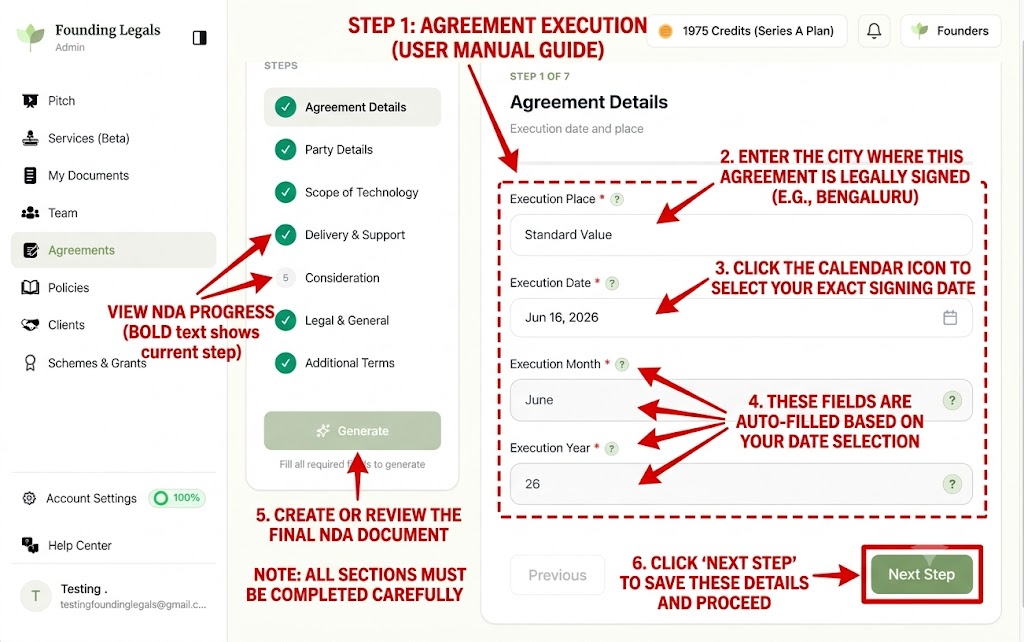
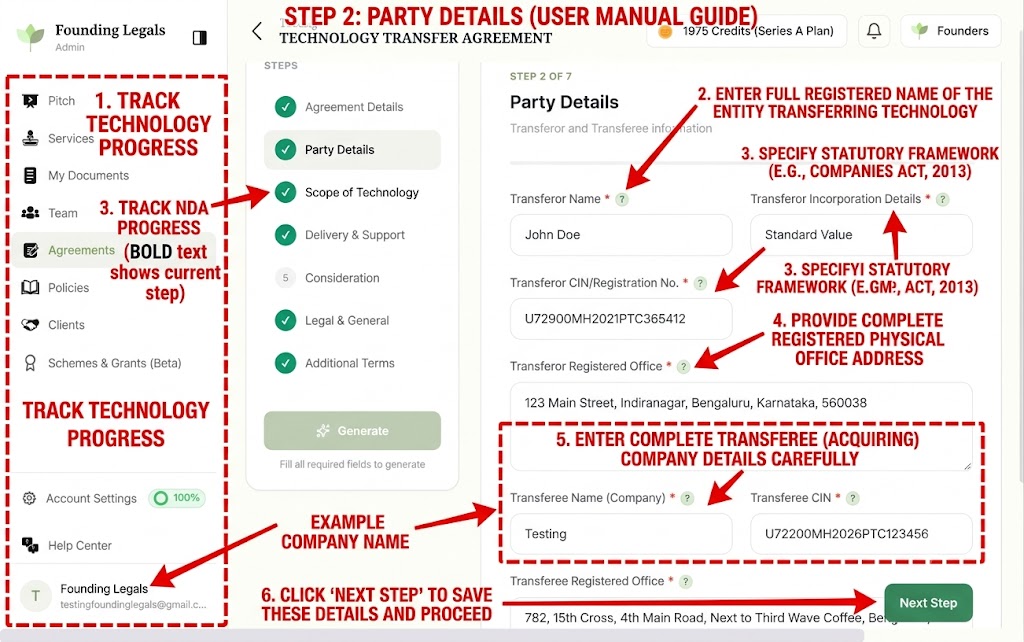
Enter the transferor and transferee legal information: Step 2 gathers details for both entities:
- Transferor Name: Enter the full registered name of the entity transferring the technology.
- Transferor Incorporation Details: Specify the statutory framework (e.g., Companies Act, 2013).
- Transferor CIN/Registration No.: Enter the Corporate Identification Number (CIN) or registration details.
- Transferor Registered Office: Provide the complete registered physical office address.
- Transferee Name (Company): Enter the legal name of the company acquiring or licensing the technology.
- Transferee CIN: Enter the acquiring company's Corporate Identification Number.
- Transferee Registered Office: Enter the registered physical address of the transferee company.
Click Next Step to save these details and proceed.
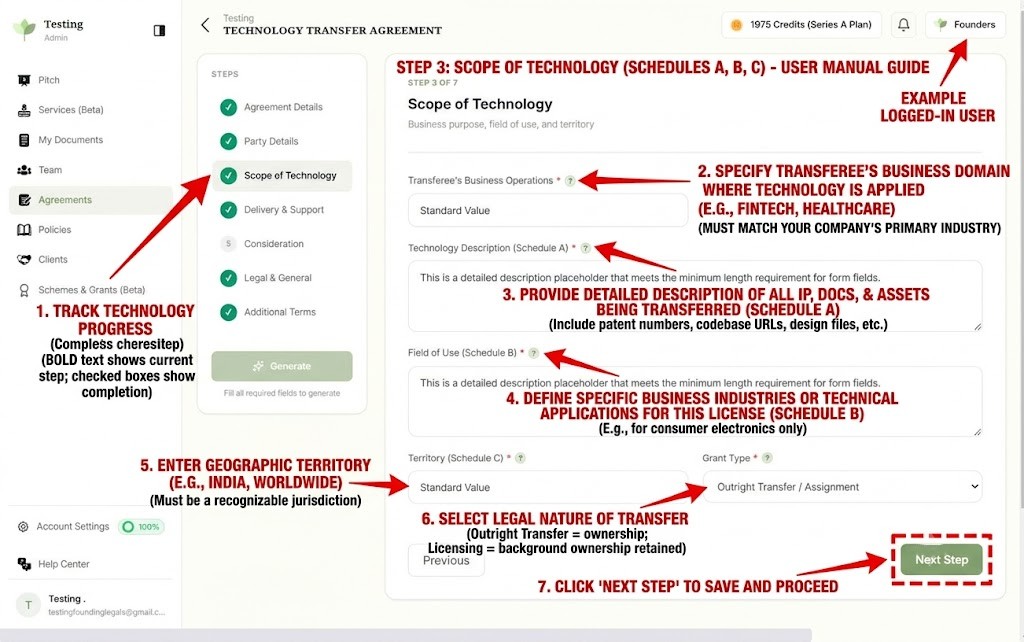
Configure the intellectual property scope and grant type: Step 3 defines what technical assets are included:
- Transferee's Business Operations: Specify the business domain where the technology will be applied (e.g., Fintech, Healthcare). This should match your company's primary industry.
- Technology Description (Schedule A): Provide a detailed description of all IP, source code, designs, and technical documentation being transferred. List repositories, patent numbers, or asset lists.
- Field of Use (Schedule B): Define specific business industries or technical applications for this transfer/license (e.g., "for consumer electronics only").
- Territory (Schedule C): Specify the geographic territory where the transferee can utilize the technology (e.g., "India" or "Worldwide").
- Grant Type: Select the legal nature of the transfer: choose Outright Transfer / Assignment (full transfer of ownership rights) or Licensing (retaining background ownership while granting a right to use).
Click Next Step to save scope parameters.
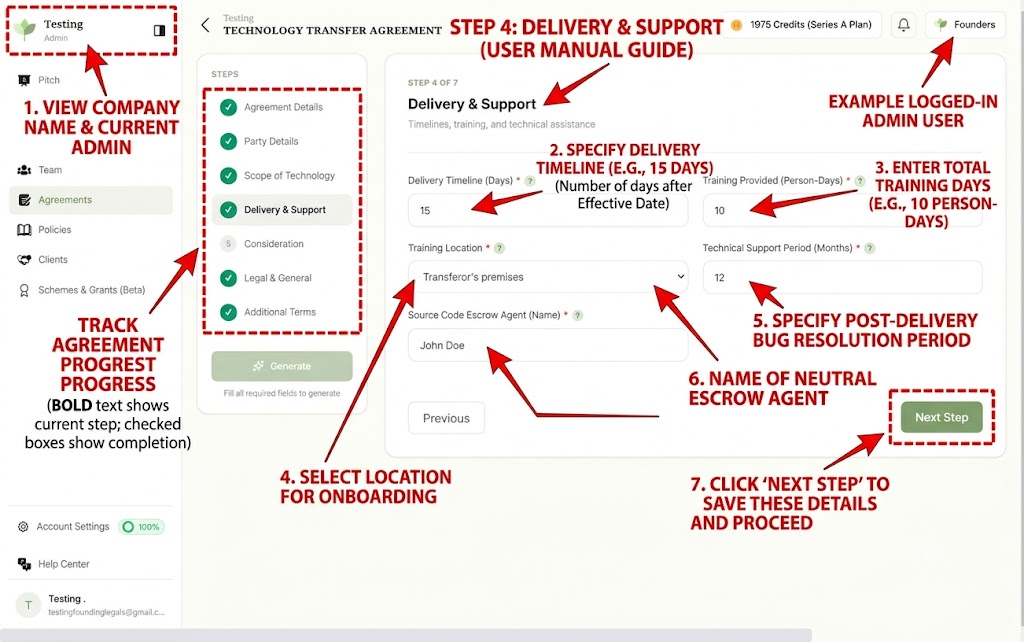
Define delivery timeline and technical training parameters: Step 4 establishes how the technology will be handed over:
- Delivery Timeline (Days): Enter the number of days after the Effective Date within which the technology must be delivered (e.g., 15).
- Training Provided (Person-Days): Enter the total number of training days for onboarding staff (e.g., 10 person-days).
- Training Location: Select where the training will take place (e.g., Transferor's premises, Transferee's premises, or Remote).
- Technical Support Period (Months): Specify the post-delivery support and bug-resolution duration (e.g., 12 months).
- Source Code Escrow Agent (Name): Provide the name of a neutral escrow agent if source code is being held in escrow to protect the transferee in case of transferor insolvency or breach.
Click Next Step to save delivery parameters.
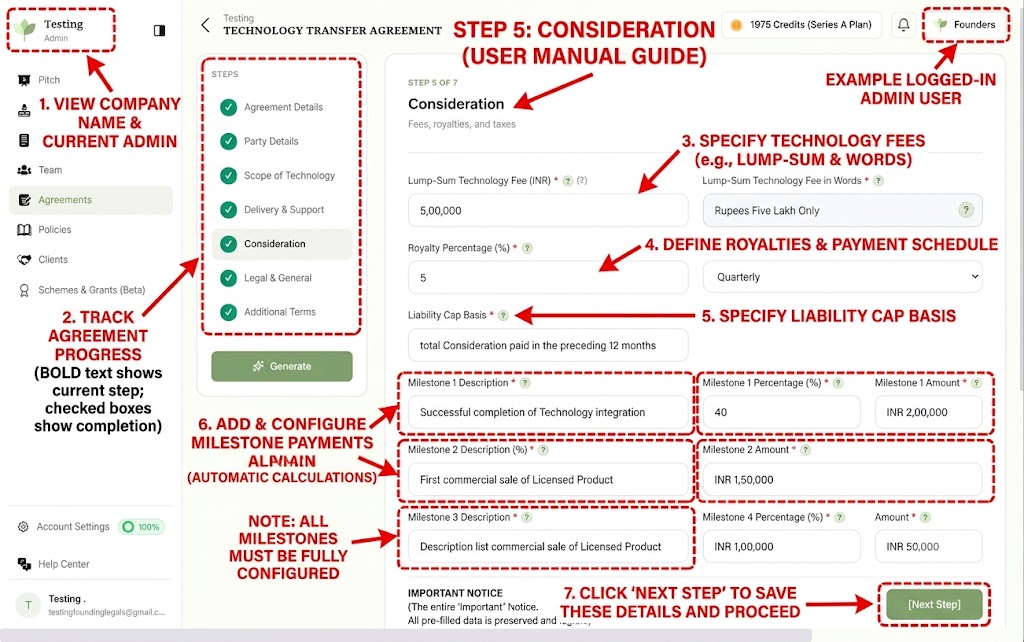
Configure fees, royalties, and payment milestones: Step 5 outlines the financial structures of the transaction:
- Lump-Sum Technology Fee (INR): Enter the main transfer fee amount (e.g., 5,00,000).
- Lump-Sum Technology Fee in Words: Enter the amount in words (e.g., Rupees Five Lakh Only).
- Royalty Percentage (%): Specify the percentage of net sales paid to the transferor (e.g., 5).
- Royalty Payment Schedule: Select the payout frequency (e.g., Monthly, Quarterly, Annually).
- Liability Cap Basis: Specify the limitation of liability (e.g., "total Consideration paid in the preceding 12 months").
- Milestone Configuration: Define specific milestone descriptions, percentages, and corresponding amounts (e.g., Milestone 1: Successful completion of technology integration - 40% - INR 2,00,000). Ensure all milestones are configured correctly.
Click Next Step to proceed.
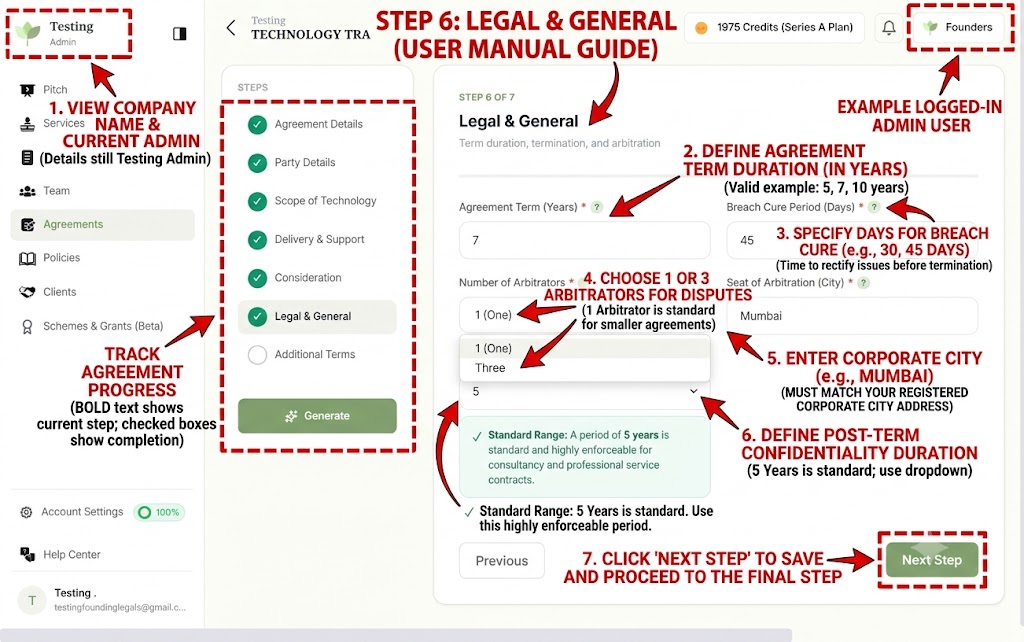
Configure term, termination, and arbitration clauses: Step 6 sets the overall legal envelope:
- Agreement Term (Years): Enter the total duration of the agreement (e.g., 7).
- Breach Cure Period (Days): Specify the time allowed to rectify defaults before termination (e.g., 45 days).
- Number of Arbitrators: Select 1 or 3 arbitrators for dispute resolution (1 is standard for cost efficiency).
- Seat of Arbitration (City): Specify the legal seat of arbitration (e.g., Mumbai).
- Post-term Confidentiality Duration: Select the survival period for confidentiality covenants from the dropdown (e.g., 5 Years is standard).
Click Next Step to save and proceed to the final step.
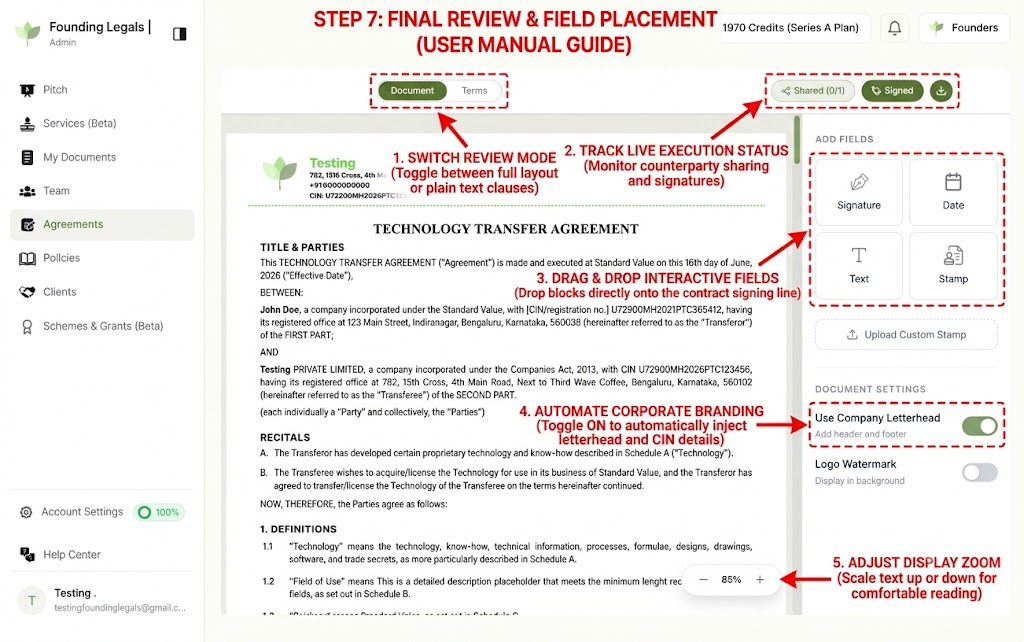
Perform final checks and execute the agreement: Step 7 shows the full assembled draft:
- Switch Review Mode: Toggle between Document and Terms views to read raw clauses.
- Drag & Drop Interactive Fields: Drag Signature, Date, Text, or Stamp blocks onto the signature lines of both parties.
- Automate Corporate Branding: Toggle the Use Company Letterhead setting ON to automatically apply your corporate design.
- Execute & Share: Click the Shared button to dispatch the document to the counterparty. Track real-time progress until execution is complete (Signed state).
Selecting the correct Grant Type in Step 3 is critical. An Outright Transfer / Assignment completely and permanently divests the Transferor of all intellectual property ownership rights (patents, copyrights, designs, know-how) and transfers them to the Transferee. In contrast, Licensing retains the core background ownership with the Transferor while merely granting a limited, revocable or irrevocable right to use the technology. Furthermore, under Indian tax law, a technology transfer triggers specific tax obligations: payments for technical know-how or royalty are subject to Tax Deducted at Source (TDS) under Section 194J (typically at 10%), and the transaction attracts GST (usually at 18%) under the classification of licensing or transfer of intellectual property rights. Ensure your accounting team accounts for these statutory withholdings.
The legal strength of a Technology Transfer Agreement lies entirely in the clarity of the descriptions. Avoid generic descriptions in Schedule A (Technology Description)like "all software code and documentation." Instead, list specific codebase URLs, patent application numbers, schematic PDF names, hardware specifications, and API documentation files. Similarly, if there is pre-existing background IP that is NOT meant to be transferred, explicitly exclude it by listing it in your terms to avoid accidental IP disputes or claims.
Quality Assurance
Reviewed by Manoj Kumar Thota
Founder / Developed Founding Legals
About the Author
Manoj Kumar Thota is the creator behind Founding Legals