How to Draft a Convertible Note Agreement
Quick Summary
A Convertible Note is a debt-equity hybrid instrument used by DPIIT-recognized startups to raise seed capital. It acts as a loan that converts into equity during a future qualified funding round. This step-by-step visual guide walks you through drafting a Convertible Note Agreement on Founding Legals.
Get Investment Ready — Agreement Type
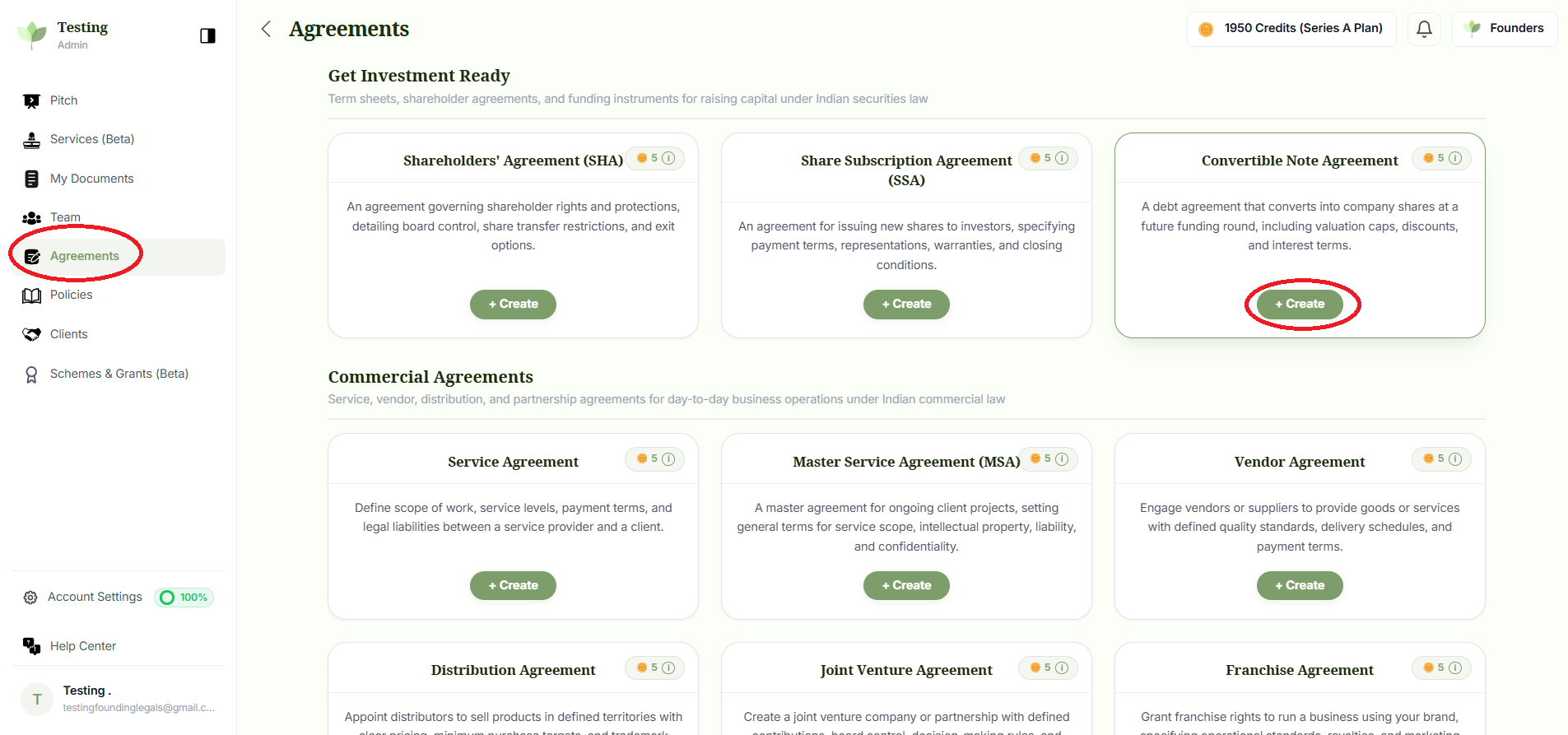
This agreement falls under the Get Investment Ready category on the Founding Legals Agreements page, alongside the Shareholders' Agreement (SHA) and the Share Subscription Agreement (SSA).
Understanding the Convertible Note (CN)
A Convertible Note is a specialized debt instrument that behaves as a loan in the short term but converts into equity shares of the company upon the occurrence of a future funding round (referred to as the "Qualified Financing Round"). Unlike standard debt, it does not require valuation at the time of investment, making it a popular seed-funding tool. In India, Convertible Notes are strictly regulated under Rule 2(1)(c)(xvii) of the Companies (Acceptance of Deposits) Rules, 2014, which imposes two absolute statutory mandates:
- DPIIT Startup Recognition: Only startups formally recognized by the Department for Promotion of Industry and Internal Trade (DPIIT) are legally permitted to issue Convertible Notes. Non-recognized startups cannot issue this instrument.
- INR 25 Lakh Minimum Investment: The minimum investment amount by a single investor in a single tranche must be INR 25,000,000 (25 Lakhs) or more.
- Maturity Limit: The note must either convert or be repaid within a maximum period of 10 years from the date of issue.
Step-by-Step Guide to Drafting a Convertible Note Agreement
Access the template: Navigate to the Agreements tab in the left-side navigation panel. Under the Get Investment Ready section, locate the Convertible Note Agreement card. Click + Create to launch the configuration wizard.
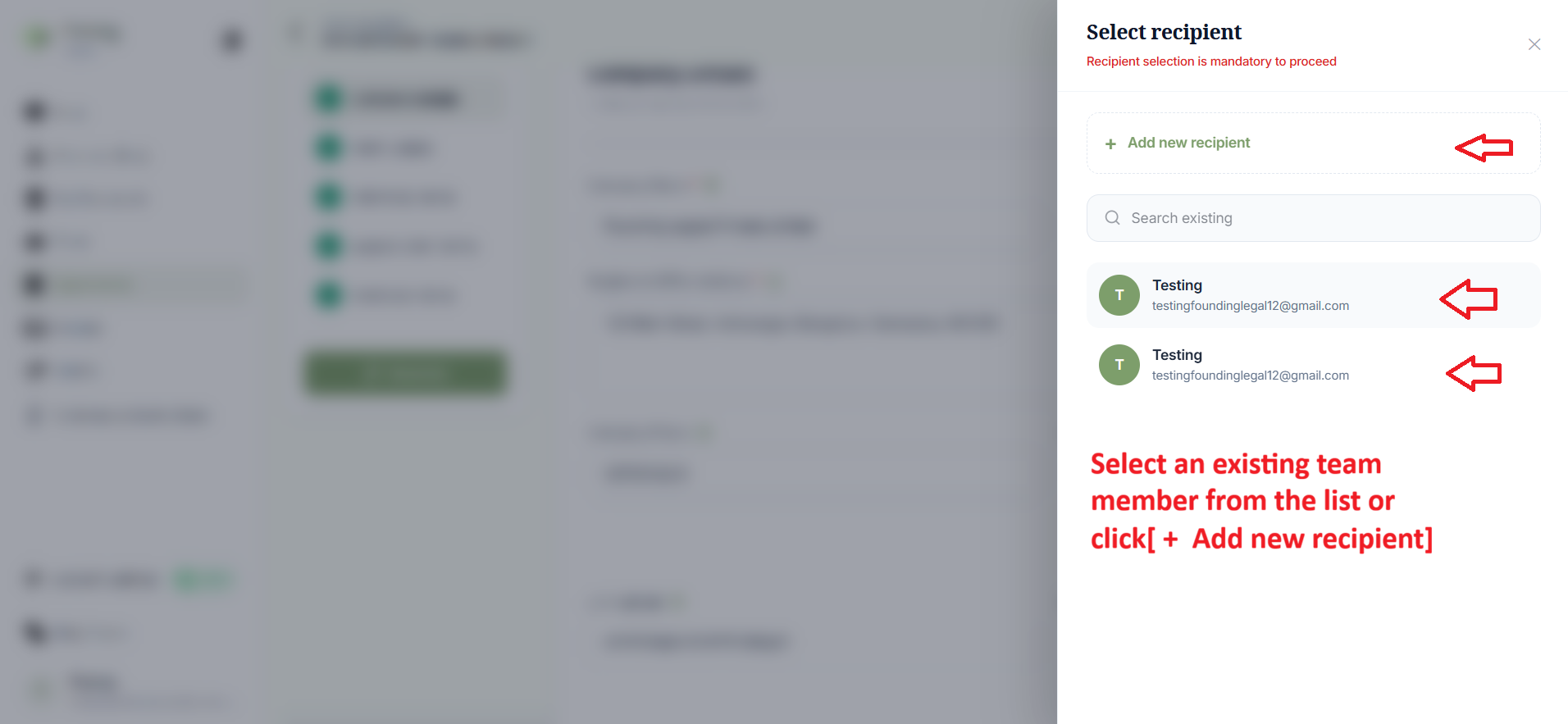
Select the noteholder: The Select Recipient panel slides out from the right. Select the investor's designated signatory or representative from your contact list, or click + Add new recipient to record new contact details.
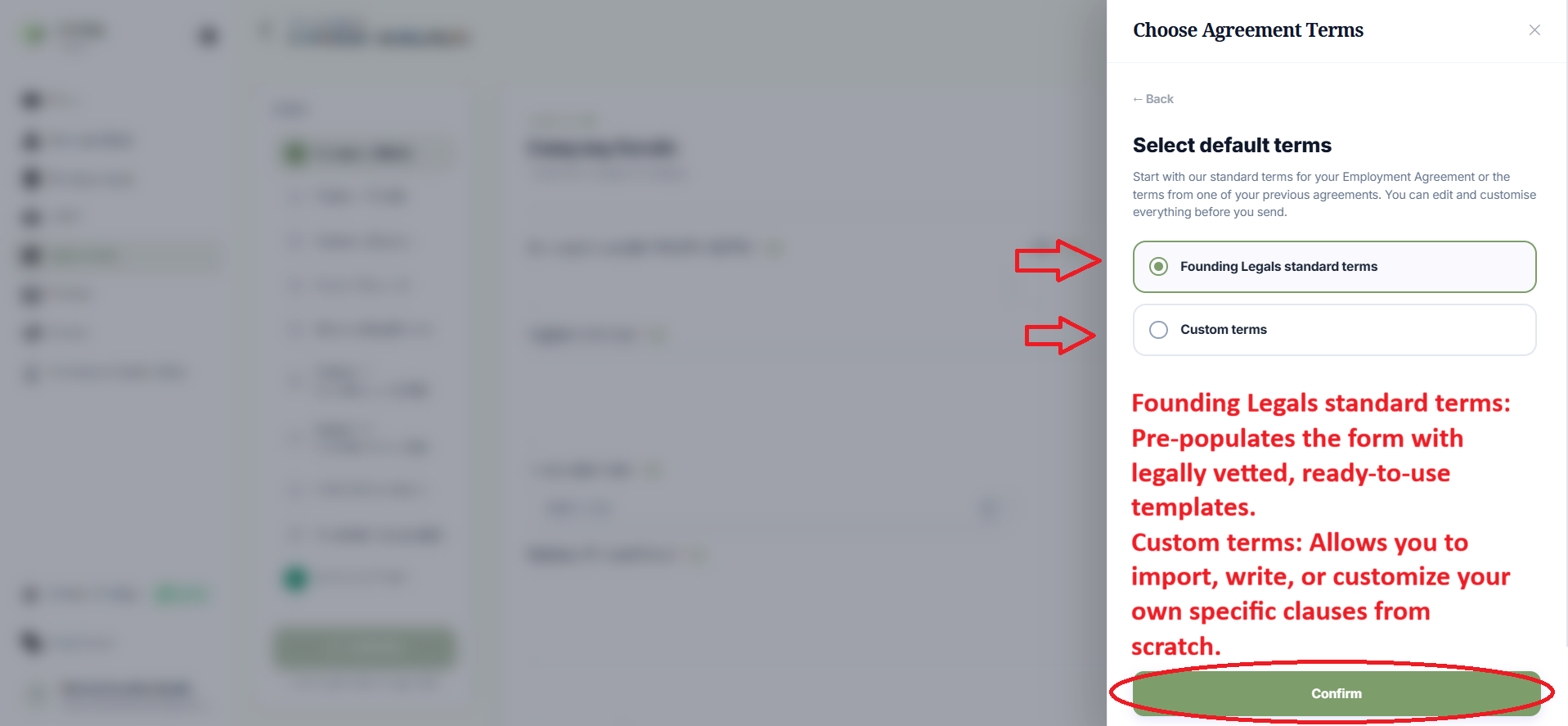
Select default or custom terms: In the Choose Agreement Terms window, choose:
- Founding Legals standard terms: Pre-populates a legally vetted template compliant with the Companies (Acceptance of Deposits) Rules, 2014, including standard conversion formulas.
- Custom terms: Choose this to import your own custom debt-equity structures.
Click Confirm to lock in your choice.
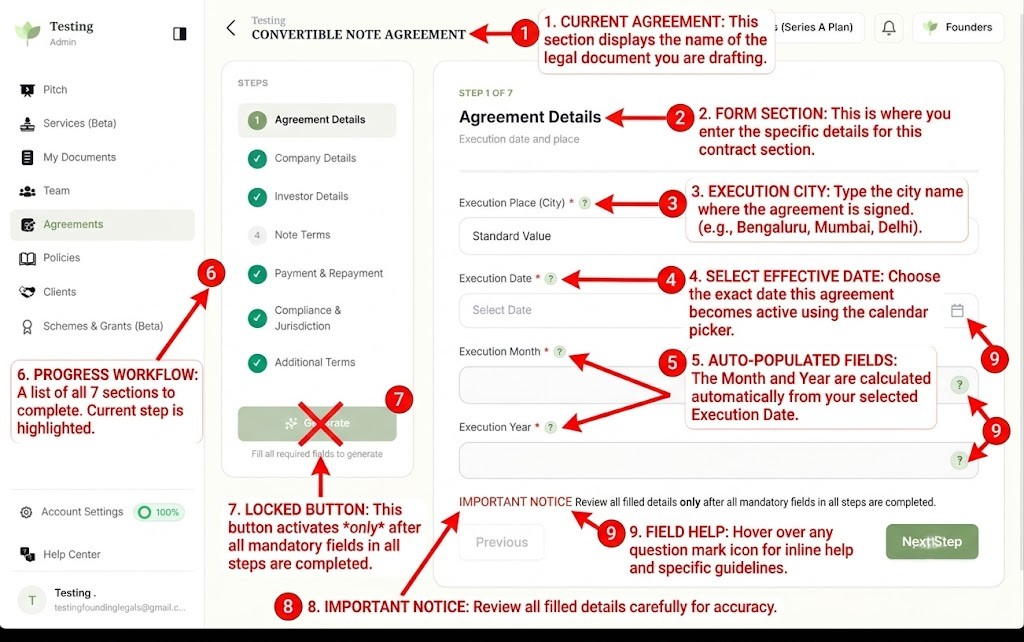
Set the signing place and date: Under Step 1, enter:
- Execution Place (City): Enter the city name where the agreement is formally signed (e.g., Bengaluru, Mumbai, or Delhi).
- Execution Date: Choose the effective date using the calendar picker. The system will auto-populate the corresponding month and year.
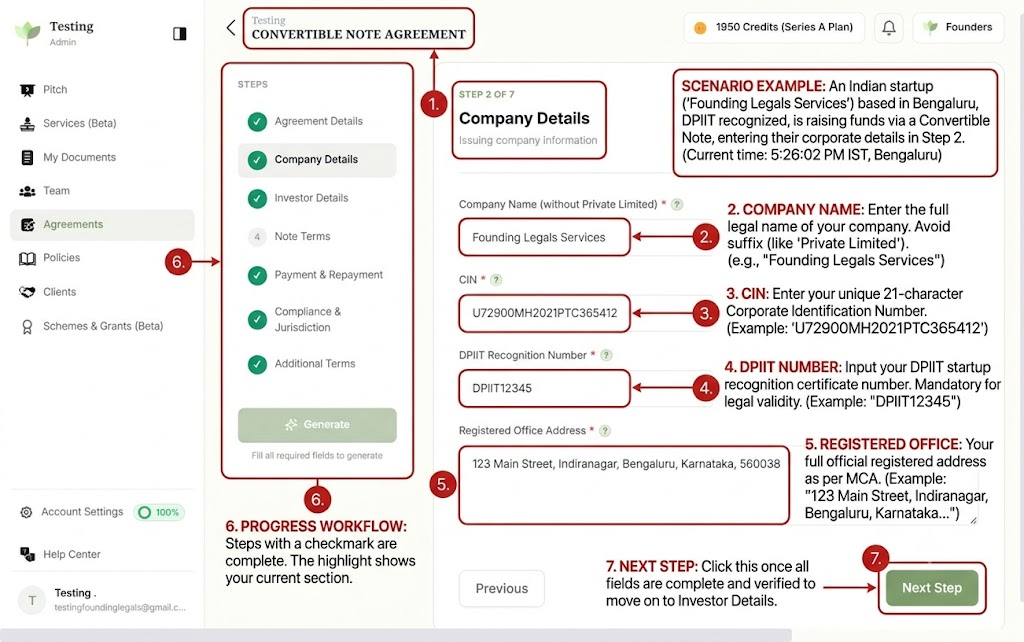
Enter issuing company details: In Step 2, provide the corporate metadata:
- Company Name: Input the official name of your company. Avoid suffix words like "Private Limited" if the field asks for name without suffix (e.g., Founding Legals Services).
- CIN: Enter your unique 21-digit Corporate Identification Number.
- DPIIT Recognition Number: Input your startup recognition certificate number (e.g., DPIIT12345). This field is mandatory as only recognized startups can issue Convertible Notes.
- Registered Office Address: Enter your full official address registered with the MCA.
Enter the investor information: Step 3 captures the subscriber's legal data:
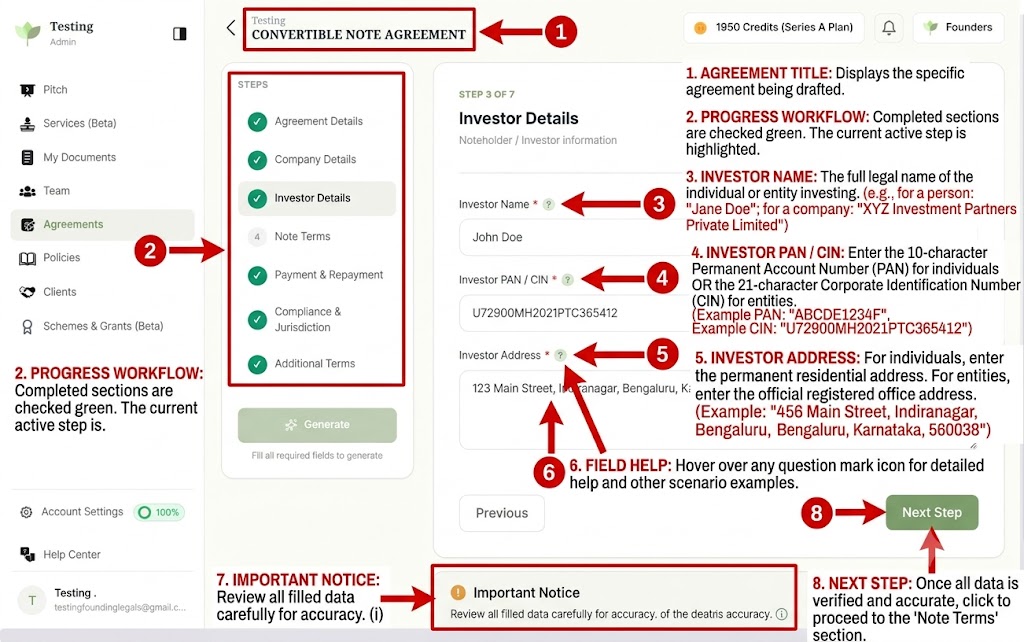
- Investor Name: Enter the full legal name of the investing individual or corporate fund entity (e.g., John Doe).
- Investor PAN / CIN: Enter the 10-character Permanent Account Number for individuals or the 21-character CIN for corporate entities.
- Investor Address: Complete official registered or residential address.
Configure the debt terms and pricing: Step 4 dictates the key economics:
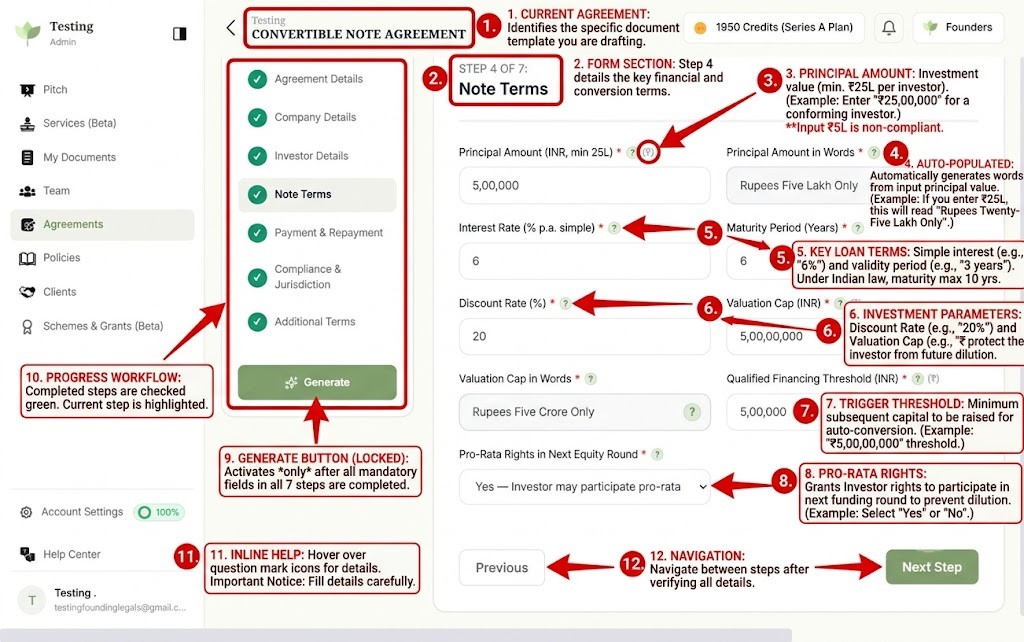
- Principal Amount (INR, min 25L): Enter the total investment amount. The system will auto-convert this value into words. Note: Entering an amount below 25 Lakhs (e.g., 5,00,000) is legally non-compliant under Rule 2(1)(c)(xvii).
- Interest Rate (% p.a. simple): The simple annual interest accrued on the note (e.g., 6%).
- Maturity Period (Years): The duration before the note must convert or be repaid (maximum is 10 years).
- Discount Rate (%): The conversion discount offered to the investor during the next round (e.g., 20%).
- Valuation Cap (INR): The maximum valuation at which the note converts into shares, protecting the investor against excessive dilution (e.g., 5,00,000,000).
- Qualified Financing Threshold (INR): The minimum capital amount (e.g., 5,00,000,000) the company must raise in a subsequent equity round to trigger automatic conversion.
- Pro-Rata Rights in Next Equity Round: Select if the noteholder will have rights to participate in future rounds to maintain their shareholding.
Set the payment timelines and default penalty: In Step 5, configure:
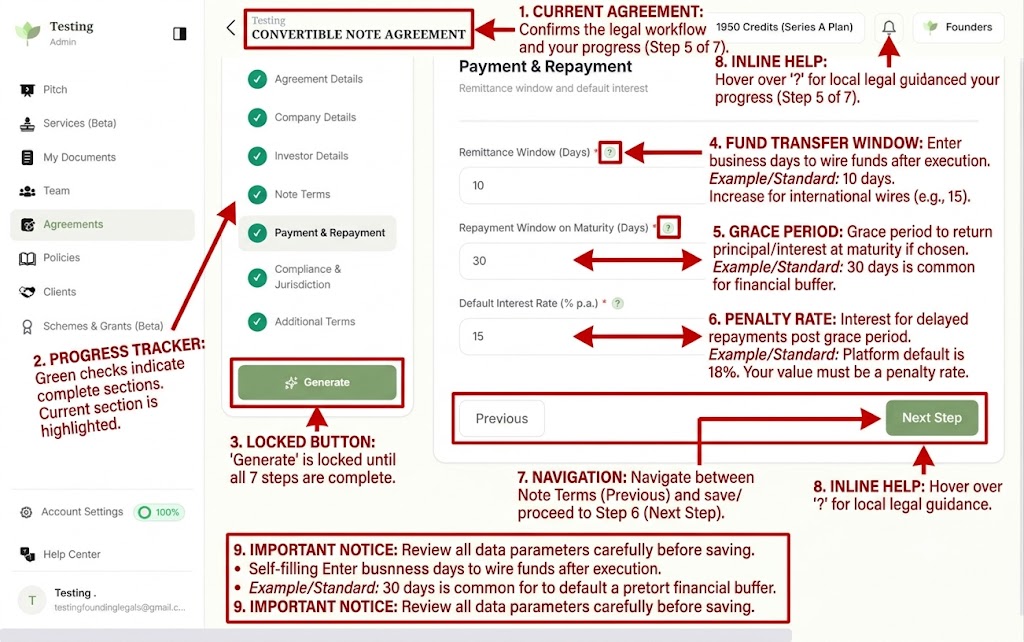
- Remittance Window (Days): The number of business days the investor has to wire the funds to the company after signing (standard is 10 days).
- Repayment Window on Maturity (Days): The grace period given to the company to repay the principal and interest if the note matures without conversion (standard is 30 days).
- Default Interest Rate (% p.a.): The penalty interest rate charged on delayed payments post grace period (standard is 15% to 18% p.a.).
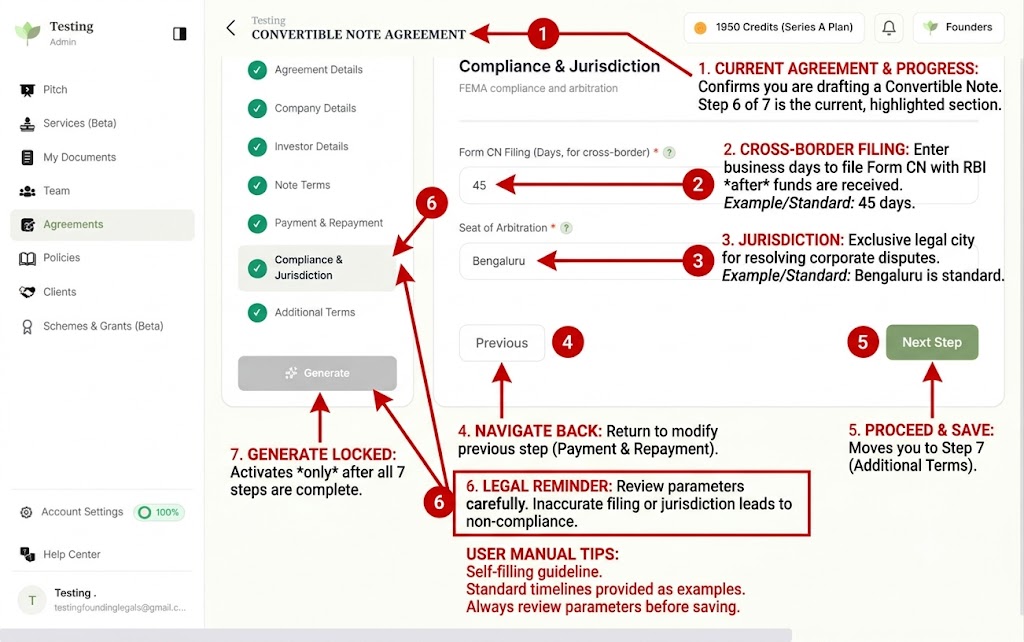
Configure FEMA filing timelines and arbitration: In Step 6, set:
- Form CN Filing (Days, for cross-border): If raising capital from a non-resident investor (FDI), enter the number of days to file Form CN with the RBI (via an AD bank) after receiving funds (standard is 45 days).
- Seat of Arbitration: The exclusive legal city where arbitration disputes are resolved (standard: Bengaluru).
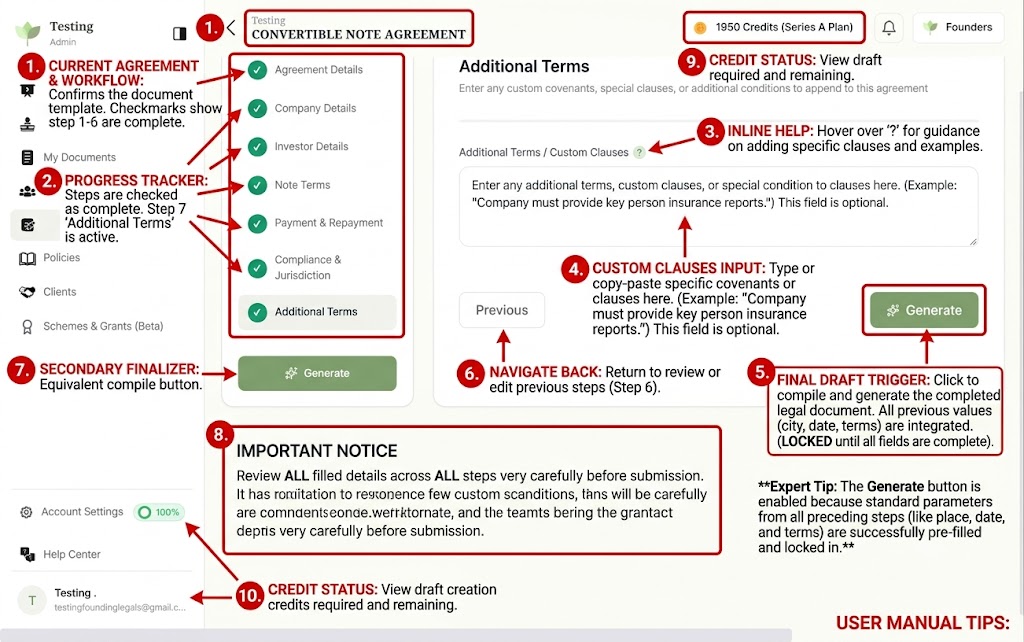
Add custom covenants and draft the agreement: In Step 7, configure:
- Additional Terms / Custom Clauses (Optional): Enter specific conditions or milestone targets (e.g., Company must provide key person insurance reports).
- Generate: Once all steps show a green checkmark, click Generate to compile your data.
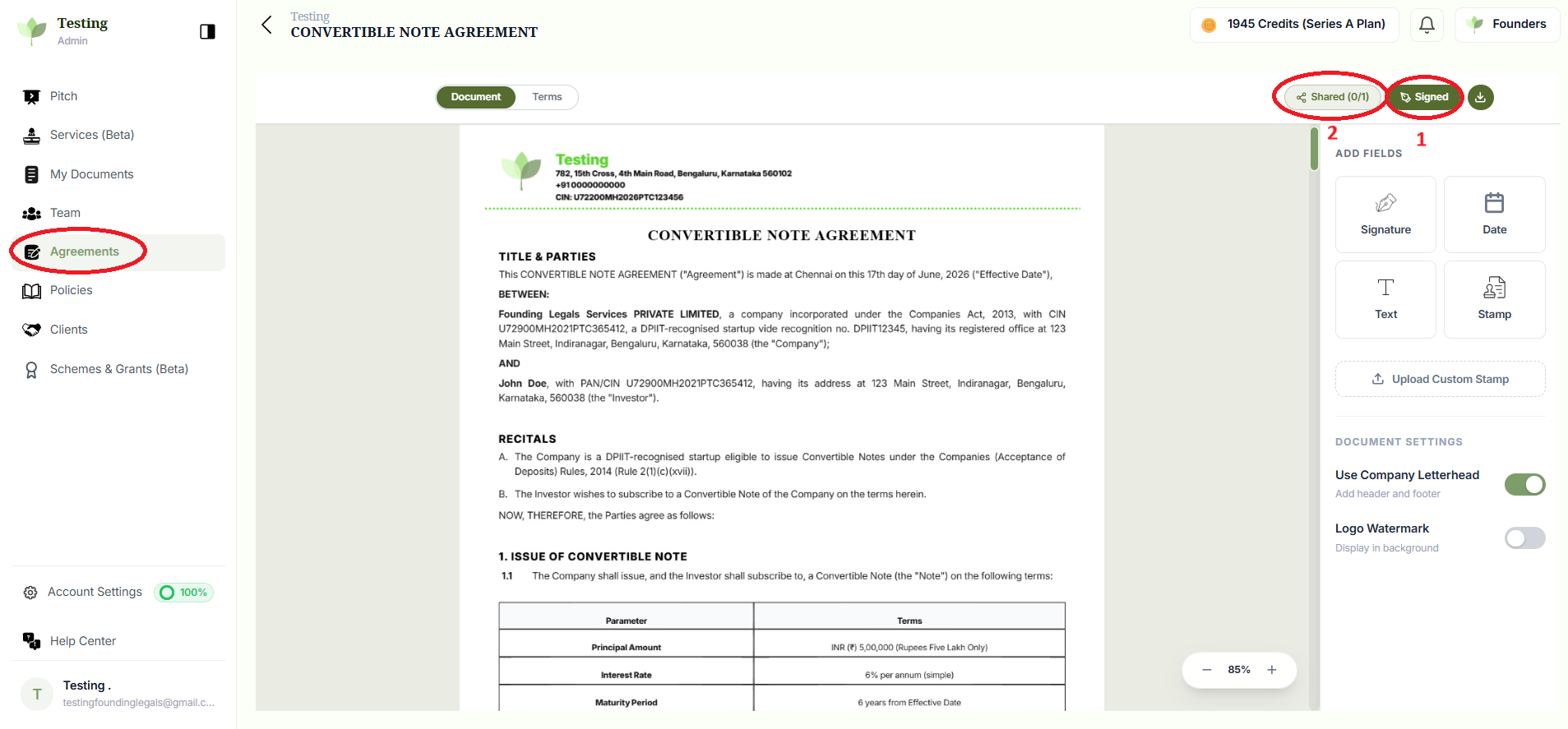
Verify clauses and position execution fields: In the document preview:
- Review Recitals: Verify that the document correctly cites Rule 2(1)(c)(xvii) of the Companies (Acceptance of Deposits) Rules, 2014, and lists the principal, interest, and maturity period in the summary table.
- Drag-and-Drop Fields: Position the Signature, Date, and Stamp elements onto the parties' sign blocks.
- Execute: Toggle company letterhead or watermark, and click Signed or Shared.
Under Rule 2(1)(c)(xvii) of the Companies (Acceptance of Deposits) Rules, 2014, a company is prohibited from raising capital via Convertible Notes unless it is a registered startup recognized by the DPIIT. Any debt issued under a convertible note by a non-recognized company is considered an illegal deposit under Section 73 of the Companies Act, 2013, attracting severe financial penalties. Furthermore, the investment must be a minimum of INR 25,000,000 (25 Lakhs) in a single tranche from a single investor. Drafting a note for an amount below this threshold (such as 5 Lakhs) is legally invalid and violates deposit rules.
If the Convertible Note is issued to a non-resident investor (FDI), compliance with foreign exchange guidelines is mandatory. Under FEMA rules, the company must file Form CN (Convertible Note) along with a CA-certified valuation report on the RBI FIRMS portal within 45 days of receipt of the subscription money. Failure to file Form CN within the statutory 45-day window constitutes a FEMA violation and will attract RBI compounding fees.
Noteholders assume higher risk by investing early in the startup's lifecycle. To compensate for this risk, they receive a Discount Rate (typically 15% to 25%) on conversion. Additionally, the Valuation Cap acts as an insurance policy for the investor: if the startup achieves a massive valuation in the next round, the investor converts their debt at the capped valuation, resulting in a higher shareholding than if they converted at the new round's price.
Quality Assurance
Reviewed by Manoj Kumar Thota
Founder / Developed Founding Legals
About the Author
Manoj Kumar Thota is the creator behind Founding Legals