How to Draft a Distribution Agreement
Quick Summary
A Distribution Agreement appoints a distributor to market, sell, and distribute products within a specified geographic territory. It establishes credit parameters, minimum purchase targets, and warranty covenants. This step-by-step visual guide walks you through drafting a Distribution Agreement on Founding Legals.
Commercial Agreements - Agreement Type
This agreement falls under the Commercial Agreements category on the Founding Legals Agreements page, which governs day-to-day business operations under Indian commercial law.
Understanding the Distribution Agreement
A Distribution Agreement is a commercial contract under which a manufacturer or supplier ("Principal") appoints a distributor to sell and market their products within a defined territory. To structure a legally sound and commercially viable distribution network under Indian law, four key elements must be addressed:
- Competition Law & Exclusivity (Section 3(4), Competition Act, 2002): Exclusive distribution arrangements are vertical agreements scrutinised under the Competition Act. They are prohibited if they cause an Appreciable Adverse Effect on Competition (AAEC) in India. Drafters must choose:
- Exclusive: The distributor is the sole seller in the territory, and the Principal cannot sell directly there.
- Sole: The Principal cannot appoint other distributors but reserves the right to sell directly.
- Non-exclusive: The Principal can appoint multiple distributors and sell directly.
- Minimum Purchase Targets (MPT): Establishing annual or quarterly purchase targets protects the Principal from territory hoarding. Failing to meet the MPT Failure Threshold (e.g., 85% of target) should grant the Principal the right to either terminate the agreement or strip the distributor of exclusivity.
- Risk Transfer & Incoterms (ICC 2020): Specifying the correct Incoterm (e.g., Ex Works (EXW), FOB, or CIF) is crucial to clarify when title and risk of loss pass from the Principal to the distributor, aligning with the Sale of Goods Act, 1930.
- Post-Termination Winding Up: Clear exit rules prevent disputes over remaining stock. Agreements must specify an Inventory Sell-Off Period (e.g., 90 days) or grant the Principal the option to repurchase stock at an Inventory Buy-Back Discount (e.g., 15%).
Step-by-Step Guide to Drafting a Distribution Agreement
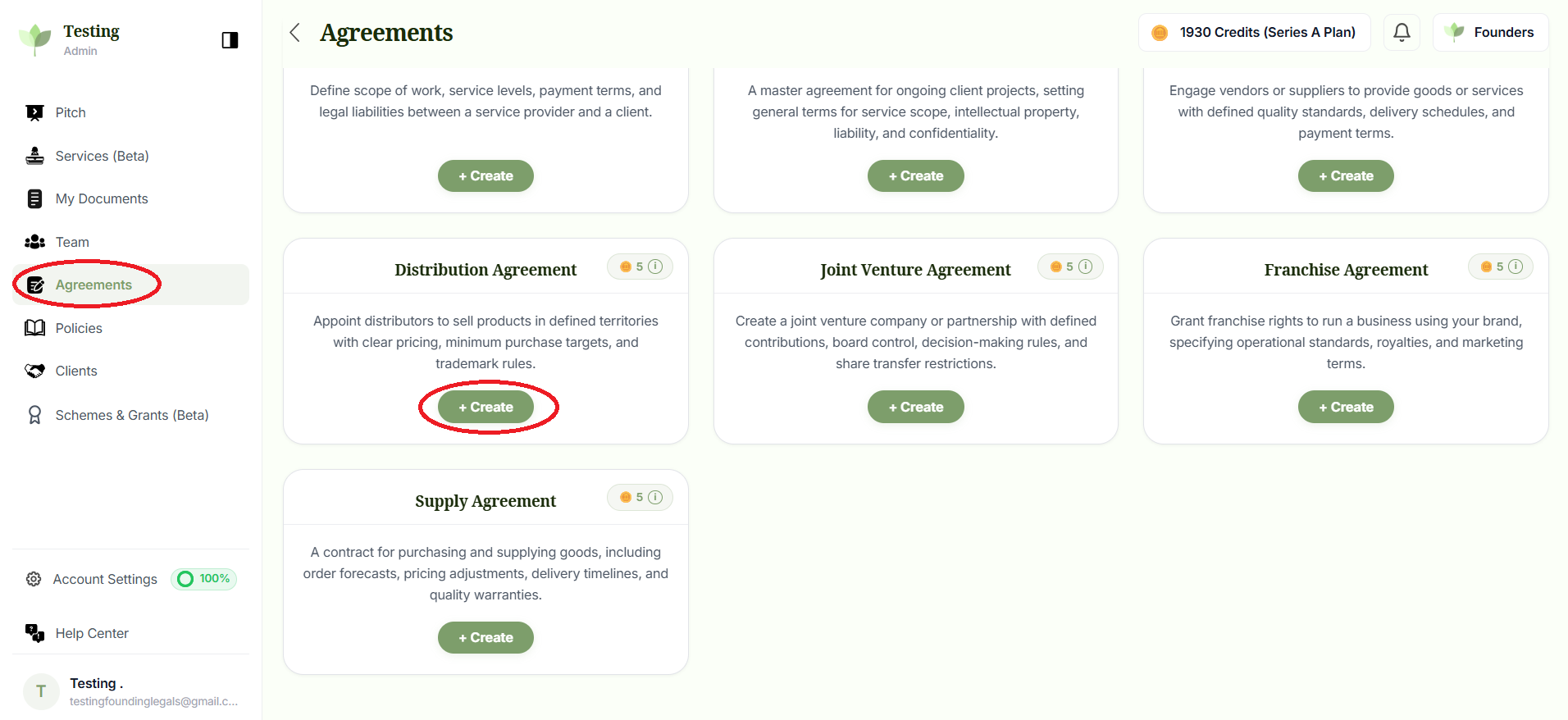
Access the template: Go to the Agreements tab in the left sidebar. Scroll to the Commercial Agreements section, locate the Distribution Agreement card, and click + Create.
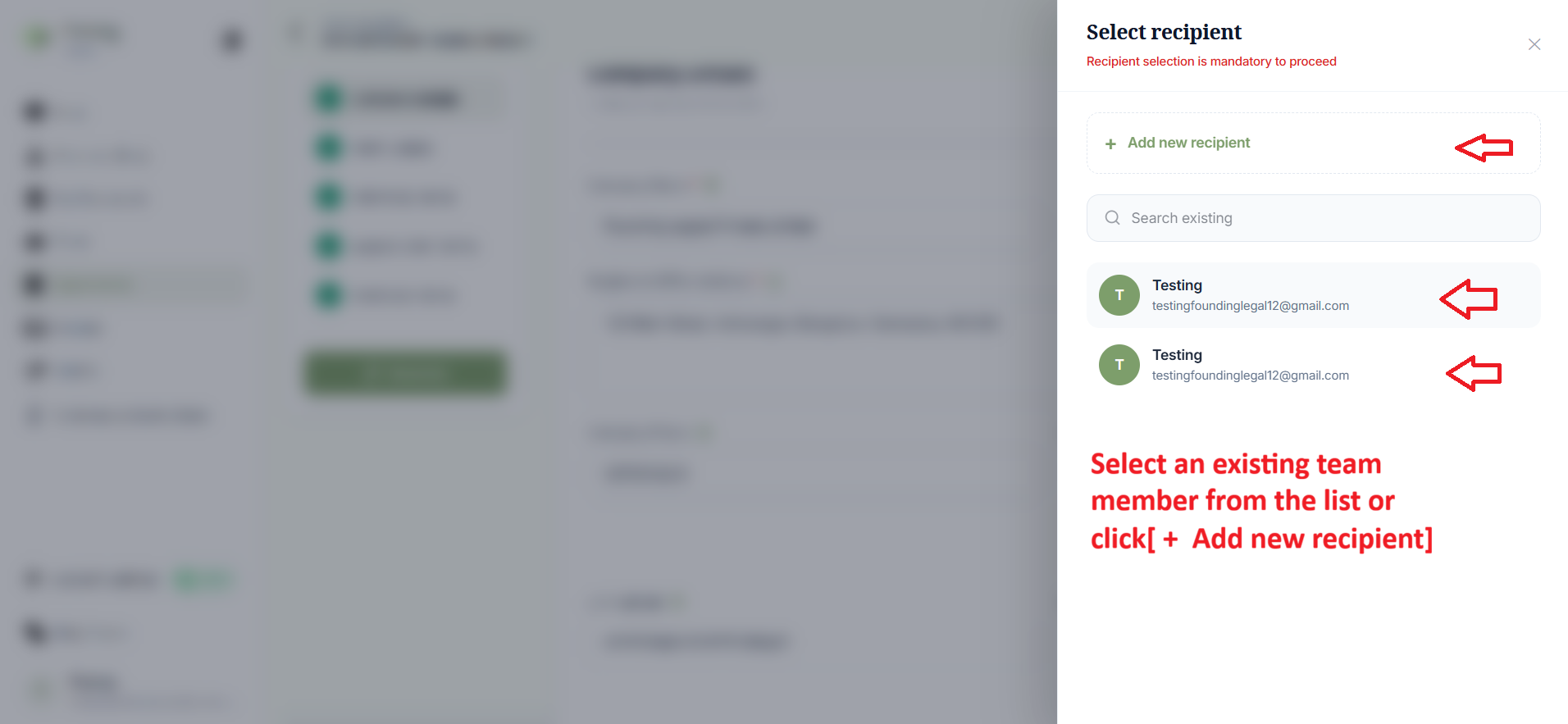
Select the counterparty: In the Select Recipient panel on the right side of the screen, select the distributor's representative from the contacts list, or click + Add new recipient.
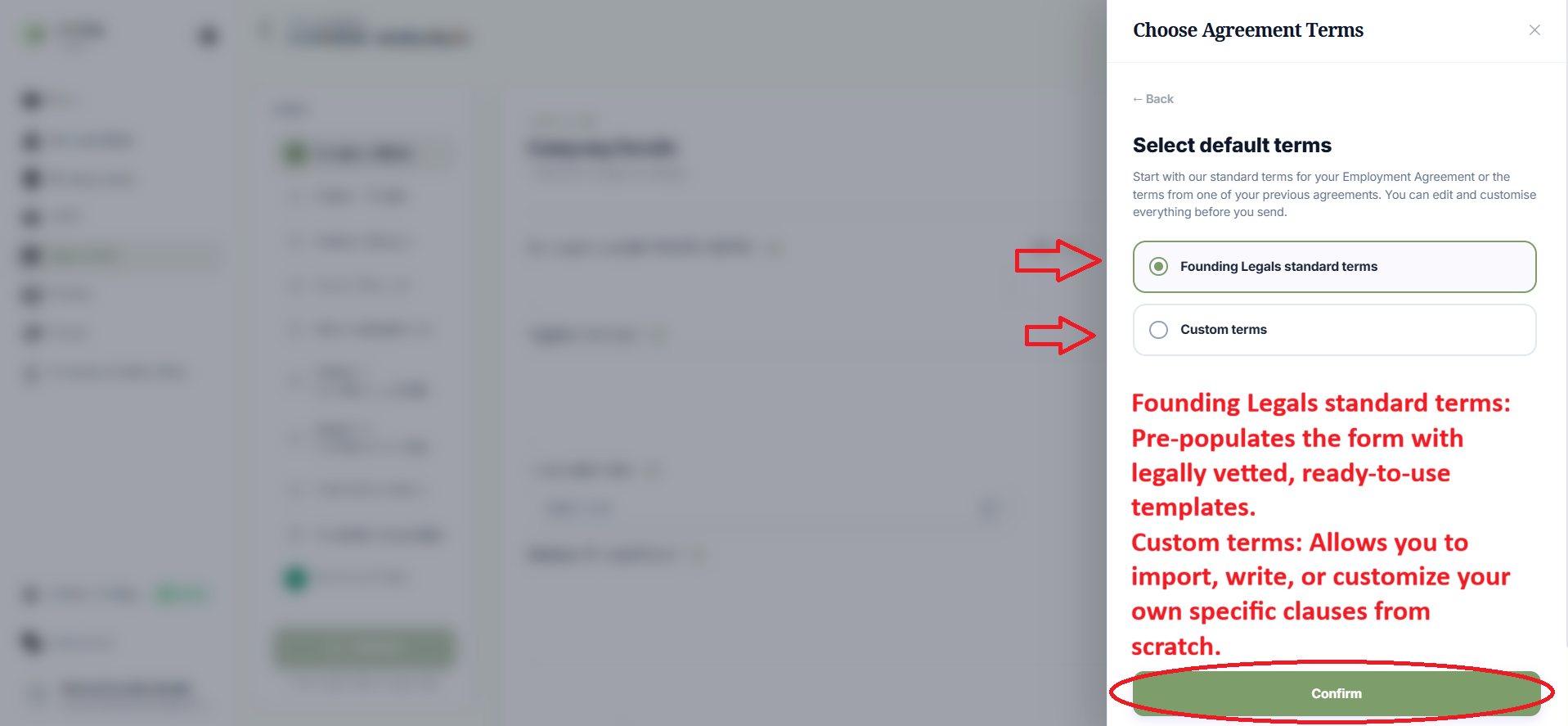
Choose terms baseline: In the Choose Agreement Terms menu, select:
- Founding Legals standard terms: Pre-populates the editor with standard supply and territory rules, MPT clauses, and marketing obligations.
- Custom terms: Choose this option if you want to import your own custom legal template.
Click Confirm to open the editor.
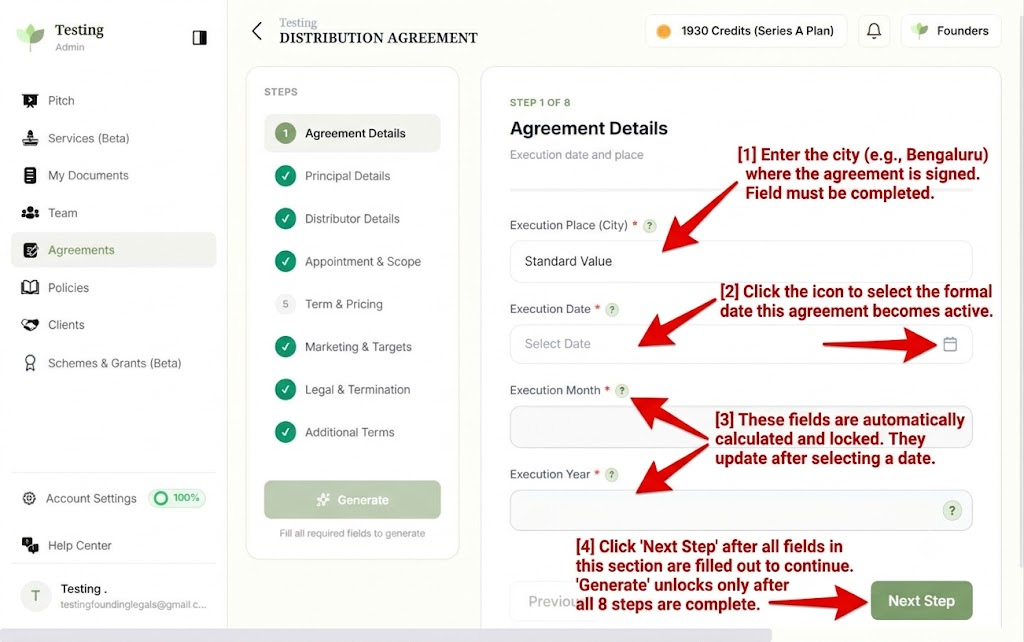
Enter signing place and date: In Step 1, enter:
- Execution Place (City): Enter the city where this agreement is legally signed (e.g., Bengaluru). This sets the local jurisdiction for stamp duty rules.
- Execution Date: Select the calendar date this agreement becomes active. Month and Year will auto-fill.
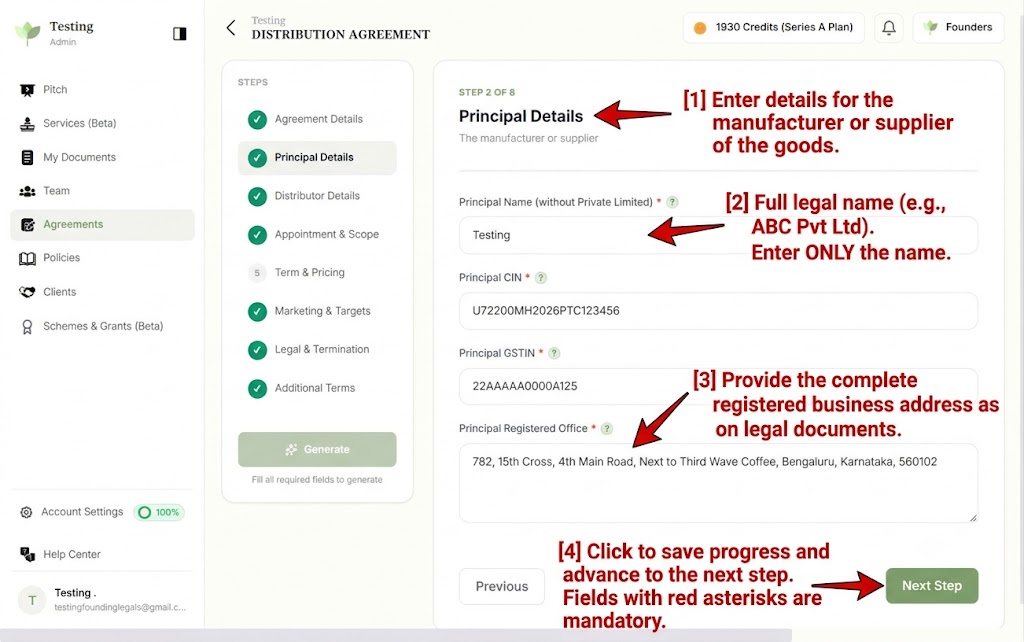
Enter manufacturer registration details: In Step 2, enter the principal company's details. Ensure all names and registration details match official corporate filings:
- Principal Name: Enter the official corporate name exactly as registered (e.g., ABC Company). Do not append Private Limited or LLP suffix as the editor adds it automatically.
- Principal CIN: Input the unique 21-digit Corporate Identification Number (CIN) for companies.
- Principal GSTIN: Enter the 15-digit Goods and Services Tax Identification Number for tax compliance.
- Principal Registered Office: Enter the complete registered office address including the Pincode.
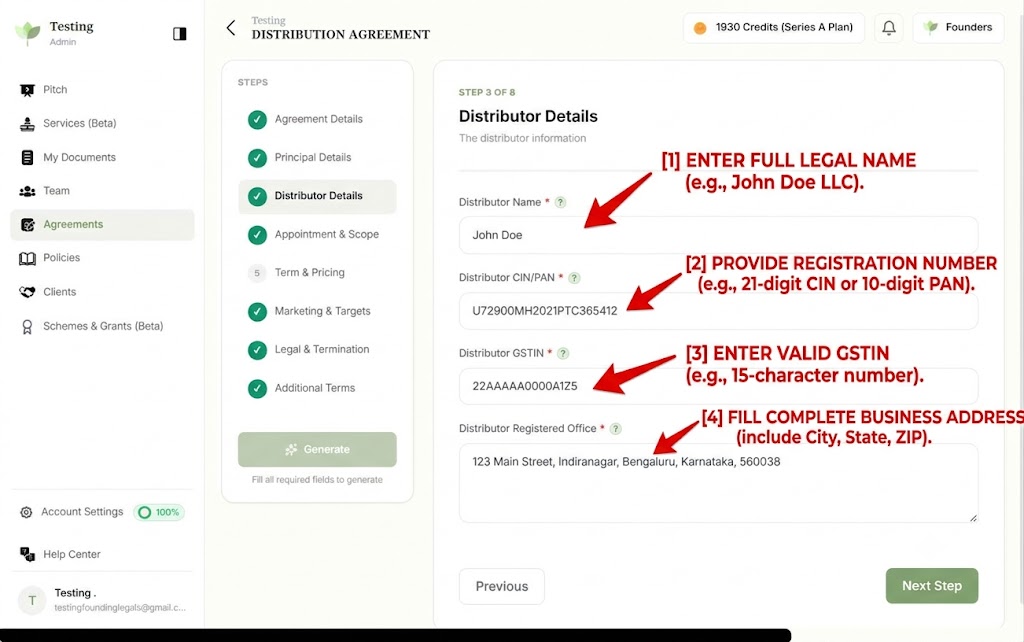
Enter distributor registration details: In Step 3, enter the distributor's registration details:
- Distributor Name: Enter the distributor's full, official name (e.g., John Doe LLC).
- Distributor CIN / PAN: Input the distributor's unique 21-digit CIN for corporations, or 10-character PAN number for partnerships/sole proprietorships.
- Distributor GSTIN: Enter the distributor's 15-digit GST registration number to prevent credit mismatches.
- Distributor Registered Office: Enter the official registered address of the distributor company including the building, street, city, state, and ZIP code.
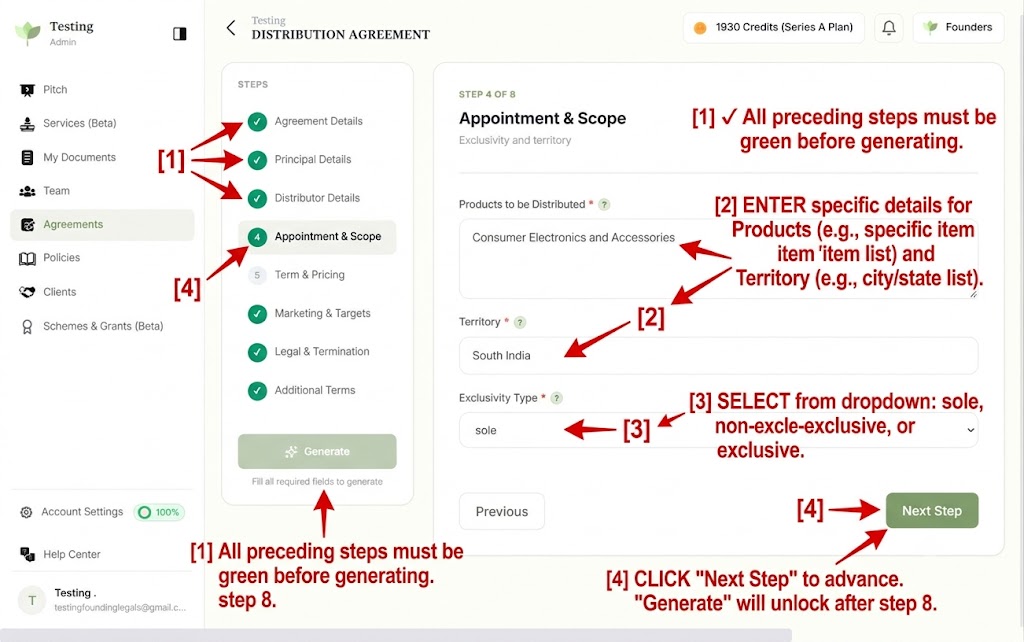
Configure product line and exclusivity: In Step 4, specify:
- Products to be Distributed: Enter specific details for products (e.g., Consumer Electronics and Accessories). Avoid vague listings.
- Territory: Define the geographic boundary (e.g., South India).
- Exclusivity Type: Select from the dropdown: sole, exclusive, or non-exclusive based on your commercial strategy.
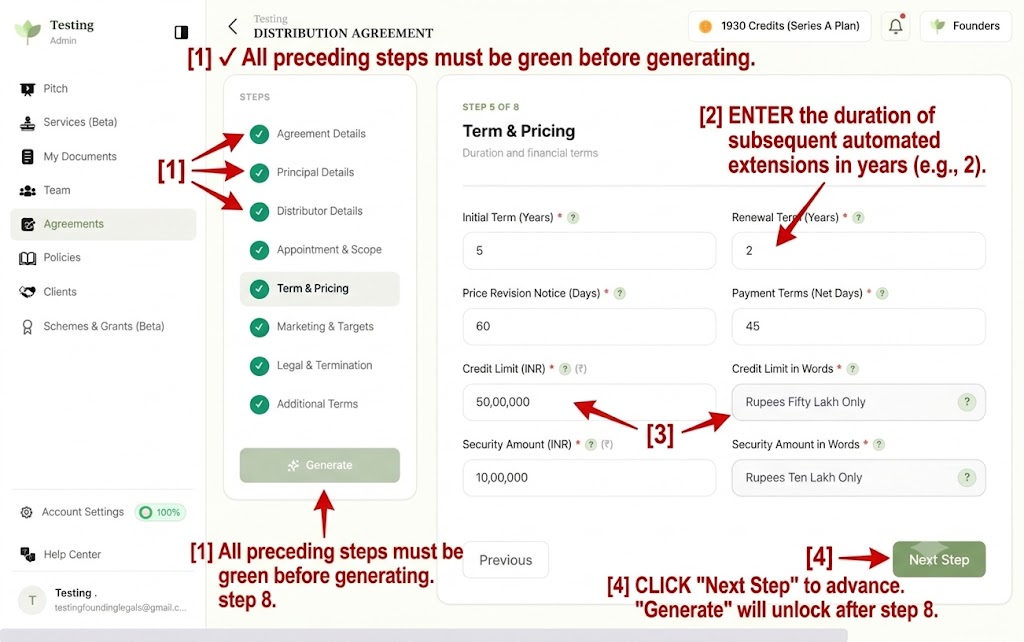
Establish term limits and credit parameters: In Step 5, enter:
- Initial Term (Years): Duration of first term (e.g., 5 years).
- Renewal Term (Years): Duration of subsequent automated extensions in years (e.g., 2 years).
- Price Revision Notice (Days): Written notice required before price changes apply to new orders (e.g., 60 days).
- Payment Terms (Net Days): Default credit days allowed for distributor payments (e.g., 45 days).
- Credit Limit (INR) & Credit Limit in Words: Max credit exposure allowed (e.g., 50,000,000 and Rupees Fifty Lakh Only).
- Security Amount (INR) & Security Amount in Words: Security deposit details (e.g., 10,000,000 and Rupees Ten Lakh Only).
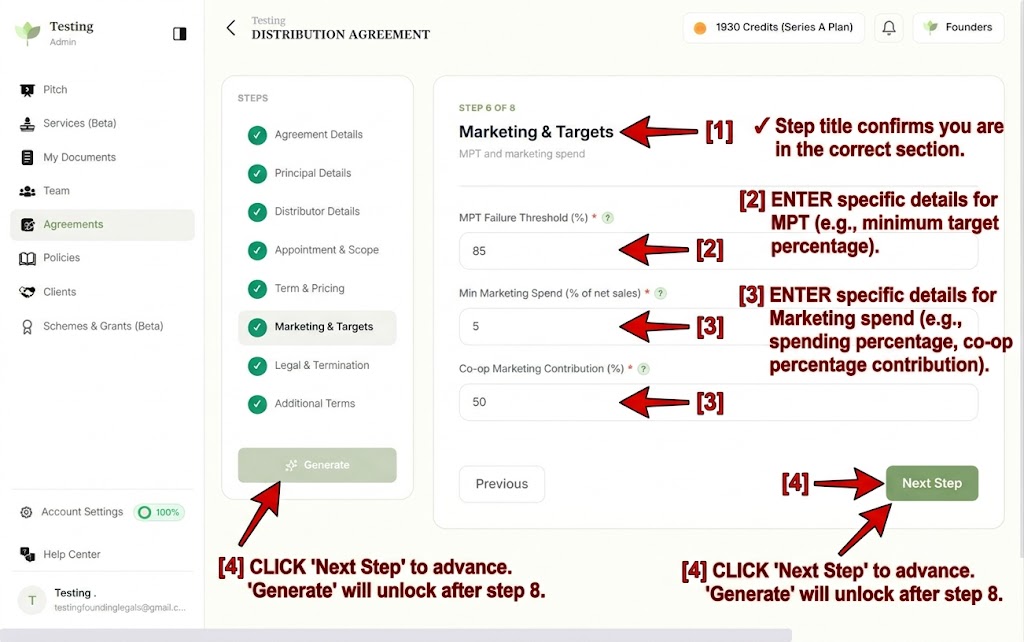
Configure targets and co-op spend: In Step 6, enter:
- MPT Failure Threshold (%): The minimum target percentage (e.g., 85%) the distributor must achieve. If the distributor falls below this, it constitutes a material breach.
- Min Marketing Spend (% of net sales): The percentage of net sales the distributor must spend on local marketing (e.g., 5%).
- Co-op Marketing Contribution (%): The percentage the Principal will contribute to shared marketing campaigns (e.g., 50%).
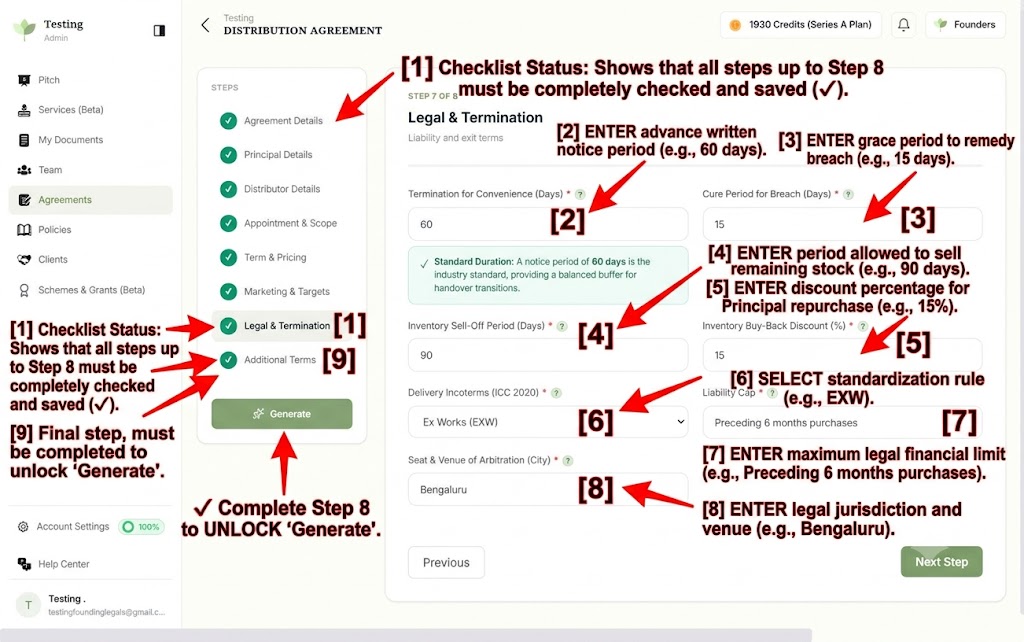
Configure exit terms and delivery logistics: In Step 7, enter:
- Termination for Convenience (Days): Written notice required to cancel the agreement early without cause (e.g., 60 days).
- Cure Period for Breach (Days): Grace period allowed to remedy breaches (e.g., 15 days).
- Inventory Sell-Off Period (Days): The period allowed to sell remaining stock post-termination (e.g., 90 days).
- Inventory Buy-Back Discount (%): Discount percentage if the Principal decides to repurchase remaining stock (e.g., 15%).
- Delivery Incoterms (ICC 2020): Select the delivery rules from the dropdown (e.g., Ex Works (EXW)).
- Liability Cap: Maximum legal financial limit for claims (e.g., Preceding 6 months purchases).
- Seat & Venue of Arbitration (City): Legal venue for dispute resolution (e.g., Bengaluru).
Add custom clauses and compile: In Step 8, enter any custom parameters (such as special marketing guidelines or product return procedures). Once all steps are complete, click Generate to build the draft.
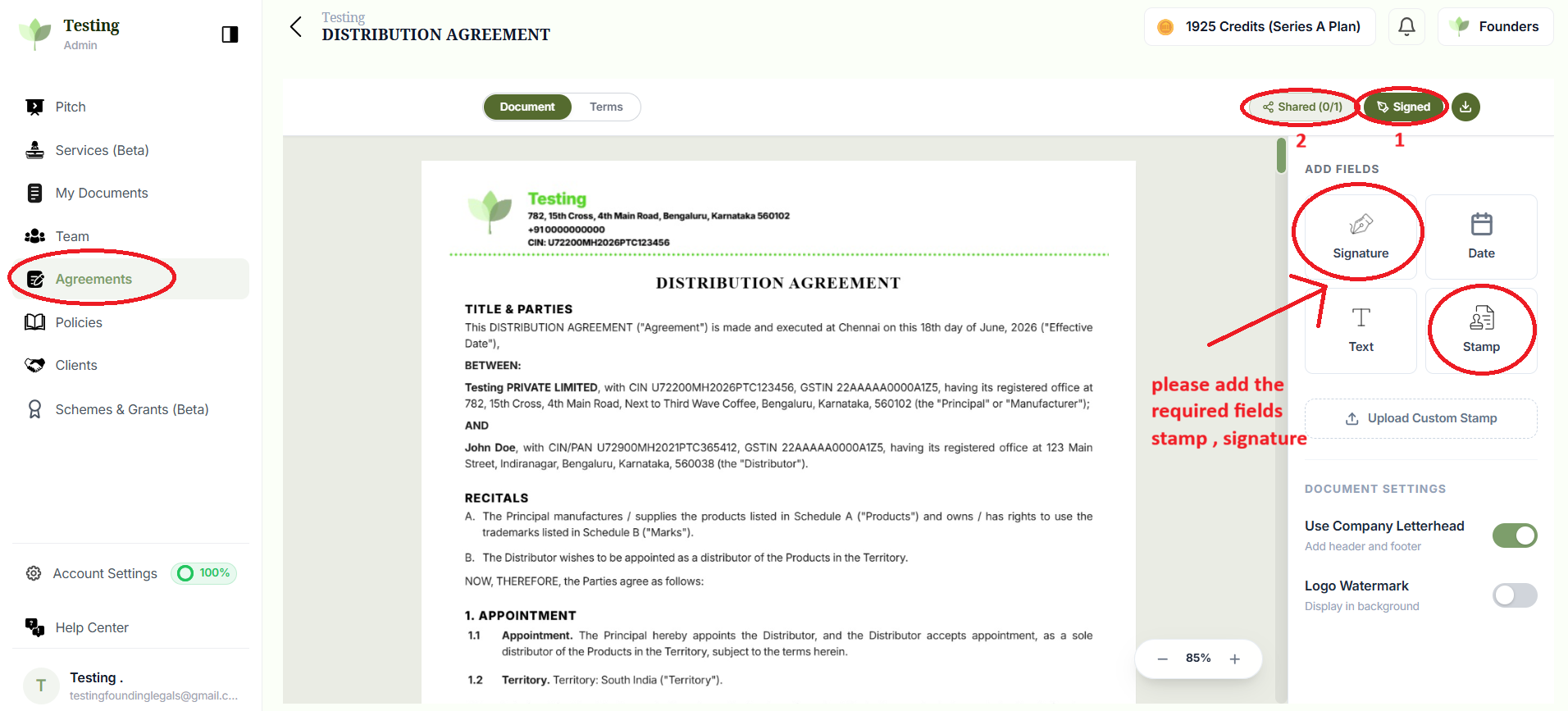
Position execution cues and sign: On the document preview screen:
- E-Sign Layout: Drag and drop the Signature and Stamp fields onto the sign block areas.
- Execution: Toggle company letterhead or watermark, and click Signed or Shared.
Exclusive distribution agreements can attract antitrust scrutiny under the Competition Act, 2002 if they cause an Appreciable Adverse Effect on Competition (AAEC) in India. If the Principal holds high market share, consider opting for a non-exclusive or sole distribution arrangement instead of absolute exclusivity to minimize legal risk.
Failing to meet the Minimum Purchase Target (MPT) Failure Threshold (e.g., 85% of target) should grant the Principal the right to either terminate the agreement or strip the distributor of exclusivity. Ensure target adjustments for subsequent years are agreed in writing to prevent unilateral modification disputes.
Selecting Ex Works (EXW) places the risk and freight cost entirely on the distributor as soon as the products leave the Principal's factory. Ensure this Incoterm matches your company's transit insurance policy, particularly regarding who bears responsibility for damage during transit.
Quality Assurance
Reviewed by Manoj Kumar Thota
Founder / Developed Founding Legals
About the Author
Manoj Kumar Thota is the creator behind Founding Legals