How to Draft and Issue an Internship Agreement
Quick Summary
An Internship Agreement is a formal document that defines the scope, duration, confidentiality, and stipend terms for an intern. Learn how to navigate the 5-step Founding Legals wizard to produce a legally sound internship offer letter in minutes.
Drafting Your Internship Agreement
Onboarding interns without a formal agreement is a compliance risk many startups overlook. An internship agreement protects your company's intellectual property, sets clear performance expectations, defines reporting structures, and prevents future disputes over stipends or non-solicitation obligations. The Founding Legals platform walks you through a structured 5-step wizard to generate a complete, professional internship offer letter that is compliant with Indian employment practices.
Step-by-Step Guide to Creating an Internship Agreement
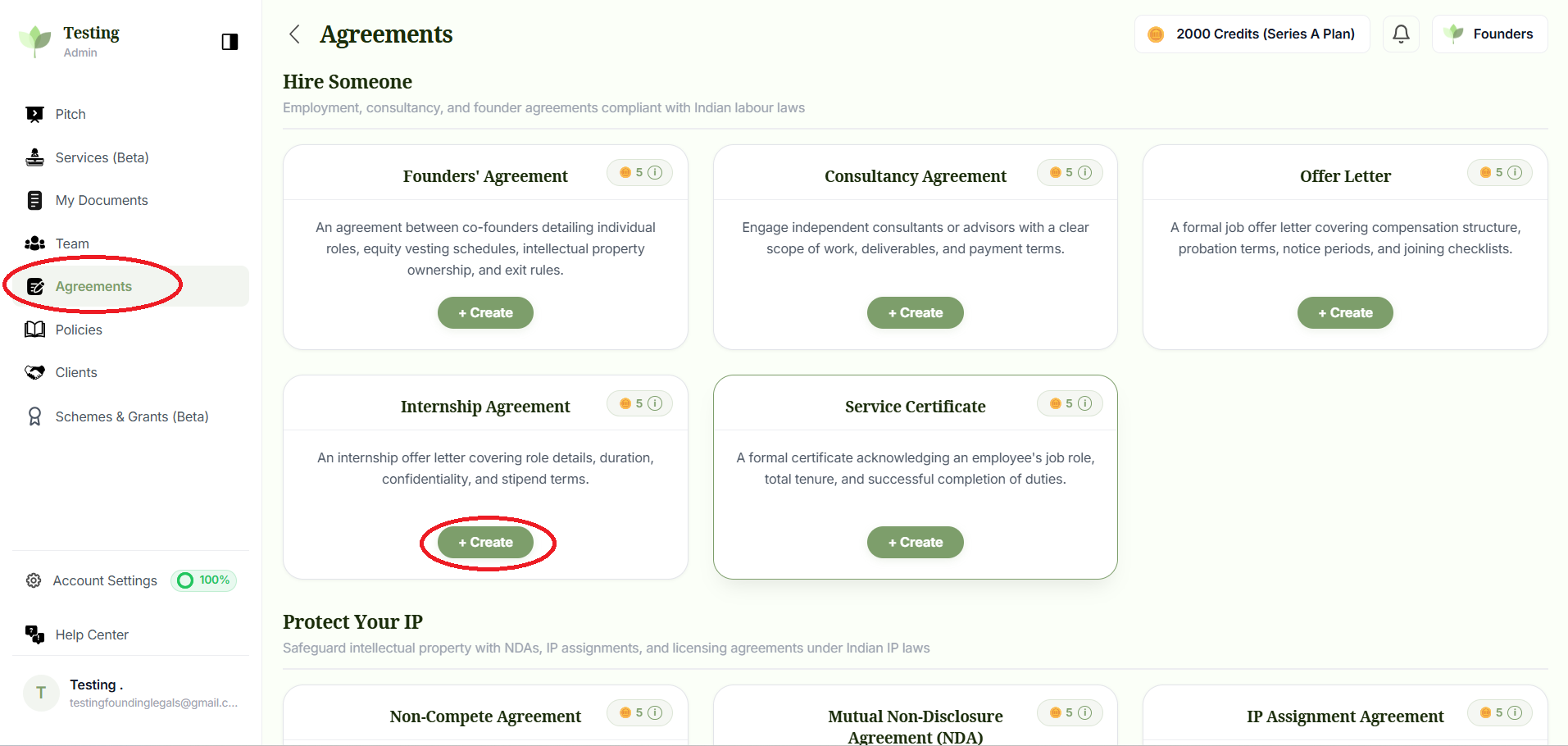
Access the module: From your Founding Legals dashboard, click Agreements in the left-hand navigation panel. On the Agreements landing page, locate the Hire Someone section. You will see the Internship Agreement card — described as an internship offer letter covering role details, duration, confidentiality, and stipend terms. Click the green + Create button on the Internship Agreement card to begin the workflow.
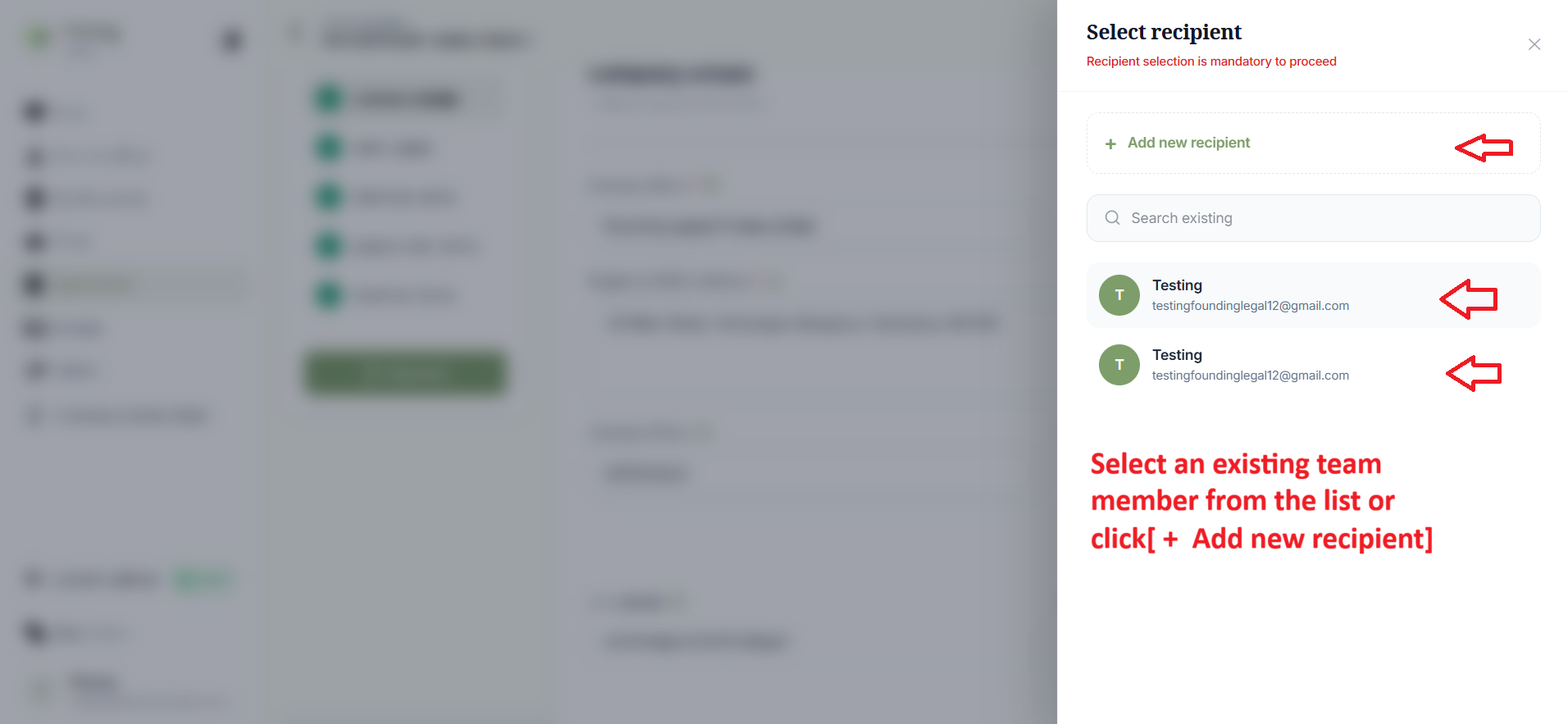
Assign the intern to this agreement: A Select Recipient panel slides in from the right. This step links the agreement to a specific individual in your system. You have two options:
- Select an Existing Team Member: Browse the list of existing contacts already added to your Founding Legals account. Click the desired recipient to select them instantly. This is the quickest route if the intern is already in your team directory.
- Add a New Recipient: Click the + Add new recipient button at the top of the panel to manually enter a new intern's details. Use the search bar to quickly locate existing entries by name or email before creating a new record.
Recipient selection is mandatory to proceed. The system will not allow you to advance without confirming the intern linked to this agreement.
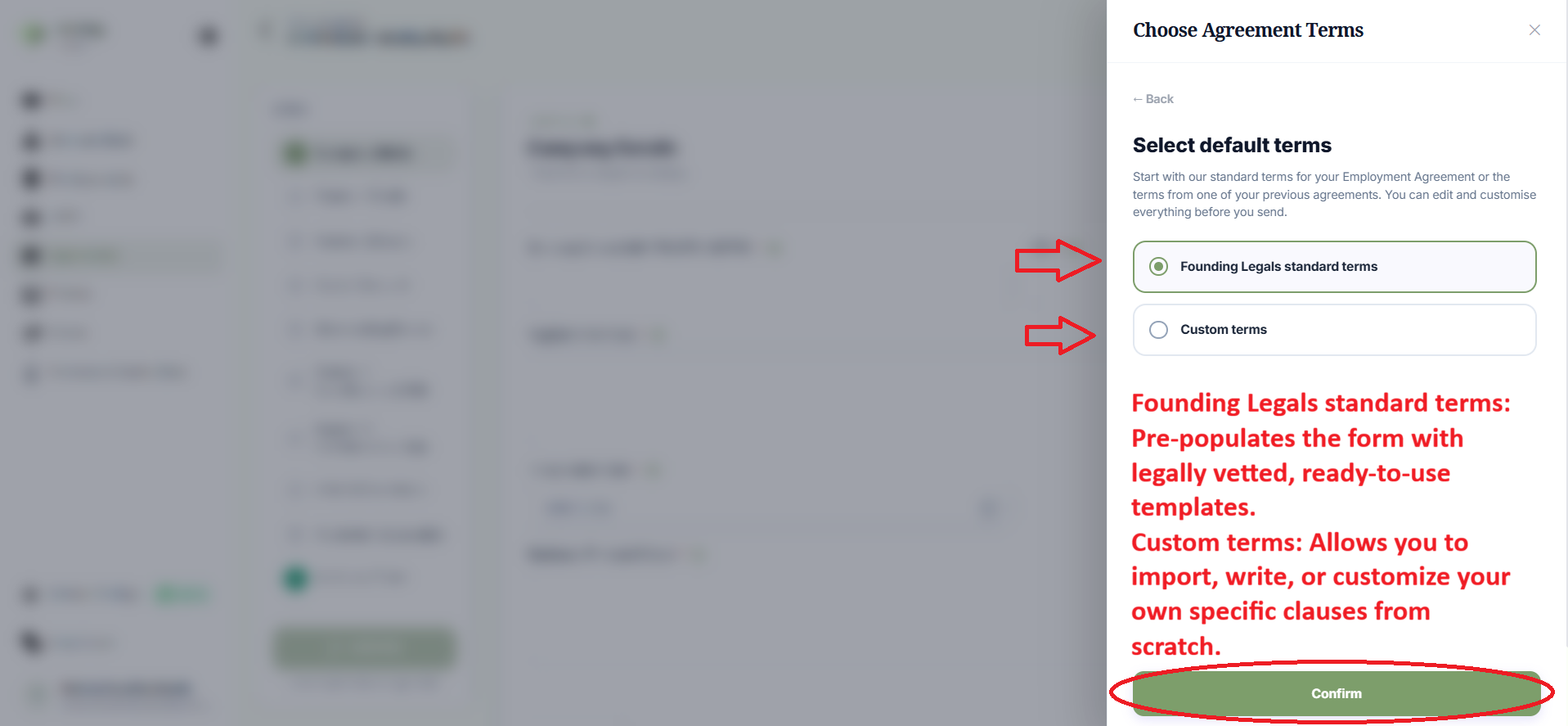
Select your legal baseline: After selecting the recipient, the Choose Agreement Terms panel appears. This is a critical decision that determines the legal foundation of your agreement. Select one of the two options and click Confirm:
- Founding Legals Standard Terms: Pre-populates the entire agreement with legally vetted, ready-to-use internship clauses covering IP ownership, confidentiality, and conduct. This is the recommended option for most startups as the clauses have been reviewed by legal professionals for Indian compliance.
- Custom Terms: Allows you to import, write, or customize your own specific clauses from scratch. Select this option only if your organization has proprietary legal templates or if industry-specific provisions are required that differ from standard practice.
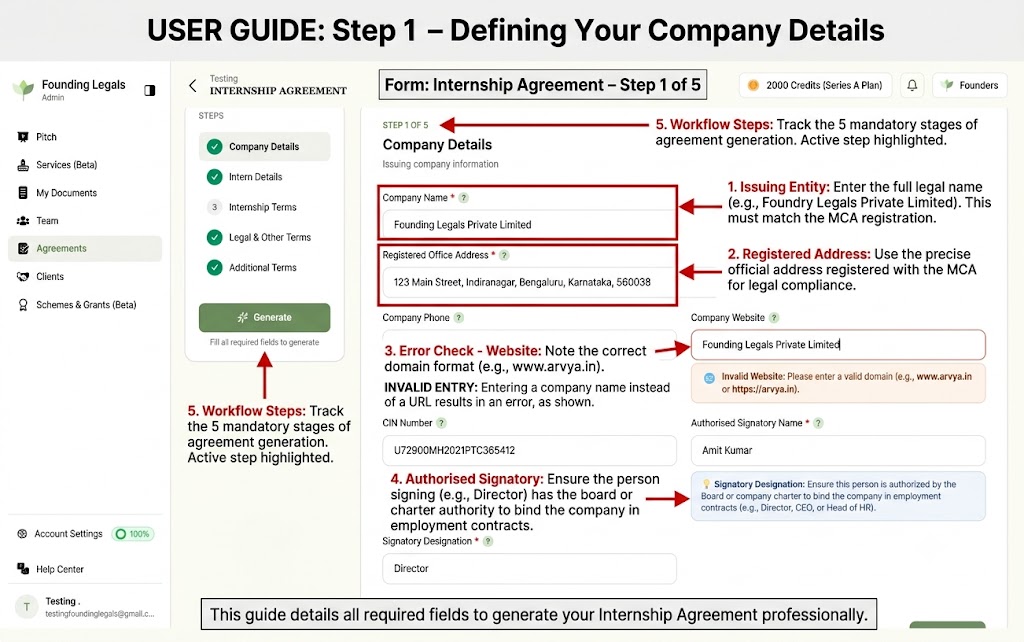
Enter your company's issuing information: The 5-step wizard begins with Company Details. This section establishes the legal identity of the employer and must match your official MCA registration records. Complete every field carefully:
- Company Name: Enter the full registered company name including its legal suffix (e.g., Founding Legals Private Limited). This must exactly match the name as registered with the Ministry of Corporate Affairs.
- Registered Office Address: Provide the precise official address as registered with the MCA. This address will appear on the letterhead and determines the legal jurisdiction governing the agreement.
- Company Phone: Enter the official company contact number for formal communication references in the agreement.
- Company Website: Enter the company's domain in the correct URL format (e.g., www.foundinglegals.com or https://foundinglegals.com). Note: entering the company name instead of a valid URL will trigger an inline validation error — the field will highlight in orange and display a warning message reminding you to use a valid domain format.
- CIN Number: Enter your 21-character alphanumeric Corporate Identification Number as issued by the MCA (e.g., U72900MH2021PTC365412). This number uniquely identifies your company in all legal documents.
- Authorised Signatory Name: Enter the full name of the individual authorized by the Board or company charter to execute employment and internship contracts on behalf of the company.
- Signatory Designation: Enter the official designation of the authorized signatory (e.g., Director, CEO, Head of HR). The platform displays a guidance tip confirming this person must be authorized by the Board to bind the company in employment contracts.
The left-hand sidebar tracks all 5 steps. Completed steps show a green checkmark. The active step is highlighted. Monitor this panel throughout the process to track your progress.
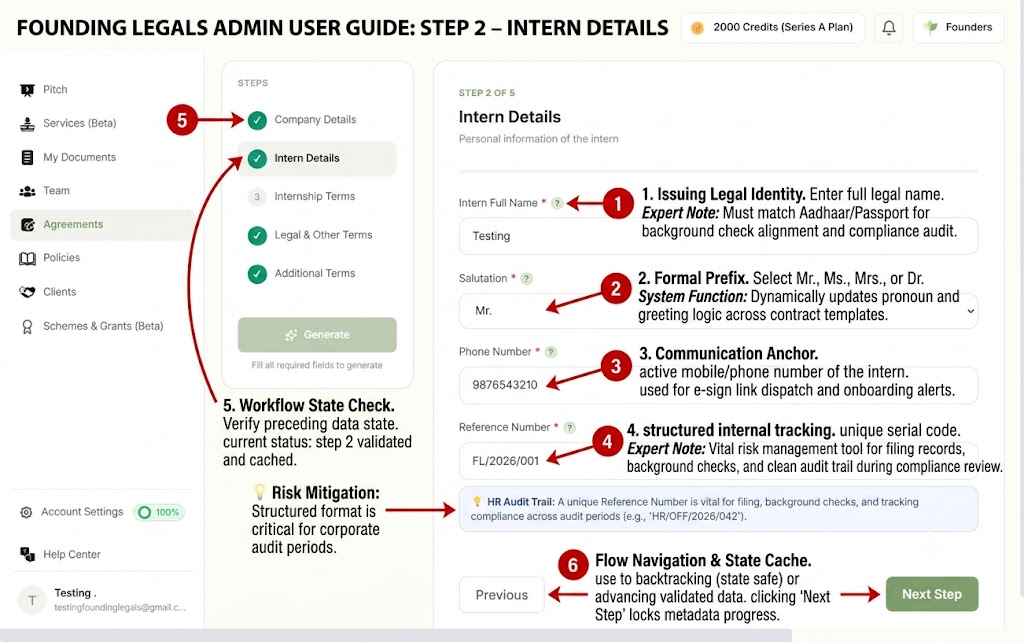
Enter the intern's personal information:This step captures the intern's legal identity. The data entered here maps directly into all formal clauses of the internship agreement. Enter the following with care:
- Intern Full Name: Enter the intern's complete legal name exactly as it appears on their Aadhaar card or Passport. Any discrepancy here will cause mismatches during background checks and compliance audits.
- Salutation: Select the appropriate formal prefix (Mr., Ms., Mrs., Dr.). This dynamically updates the pronoun and greeting logic used across all generated contract templates, ensuring professional consistency throughout the document.
- Phone Number: Enter the intern's active mobile number. This is the communication anchor used for e-sign link dispatch, onboarding alerts, and document status notifications.
- Reference Number: Assign a structured internal tracking code for HR filing, background checks, and compliance audits (e.g., FL/2026/001 or HR/INT/2026/042). This unique serial number is a vital risk management tool that enables clean audit trails across payroll systems and compliance review periods.
Click Next Step to save and cache this data. Clicking Previous takes you back to Company Details without losing any information already entered.
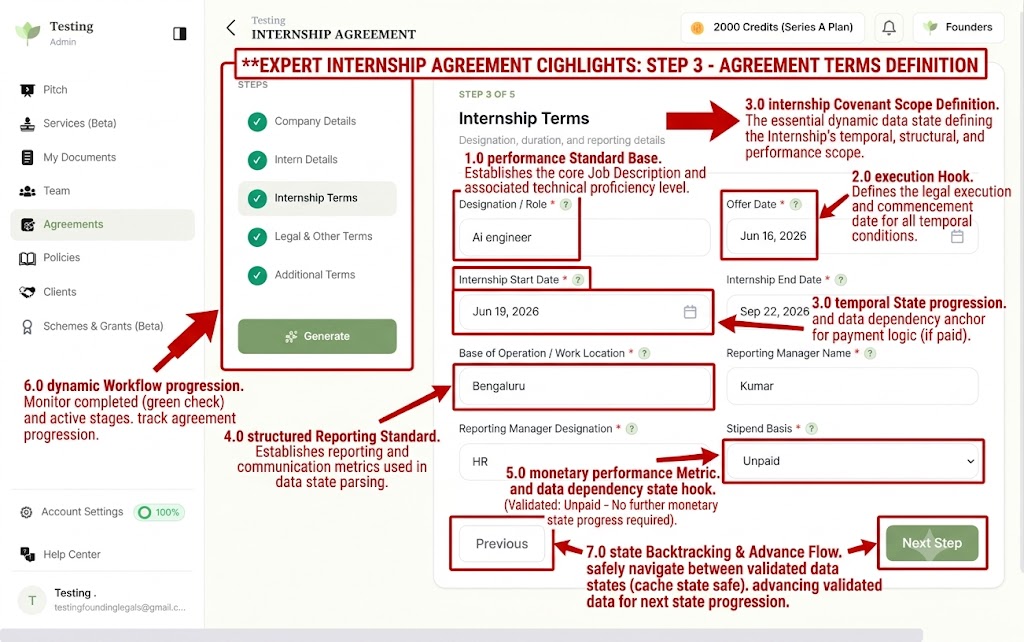
Define the operational and structural parameters of the internship: This is the core step that gives the agreement its legal and commercial substance. Every value entered here governs the temporal scope, reporting structure, and monetary arrangement of the internship. Complete each field precisely:
- Designation / Role: Enter the intern's official job title or functional role within the organization (e.g., AI Engineer, Marketing Intern, Product Intern). This designation defines the performance standard and the technical proficiency level expected from the intern, and it is printed on the internship offer letter.
- Offer Date: Select the date on which this internship offer is formally being made. This is the legal execution date and commencement anchor for all temporal conditions referenced in the agreement.
- Internship Start Date: Set the confirmed first working day of the internship. This date triggers all duration calculations and is the reference point for stipend payment timelines if applicable.
- Internship End Date: Set the last working day of the internship. Together with the Start Date, this defines the total internship duration, which appears in the agreement and governs any performance review windows.
- Base of Operation / Work Location: Specify the city or office from which the intern will primarily operate (e.g., Bengaluru). This determines which local labor practices and compliance standards are applicable during the internship period.
- Reporting Manager Name: Enter the full name of the internal team leader or department head to whom the intern will directly report. This establishes a formal reporting structure and is referenced in the communication and evaluation clauses.
- Reporting Manager Designation: Enter the reporting manager's official title (e.g., HR Manager, Engineering Lead). This information is used in the agreement for communication hierarchy documentation.
- Stipend Basis: Select whether the internship is Paid or Unpaid. If Unpaid is selected, the platform confirms no further monetary state progression is required and the stipend fields are hidden. If Paid is selected, additional stipend amount and payment frequency fields appear for configuration.
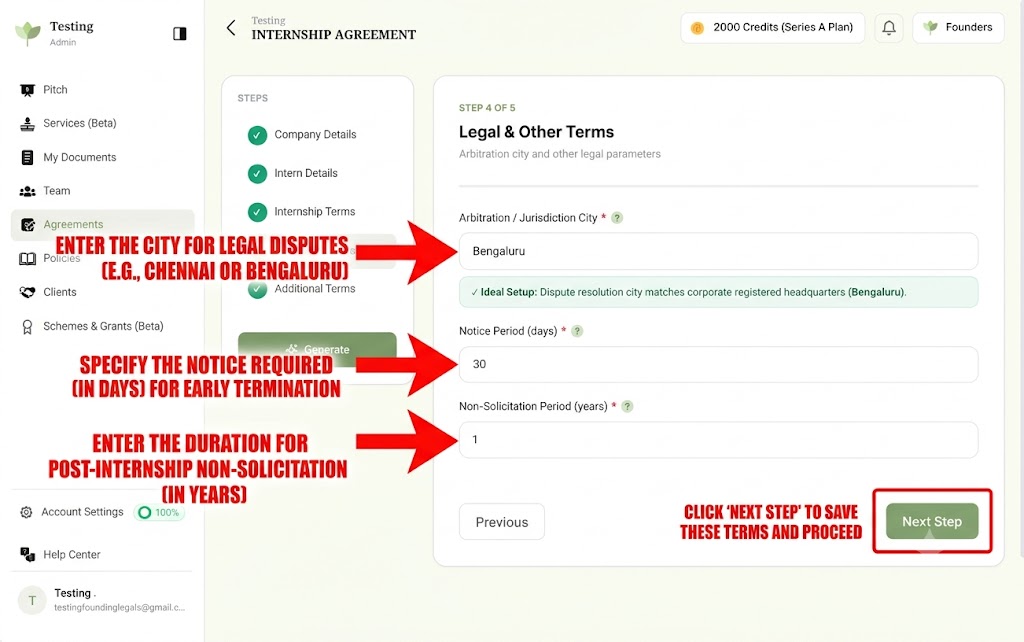
Set the governing legal covenants: This step defines the protective legal parameters that make the internship agreement enforceable and professionally defensible. Each value entered here is binding and will appear in the formal terms section of the internship offer letter:
- Arbitration / Jurisdiction City: Enter the city whose courts will have exclusive jurisdiction over any legal dispute arising from this agreement (e.g., Bengaluru, Chennai, Mumbai). Best practice is to enter the city of your company's registered office, which the platform confirms with an Ideal Setup validation badge when the jurisdiction city matches your corporate headquarters.
- Notice Period (days): Enter the number of calendar days of written notice required for early termination by either party. 30 days is the standard industry-balanced period that allows adequate handover time and prevents operational disruption.
- Non-Solicitation Period (years): Enter the duration in years during which the intern is prohibited from soliciting the company's employees, clients, or business connections after the internship concludes. A period of 1 year is the standard minimum that courts in India have generally upheld as reasonable and enforceable.
Click Next Step to save these terms and advance to the final configuration step. All data is cached and safe to revise by clicking Previous at any point.
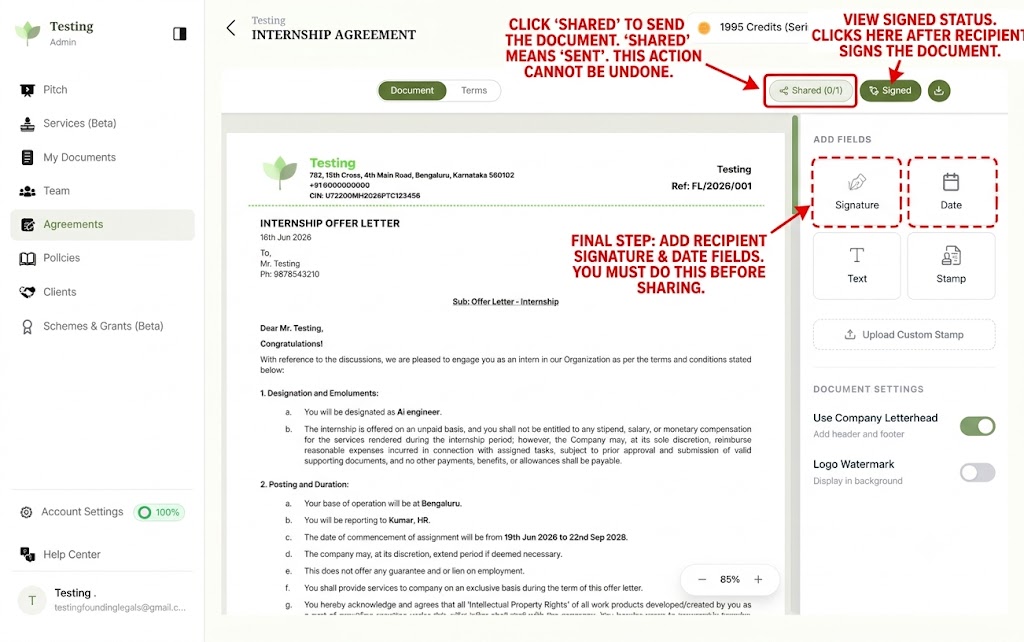
Finalize, sign, and deliver the internship offer letter: Once all five steps display green checkmarks in the sidebar, click the green Generate button. The platform opens the live document viewer showing the complete, formatted Internship Offer Letter on company letterhead. From this final screen, you must complete the following actions before sharing:
- Add Signature & Date Fields (Required): Before sharing the document, you must drag and drop the Signature and Date fields from the Add Fields panel on the right onto the appropriate signature lines in the document. This makes the agreement ready for formal e-signing by the recipient. You can also add Text blocks or a Stamp field if your organization uses a company seal.
- Upload Custom Stamp: Use the Upload Custom Stamp option if your company uses a branded rubber stamp or official seal on legal documents.
- Document Settings: Use the settings panel to toggle Use Company Letterhead on or off (adds your company header and footer to the document) and to enable or disable the Logo Watermark that appears as a background watermark on each page.
- Share the Document: Click the Shared button to send the finalized agreement to the intern. Note: this action dispatches the document immediately and cannot be undone. The counter (e.g., 0/1) tracks how many recipients have received versus signed the document.
- View Signed Status: Once the intern signs the document, click the Signed button to view and download the fully executed internship agreement with all e-signatures applied.
Under the Apprentices Act, 1961, and various state-level Shops and Establishments Acts, interns occupy a distinct legal category from regular employees. Do not insert clauses that grant PF (Provident Fund), ESI (Employee State Insurance), gratuity, or statutory leave entitlements in an internship agreement, as doing so can lead to courts reclassifying the relationship as employment. Additionally, unpaid internships are legally valid only if the intern is primarily receiving training or skill development — using unpaid interns as substitutes for regular productive employees is a compliance risk.
The most common error when generating internship agreements is clicking Shared before placing the Signature and Date fields on the document. Once shared, the document is dispatched and the action cannot be undone. Always drag the Signature and Date tiles from the Add Fields panel onto the correct signature lines in the document viewer before clicking Shared. This ensures the intern can formally e-sign the agreement, creating a legally complete and auditable record.
Quality Assurance
Reviewed by Manoj Kumar Thota
Founder / Developed Founding Legals
About the Author
Manoj Kumar Thota is the creator behind Founding Legals