How to Draft a Service Agreement
Quick Summary
A Service Agreement is a commercial contract defining the scope of work, deliverables, performance standards, payment terms, and intellectual property ownership between a service provider and a client. This step-by-step visual guide walks you through drafting a Service Agreement on Founding Legals.
Commercial Agreements — Agreement Type
This agreement falls under the Commercial Agreements category on the Founding Legals Agreements page, which governs day-to-day business operations under Indian commercial law.
Understanding the Service Agreement
A Service Agreement is a foundational contract entered into between a service provider (a company or individual consultant) and a client. It outlines the specific services to be performed, milestones to be achieved, payment mechanisms, quality metrics (SLAs), and critical legal protections regarding liability limits and intellectual property. When drafting a Service Agreement under Indian commercial law, keep three vital areas in mind:
- GST and Tax Compliance: Services in India are subject to Goods and Services Tax (GST), typically at 18%. The agreement must accurately reflect the GSTIN of both parties. For services exported outside India (to foreign clients), the contract must satisfy the conditions of "Export of Services" under the Integrated GST (IGST) Act, 2017, to qualify as a zero-rated supply (requiring payment in convertible foreign exchange and filing a Letter of Undertaking (LUT) on the GST portal).
- IP Assignment (Section 17, Copyright Act, 1957): By default, the author of a work owns the IP. In a commercial service relationship, the agreement must include an explicit work-for-hire assignment clause stating that all rights, title, and interest in any intellectual property created during the services are transferred to the client upon payment.
- Limitation of Liability: Service providers should seek to cap their overall liability to the total fees received under the agreement, while clients will look to carve out exceptions (uncapped liability) for breaches of confidentiality, data protection, and IP infringement.
Step-by-Step Guide to Drafting a Service Agreement
Access the template: Go to the Agreements tab in the left sidebar. Scroll down to the Commercial Agreements category and locate the Service Agreement card. Click + Create to open the drafting workspace.
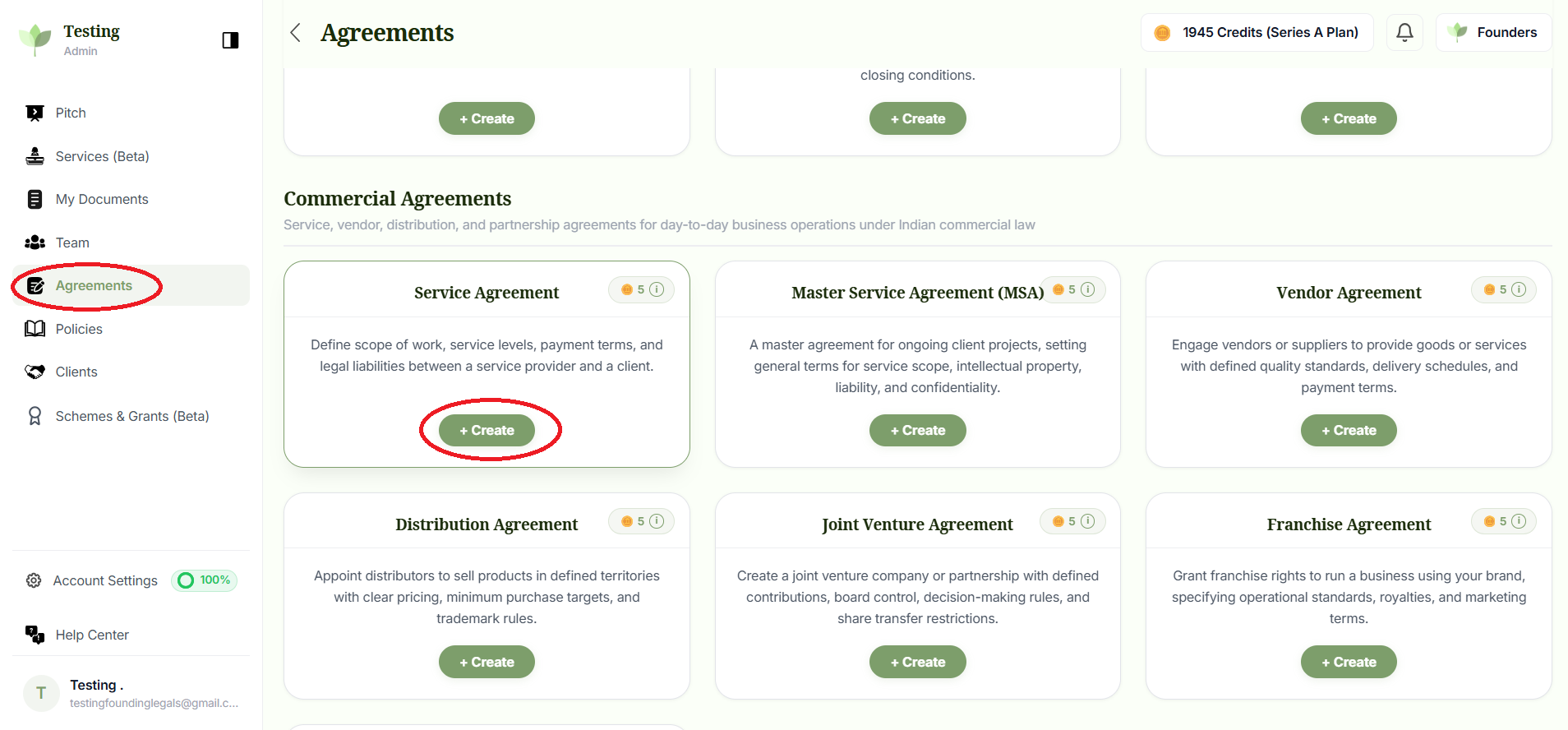
Select the signee: The Select Recipient panel will open on the right. Select your client's authorized representative or contact from the list, or click + Add new recipient to record their details.
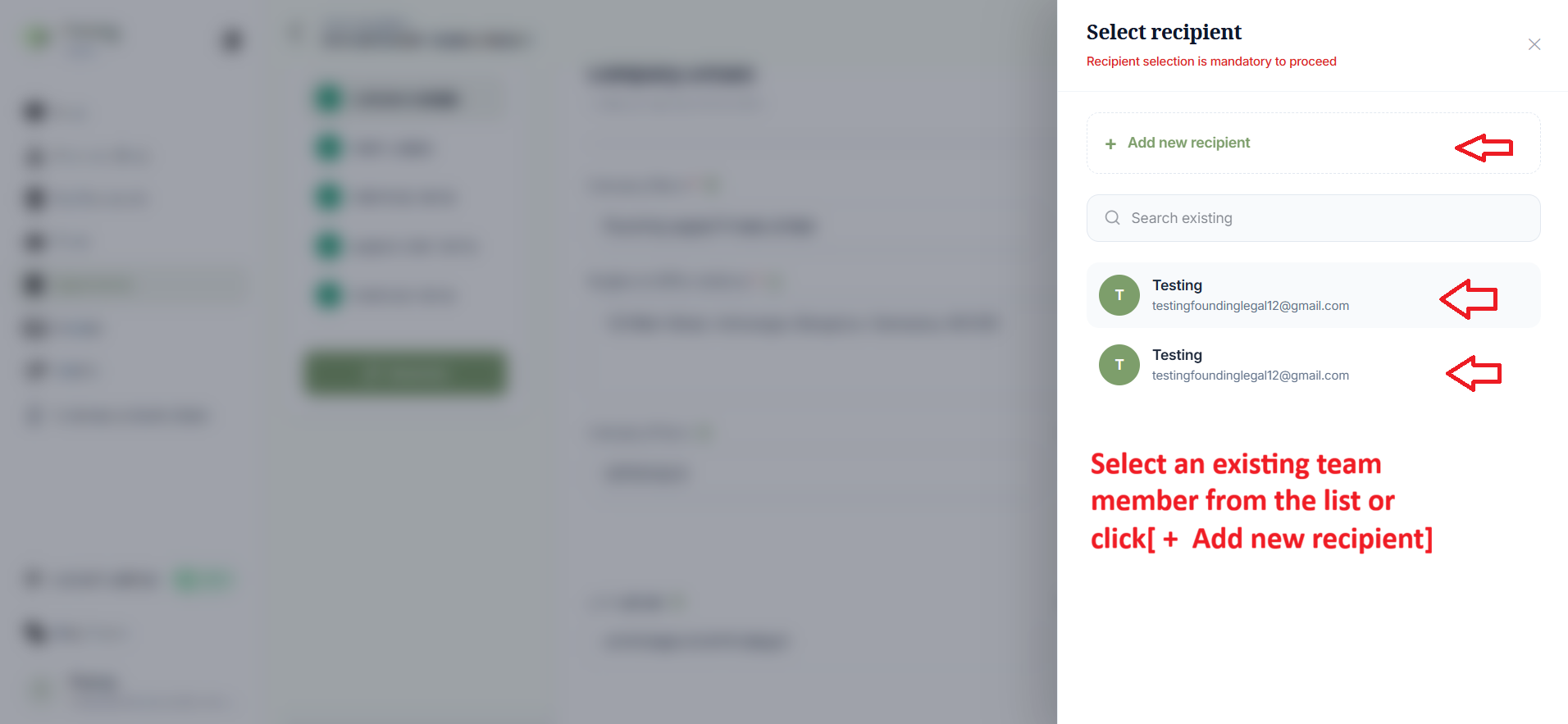
Choose terms baseline: In the Choose Agreement Terms menu, choose:
- Founding Legals standard terms: Pre-populates the editor with standard commercial terms, including standard confidentiality and intellectual property assignment covenants.
- Custom terms: Choose this if you want to import your own custom service clauses.
Click Confirm to proceed.
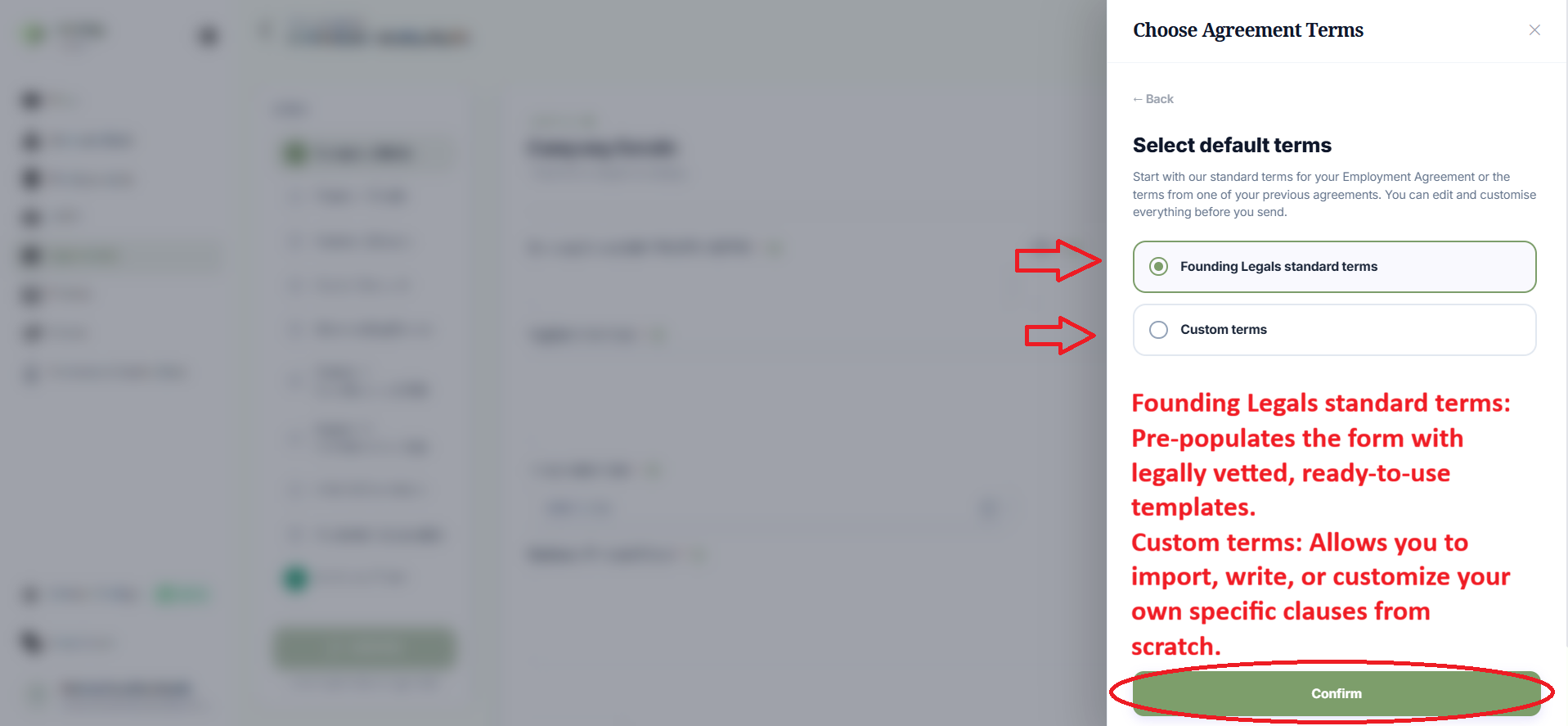
Enter signing place and date: In Step 1, enter:
- Execution Place (City): Enter the city where the contract is signed (e.g., Bengaluru). This determines the default local jurisdiction in stamp duty calculations.
- Execution Date: Select the effective start date. The corresponding month and year will be calculated automatically.
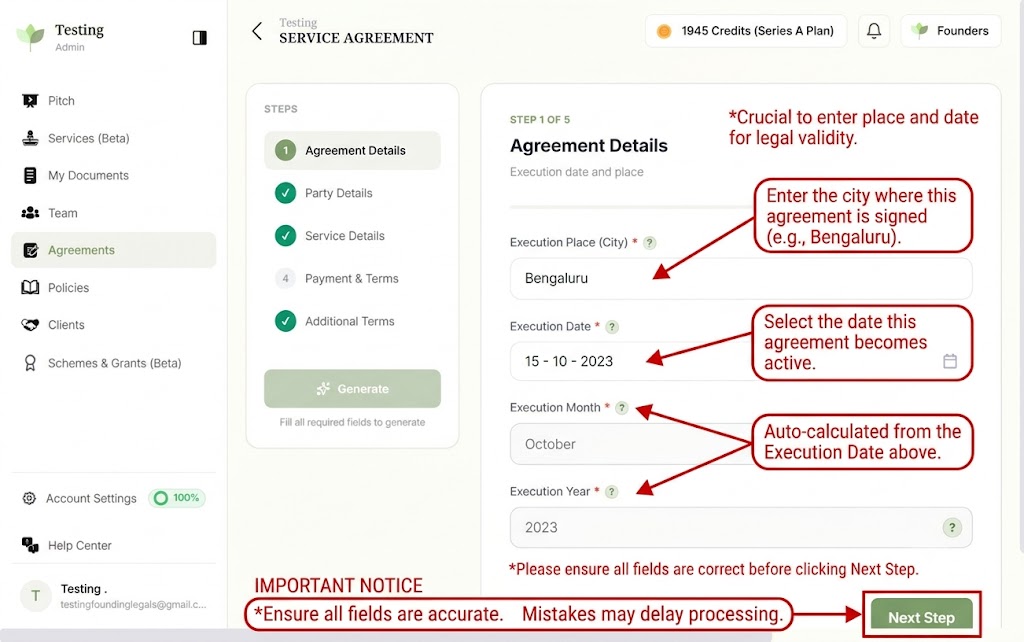
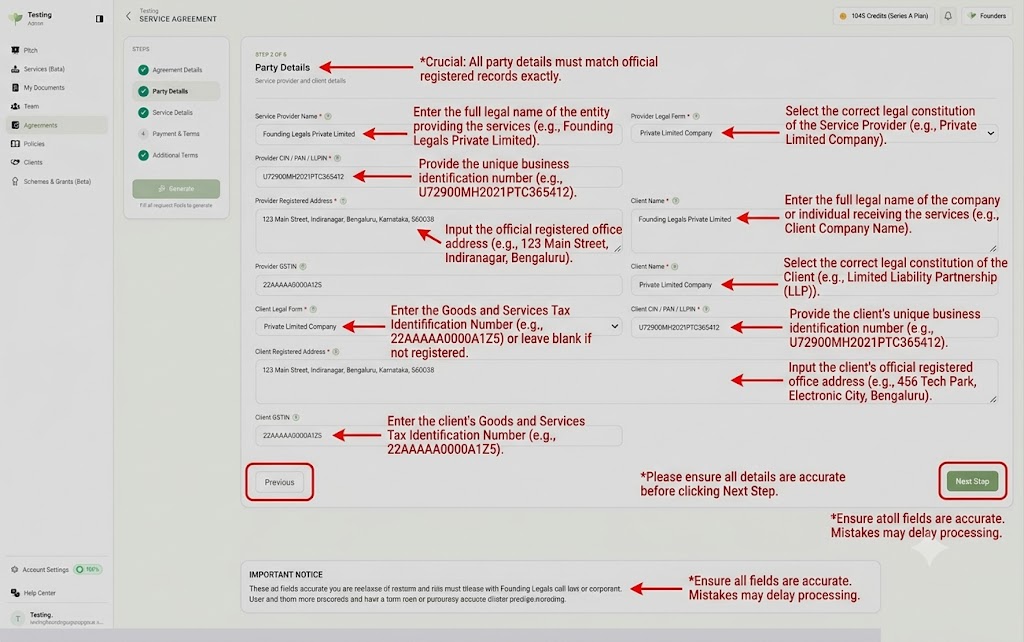
Provide provider and client profiles: In Step 2, carefully enter details for both entities. To prevent contract disputes or tax delays, ensure these details match official corporate registration records:
- Legal Names & Constitutions: Enter the full corporate names and select the correct entity constitution (e.g., Private Limited Company, Partnership, LLP, or Proprietorship) for both the Service Provider and the Client.
- CIN / PAN / LLPIN: Provide the business registration number.
- Registered Office Addresses: Enter the official registered office address for both parties.
- GSTIN Numbers: Input the 15-character Goods and Services Tax Identification Number for both parties. If the client is a foreign entity or unregistered, leave this field blank.
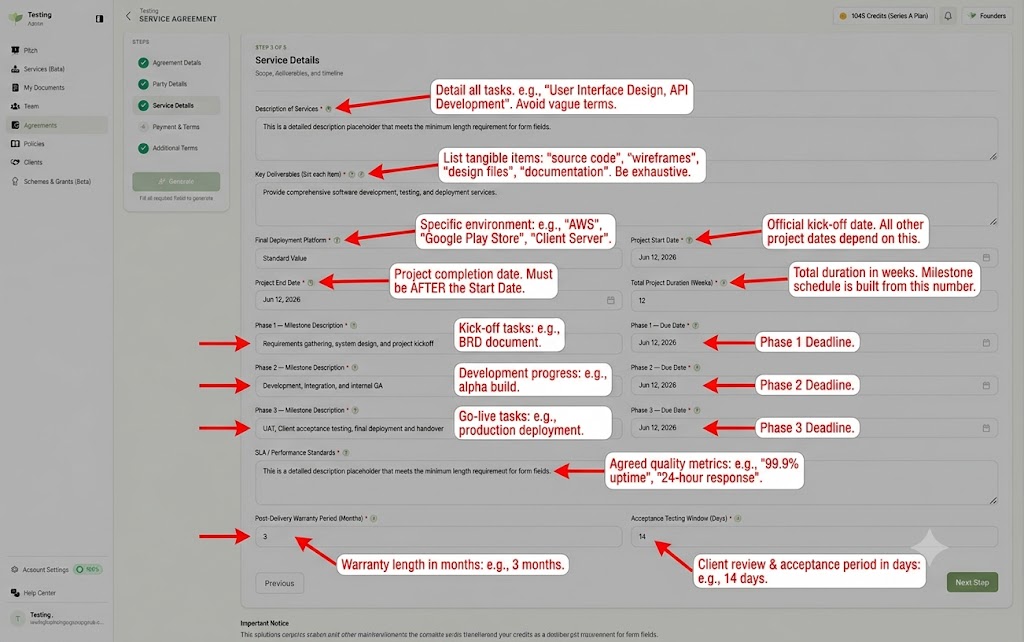
Define the scope of work and project timeline: Step 3 maps the core operational metrics:
- Description of Services: Detail the tasks to be performed (e.g., User Interface Design, API Development). Avoid generic or ambiguous placeholders.
- Key Deliverables: List tangible items the provider must deliver (e.g., source code, design wireframes, documentation).
- Final Deployment Platform: Specify target environments (e.g., AWS, Google Play Store, Client Server).
- Project Dates: Set the official Project Start Date and Project End Date (must be after the start date).
- Total Project Duration (Weeks): Enter numerical duration in weeks.
- Milestone Descriptions & Due Dates: Break down the project into up to three distinct phases (e.g., Phase 1: Requirements Gathering, Phase 2: Alpha Build, Phase 3: Production Handover) with independent deadlines.
- SLA / Performance Standards: State agreed quality metrics (e.g., 99.9% uptime, 24-hour response time).
- Post-Delivery Warranty Period (Months): Specify the free bug-support duration (e.g., 3 months).
- Acceptance Testing Window (Days): The review window the client has to test and either approve or reject deliverables (e.g., 14 days).
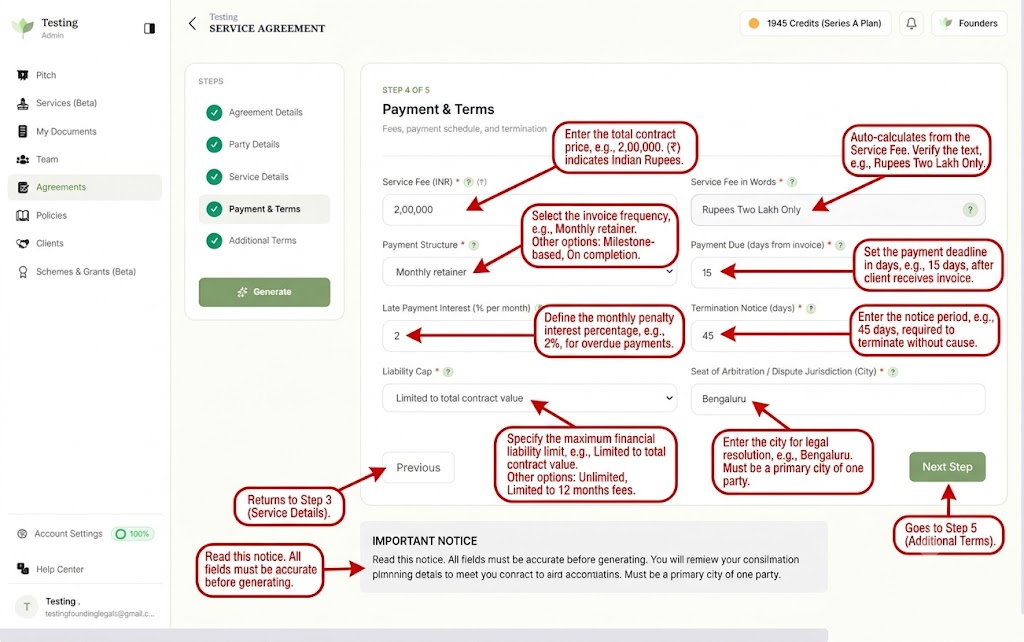
Configure financial and dispute parameters: Step 4 governs monetary exchanges and default rules:
- Service Fee (INR): Enter the total contract fee value (e.g., 2,00,000). The system auto-calculates the words representation (e.g., Rupees Two Lakh Only).
- Payment Structure: Select invoicing frequency (e.g., Monthly Retainer, Milestone-based, or On Completion).
- Payment Due: Enter the payment window in days after invoice delivery (e.g., 15 days).
- Late Payment Interest (% per month): The penalty interest charged on overdue payments (e.g., 2%).
- Termination Notice (Days): Enter the written notice period required for termination without cause (e.g., 45 days).
- Liability Cap: Choose the financial limit of liability (e.g., Limited to total contract value, Limited to 12 months fees, or Unlimited).
- Seat of Arbitration / Dispute Jurisdiction (City): Enter the city (e.g., Bengaluru) for dispute resolution.
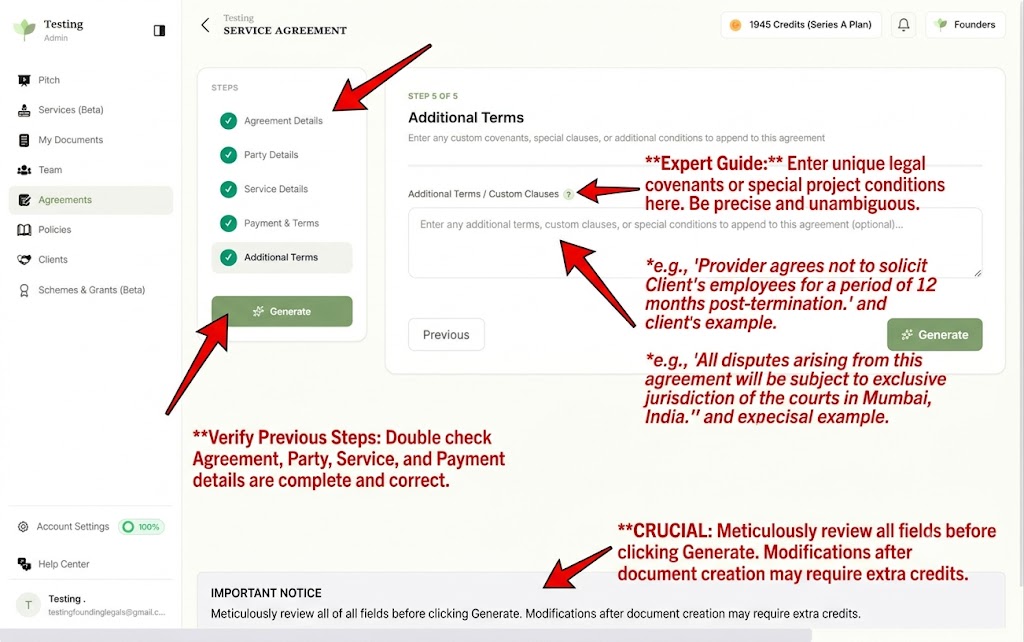
Add custom covenants and finalize drafting: In Step 5, configure:
- Additional Terms / Custom Clauses (Optional): Input specific covenants like non-compete rules, restrictive items, or custom conditions (e.g., "Provider agrees not to solicit Client's employees for a period of 12 months post-termination.").
- Generate: Once all 5 steps display a green checkmark, click Generate to build the draft.
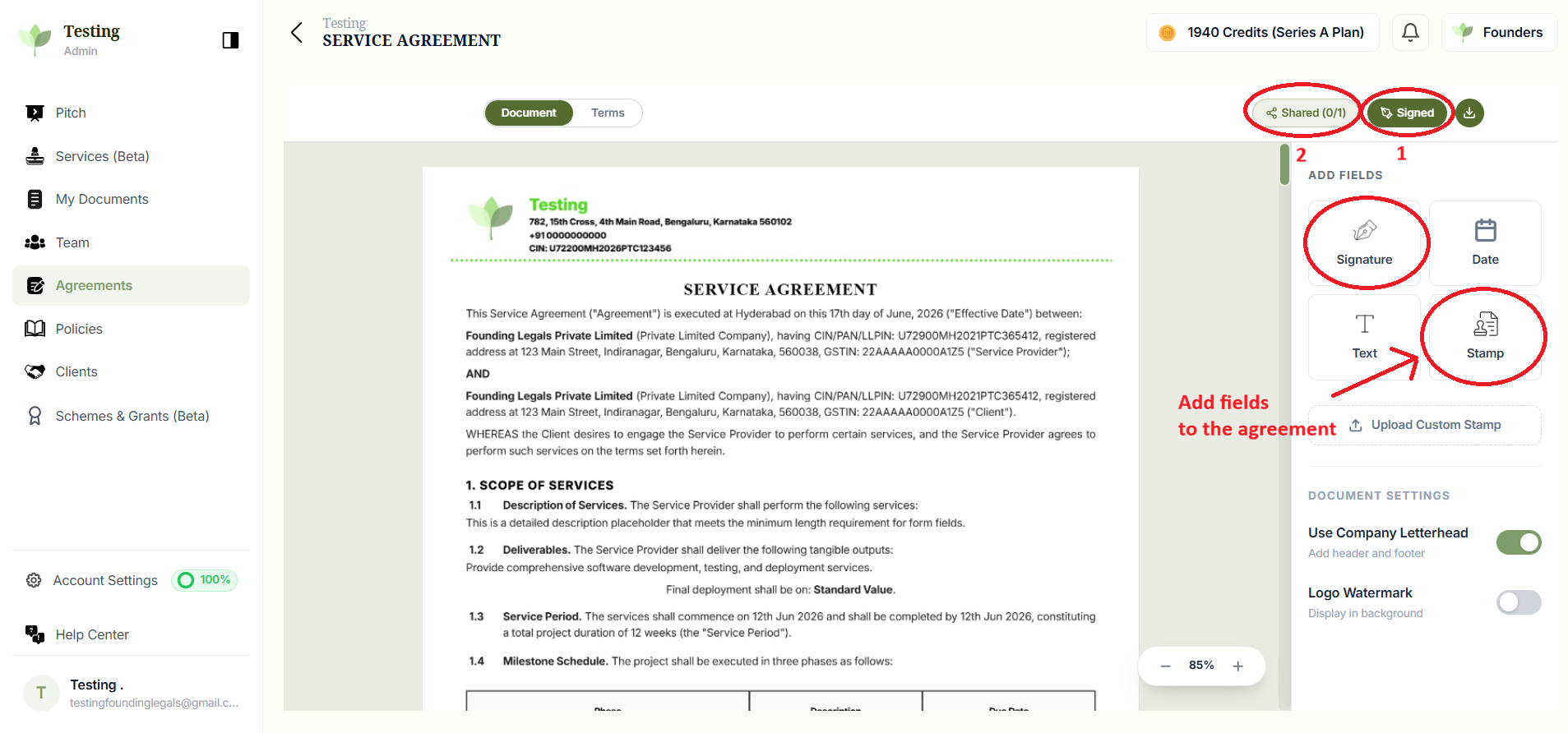
Position execution fields and sign: On the document preview screen:
- Review Scope & Parties: Verify that the description of services, milestone schedule, GSTIN numbers, and registered addresses are correct.
- E-Sign Layout: Drag and drop the Signature and Stamp fields onto the sign block areas.
- Execution Cues: Toggle company letterhead and back watermark, then select Signed or Shared to route for signature.
Ensure both parties' GSTIN details are correct. In India, providing services without declaring correct GSTIN details can result in invoice mismatch under GSTR-1 filings, blocking the client from claiming Input Tax Credit (ITC). If the service provider is exporting services, ensure a valid Letter of Undertaking (LUT) is filed for the financial year. This is required under Integrated GST (IGST) rules to supply services without paying IGST upfront, provided payment is received in foreign exchange within 1 year of invoice date.
Under Section 17 of the Indian Copyright Act, 1957, the creator of a work is considered its first owner. If the Service Agreement does not include an explicit, written IP assignment clause, ownership of the software, designs, or documentation remains with the service provider even after the client pays for them. To prevent copyright ownership claims, the agreement must state that all intellectual property developed during the course of services is assigned to the client immediately upon creation.
To prevent project scope creep, providers should set a reasonable Acceptance Testing Window (e.g., 7 to 14 days). If the client does not submit written bug reports within this window, the deliverables should be deemed accepted. The post-delivery warranty support should also be capped (e.g., 30 to 90 days), with any further modifications billed under separate Change Requests (CRs).
Quality Assurance
Reviewed by Manoj Kumar Thota
Founder / Developed Founding Legals
About the Author
Manoj Kumar Thota is the creator behind Founding Legals