How to Draft a Joint Venture Agreement
Quick Summary
A Joint Venture Agreement governs the collaboration of two or more entities to establish a new joint business venture (JV Co). It defines funding contributions, equity share allocations, board representation, post-exit non-compete periods, and regulatory compliance (CCI & MCA). This step-by-step visual guide walks you through drafting a Joint Venture Agreement on Founding Legals.
Commercial Agreements - Agreement Type
This agreement falls under the Commercial Agreements category on the Founding Legals Agreements page, which governs day-to-day business operations under Indian commercial law.
Understanding the Joint Venture Agreement
A Joint Venture (JV) Agreement is a foundational contract under which two or more independent businesses pool their resources, capital, and expertise to form a new legal entity (JV Co) or enter into a strategic alliance. To construct a legally compliant joint venture in India, partners must navigate four key regulatory and corporate framework requirements:
- CCI Merger Control (Section 5, Competition Act, 2002): Creating a Joint Venture constitutes a "combination" under the Competition Act. If the asset or turnover levels of the JV partners exceed the statutory limits, prior notification and approval from the Competition Commission of India (CCI) are mandatory, unless the JV qualifies for the De Minimis (Target Exemption).
- JV Co Incorporation (Companies Act, 2013): Incorporated JVs require forming a new company (usually a Private Limited Company) via the Ministry of Corporate Affairs (MCA) SPICe+ filing. The agreement must define the JV Co's Authorised Share Capital, which dictates the registration fees payable to the Registrar of Companies (RoC).
- Lock-In & Transfer Restrictions (Section 27, Contract Act, 1872): To ensure commitment, partners typically agree to a Lock-In Period (e.g., 3 years) restricting share transfers. However, post-exit non-compete covenants must be drafted carefully. Under Section 27 of the Indian Contract Act, 1872, post-exit restraints are generally void unless they fall within narrow exceptions, such as the sale of goodwill.
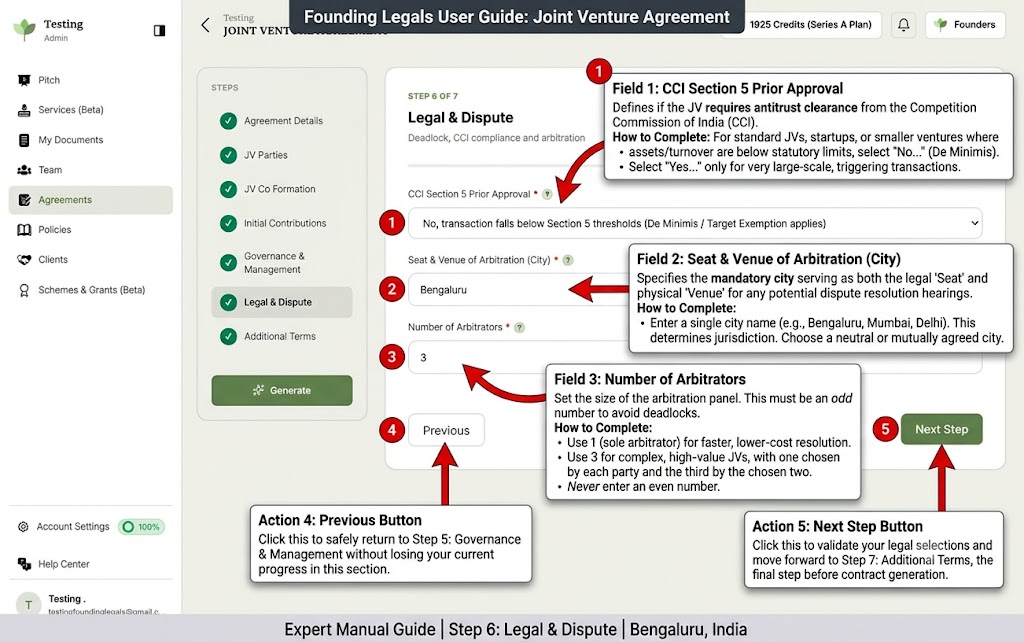
- Arbitration Panels (Section 10, Arbitration & Conciliation Act, 1996): To prevent deadlock in joint ventures, the dispute resolution clause must specify an odd number of arbitrators (typically 1 for smaller JVs and 3 for larger ones) as mandated by Section 10 of the Act. An even number of arbitrators is legally invalid.
Step-by-Step Guide to Drafting a Joint Venture Agreement
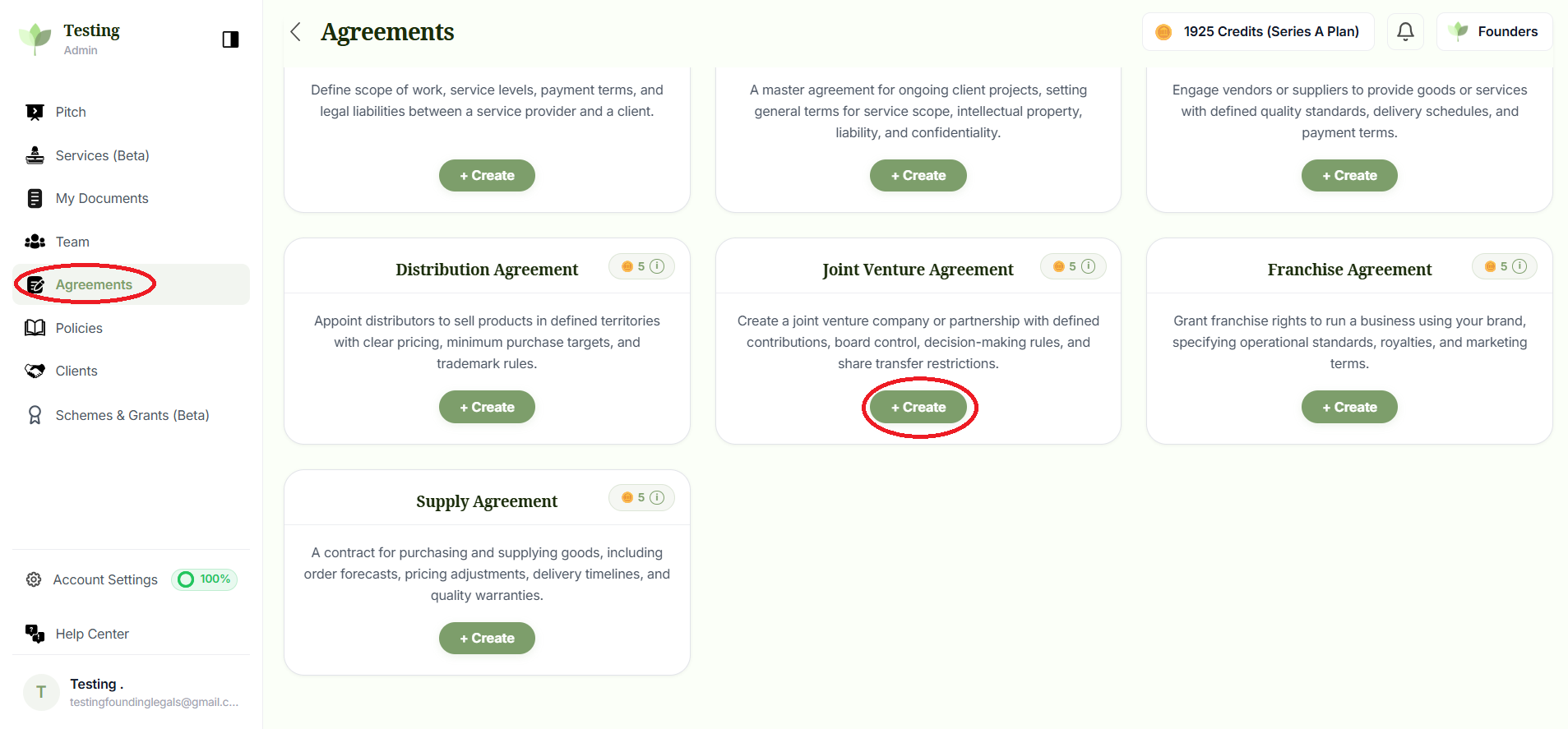
Access the template: Go to the Agreements tab in the left sidebar. Scroll to the Commercial Agreements section, locate the Joint Venture Agreement card, and click + Create.
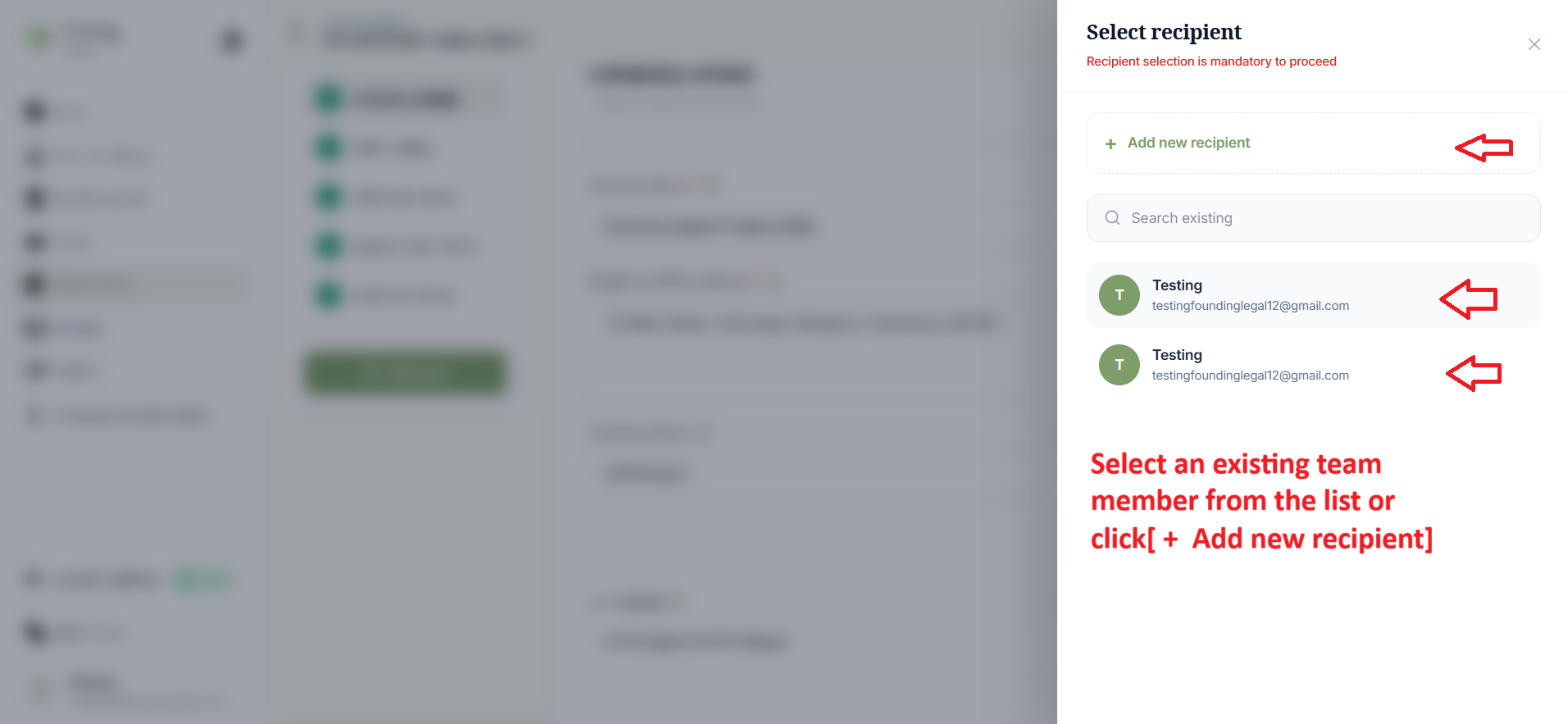
Select the partner: In the Select Recipient panel on the right side of the screen, select the other JV partner's representative from the contacts list, or click + Add new recipient.
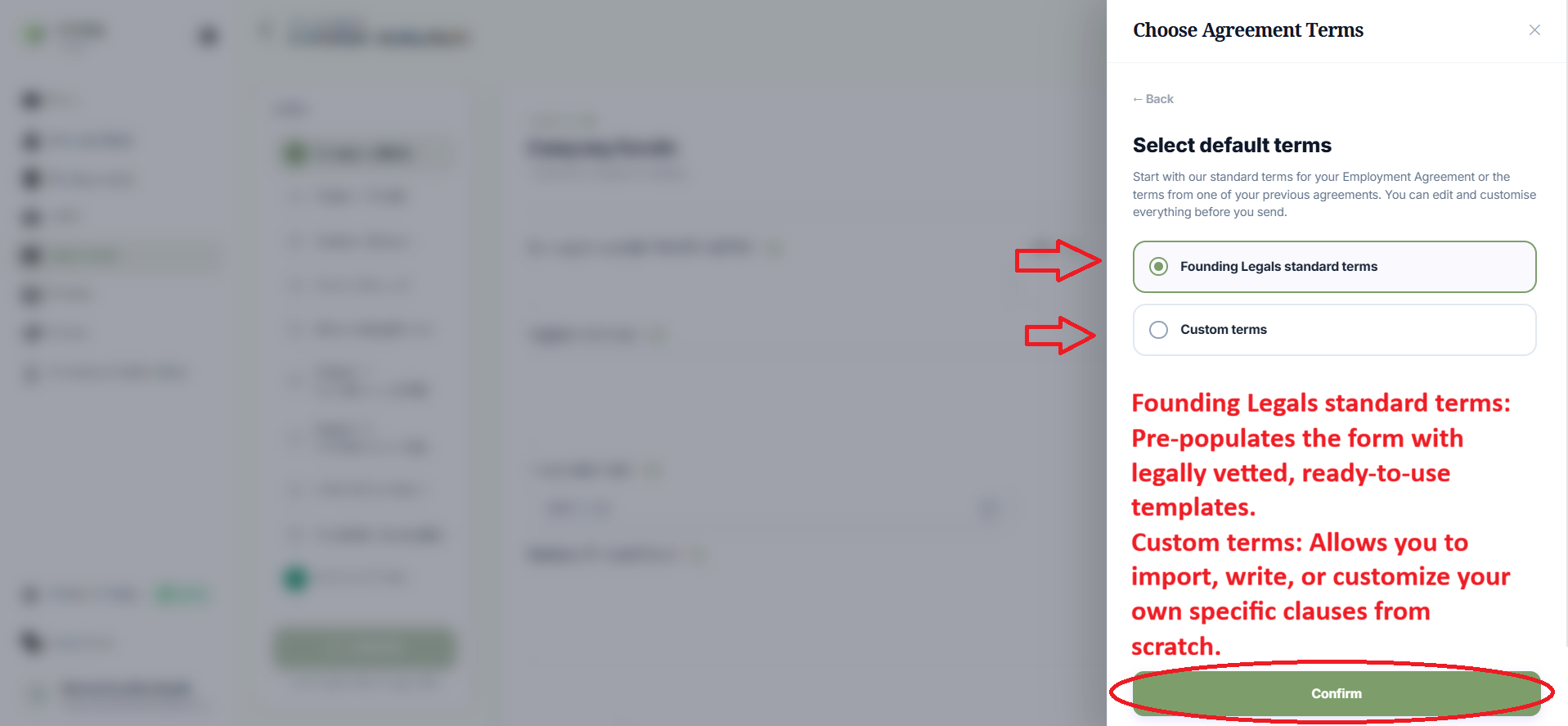
Choose terms baseline: In the Choose Agreement Terms menu, select:
- Founding Legals standard terms: Pre-populates the editor with standard joint venture formation covenants, share allocations, management governance, and deadlock provisions.
- Custom terms: Choose this option if you want to import your own custom JV templates.
Click Confirm to open the editor.
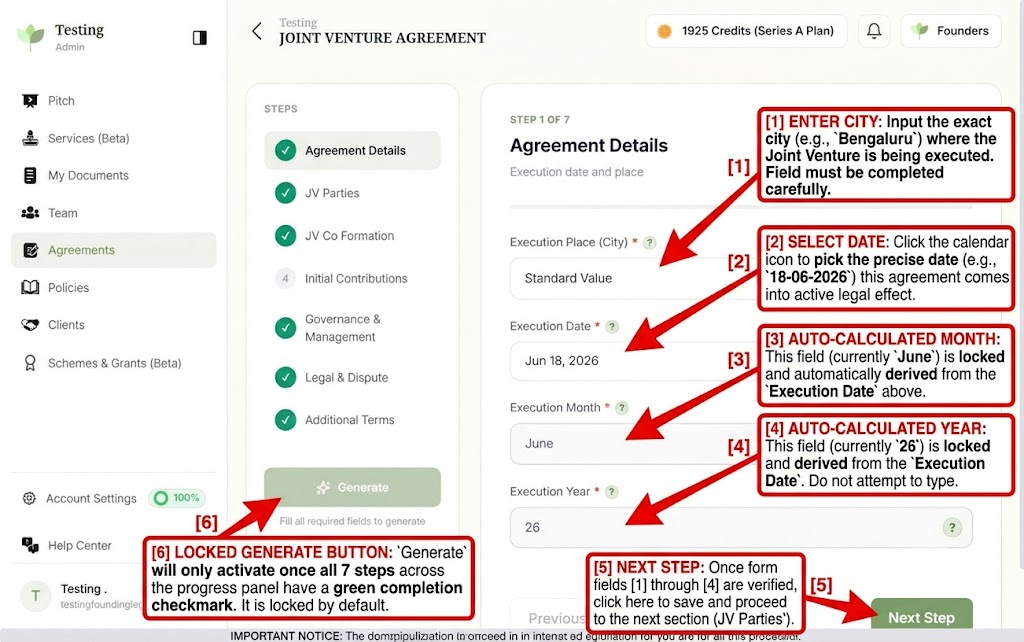
Enter signing place and date: In Step 1, enter:
- Execution Place (City): Enter the city where this agreement is executed (e.g., Bengaluru). This determines local stamp duty rates.
- Execution Date: Select the calendar date the agreement becomes active. Month and Year will auto-fill.
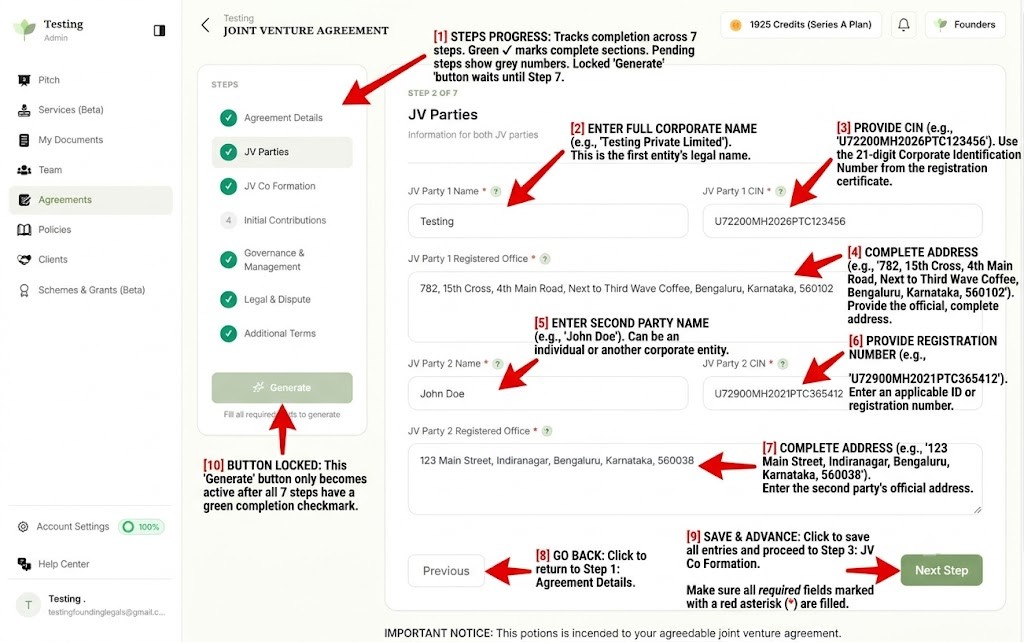
Enter registration details for both partners: In Step 2, enter details for both JV Party 1 and JV Party 2:
- JV Party Names: Enter the official registered names of the collaborating entities (e.g., Testing Private Limited and John Doe).
- JV Party CINs: Enter the 21-digit Corporate Identification Numbers for corporate parties, or leave blank if a partner is an individual.
- JV Party Registered Offices: Complete registered addresses including Pin Codes for both parties.
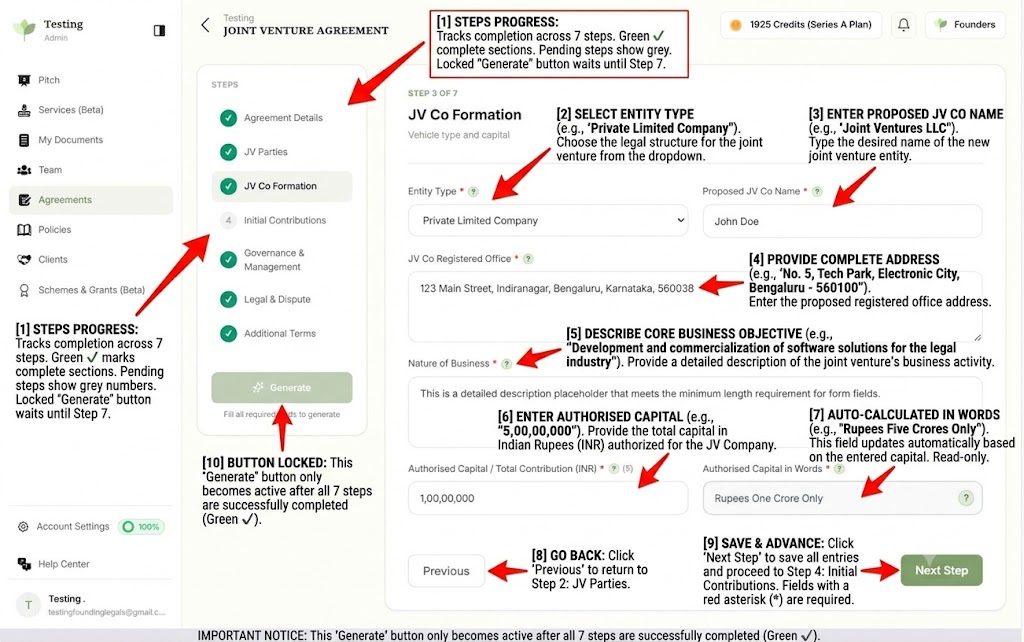
Define the new JV entity vehicle: In Step 3, configure the target corporate vehicle:
- Entity Type: Select the legal structure from the dropdown (e.g., Private Limited Company or Limited Liability Partnership).
- Proposed JV Co Name: Enter the desired corporate name for reservation (e.g., Joint Ventures LLC).
- JV Co Registered Office: Enter the proposed physical registered address for the new company.
- Nature of Business: Enter the core business purpose (e.g., Development and commercialization of software solutions for the legal industry).
- Authorised Capital / Total Contribution (INR): Enter the initial authorised share capital (e.g., 1,00,000,000). The words will auto-calculate (e.g., Rupees One Crore Only).
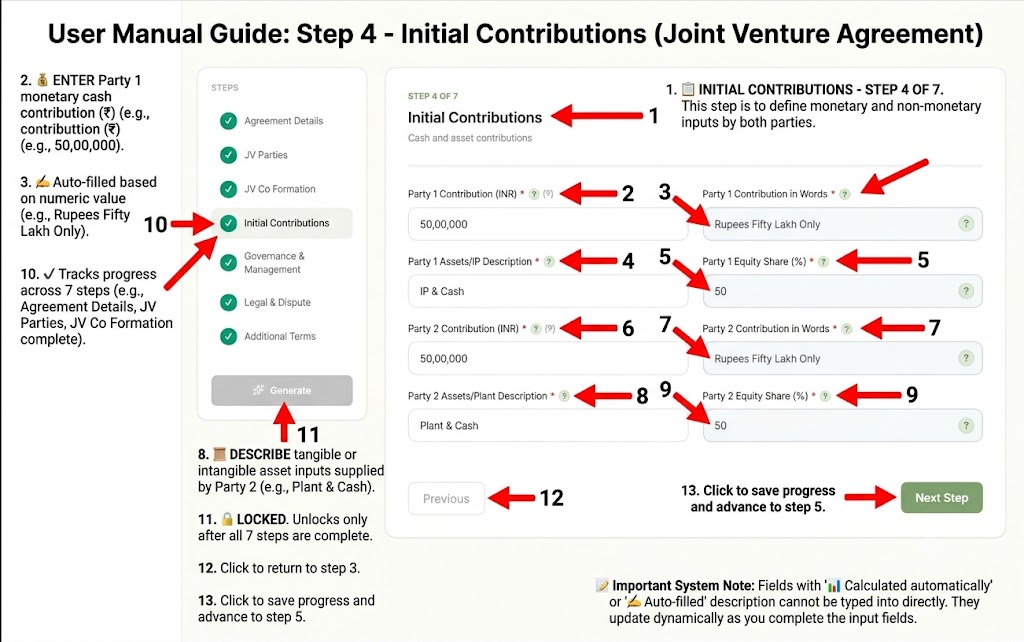
Configure monetary and non-monetary inputs: In Step 4, allocate capital and equity percentages:
- Contributions (INR): Enter the monetary cash contribution for Party 1 and Party 2 (e.g., 5,000,000). The text descriptions will auto-fill.
- Assets/IP/Plant Descriptions: Describe tangible or intangible assets supplied by each party (e.g., IP & Cash for Party 1, and Plant & Cash for Party 2).
- Equity Share (%): Enter the percentage shareholding split (e.g., 50% for each). Ensure the total equals 100%.
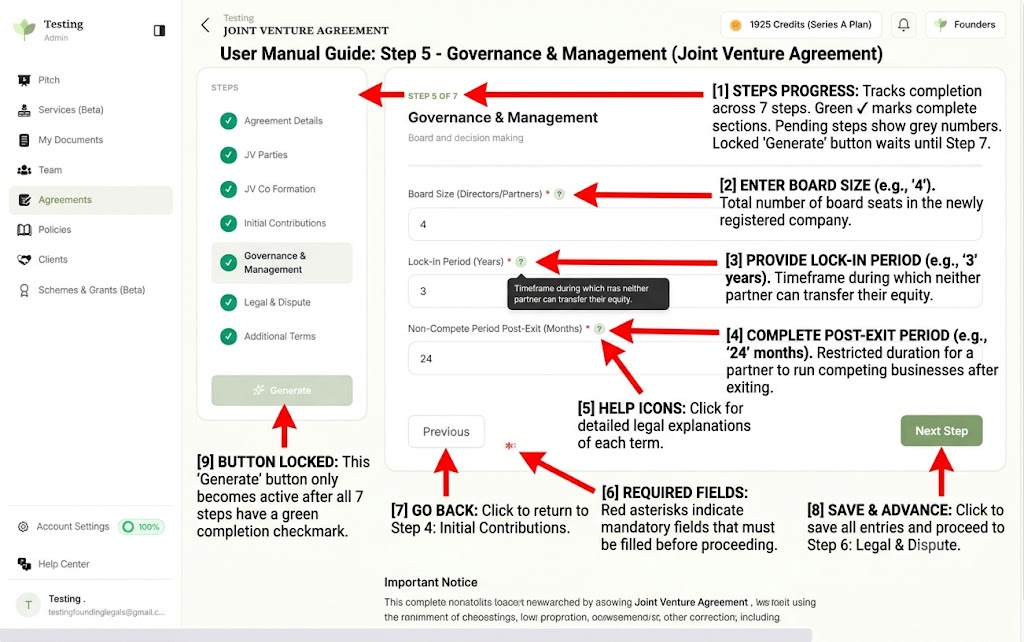
Establish board structures and restrictive covenants: In Step 5, input:
- Board Size (Directors/Partners): The total number of board seats in the newly registered company (e.g., 4).
- Lock-In Period (Years): Timeframe during which neither partner can transfer their equity (e.g., 3 years).
- Non-Compete Period Post-Exit (Months): Restricted duration for a partner to run competing businesses after exiting the JV (e.g., 24 months).
Configure antitrust clearance and arbitration details: In Step 6, enter:
- CCI Section 5 Prior Approval: Choose whether prior antitrust approval is needed. For standard startups, select No, transaction falls below Section 5 thresholds (De Minimis / Target Exemption applies).
- Seat & Venue of Arbitration (City): Select the city for arbitration proceedings (e.g., Bengaluru).
- Number of Arbitrators: Select the size of the arbitration panel (e.g., 3). Must be an odd number to avoid deadlocks.
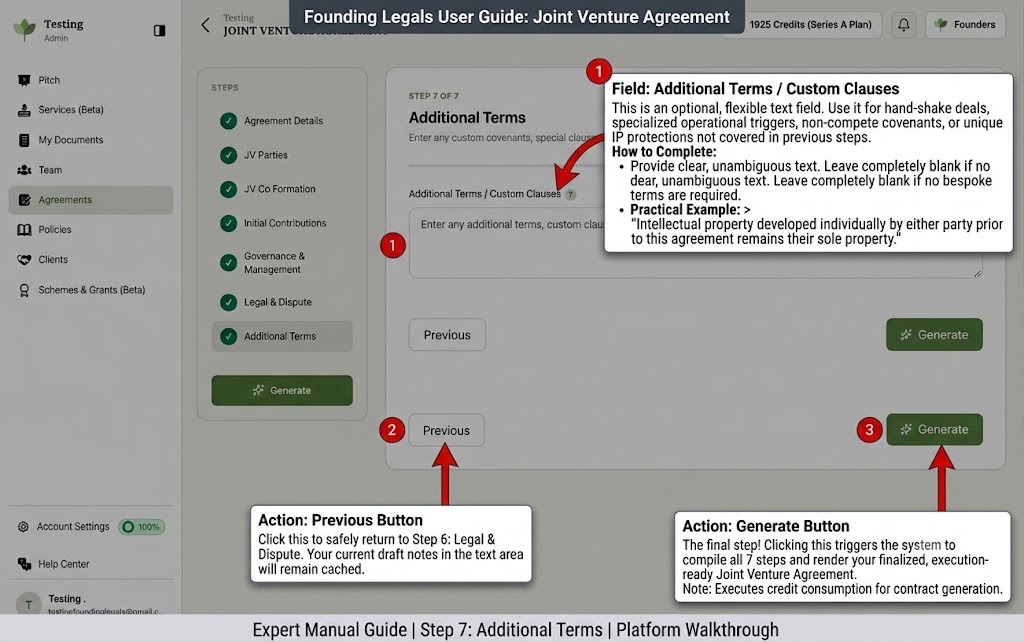
Add custom clauses and compile: In Step 7, insert any specific covenants, representations, or warranties unique to your partnership. Once all steps are complete, click Generate to build the draft.
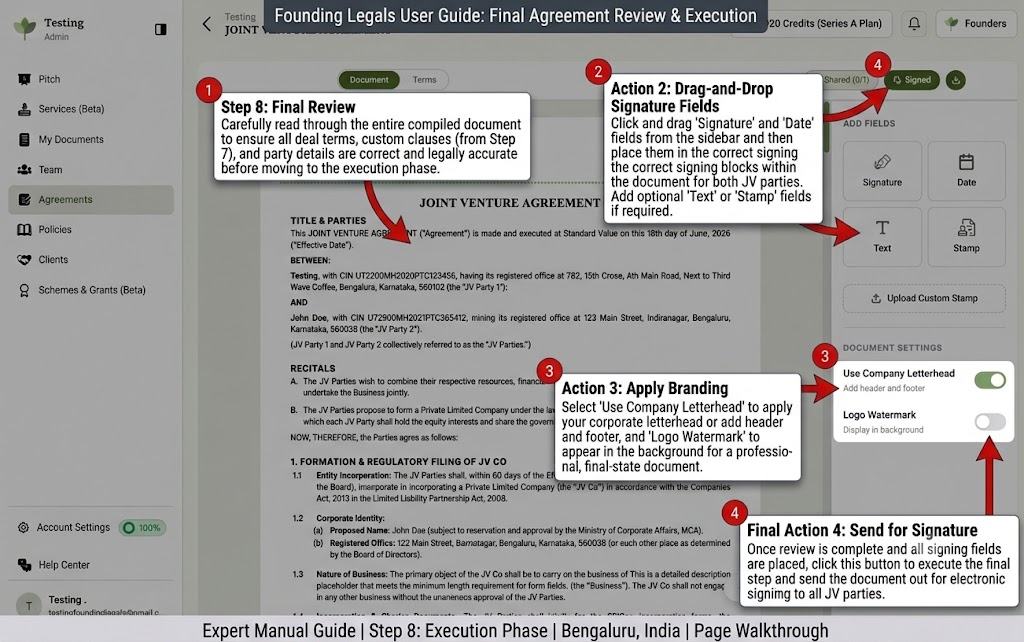
Review, brand, and execute the JV Agreement: In the final Document Review screen:
- Final Review: Carefully check all deal terms, entity structures, and share allocations.
- Add Signatures & Stamps: Drag and drop the Signature, Date, and Stamp fields from the panel onto the signing areas for both partners.
- Apply Branding: Toggle Use Company Letterhead or Logo Watermark for a professional finish.
- Execute: Click Signed or Shared to execute the legally binding agreement.
Joint ventures exceeding statutory asset or turnover thresholds qualify as a "combination" under Section 5 of the Competition Act, 2002. These require mandatory, suspensory notifications to the Competition Commission of India (CCI) prior to execution. If your transaction exceeds the limits, do not execute the agreement until CCI clearance is received.
Under Section 27 of the Indian Contract Act, 1872, post-exit non-compete restrictions are heavily scrutinized and generally held to be void. Ensure that any post-exit restrictions are reasonable in scope, geography, and duration, and are tied directly to the protection of proprietary IP or goodwill to improve enforceability.
Section 10 of the Arbitration and Conciliation Act, 1996 prohibits an even number of arbitrators on a panel. Choosing 3 arbitrators (where each party appoints one and the two appoint the third presiding arbitrator) is the standard best practice for joint ventures, ensuring deadlocks are resolved by an independent third party.
Quality Assurance
Reviewed by Manoj Kumar Thota
Founder / Developed Founding Legals
About the Author
Manoj Kumar Thota is the creator behind Founding Legals